
An ETL process finishes without an exception — but was everything really loaded that should have been? The mere fact that a process did not abort says nothing about whether it actually did what was expected of it. A readable, evaluable log is what turns a gut feeling into a defensible statement.
This design pattern logs an ETL run on three levels and answers the questions that success or failure hinge on:
- How long does the ETL process take overall?
- How long does a single component take — a stored procedure, an SSIS package or another building block?
- How long does a specific SQL statement take?
- How many rows did a SQL statement actually affect?
- And above all: did the process as a whole, a component or a single statement complete successfully?
TL;DR — what this article covers:
- Three-tier logging — the tables
[LL].[Execution],[LL].[Component]and[LL].[Trace]capture run, component and action at increasing granularity. - Stored-procedure toolkit — procedures such as
[LL].[spInsertTrace]and[LL].[spUpdateTrace]write and update the log records. - Exception handling with
[LL].[Error]— a TRY/CATCH pattern ends the run in an orderly way and records every error in an evaluable form. - Continuation of the ETL architecture — the example uses schema
T2from the architecture article and adds the logging layer.
Prerequisites. SQL Server and a basic understanding of stored procedures and TRY/CATCH. This article is part of the ETL design-pattern cluster. As a lead-in, see Data Quality in an ETL Process and The Architecture of an ETL Process.
Contents
- The Result
- Now the Derivation…
- Three-Tier Logging
- Table Description, Declaration and Data Model
- ETL Process Execution Status
- Logging Procedures
- Exception Handling
- Example: Logging and Exception Handling in an ETL Process
- Conclusion
- FAQ
- Related Articles
The Result
At its core the approach is straightforward: at the start of every action a log record is written, and once the action finishes it is updated with the outcome success or failure — and, where useful, with further information. In principle, that is all there is to it. In practice, a little more is needed after all.
Even though creating a log should not be a big deal, there is quite a bit to say about it. This article starts with the result and works backwards from there. The process logging presented here is three-tier and uses the following log tables:
[LL].[Execution][LL].[Component][LL].[Trace]
These tables log an ETL process and its associated components and steps at increasing granularity — read from top to bottom. The ETL process, the components and the individual steps are each logged with exactly one record.
Closely tied to logging the process is logging errors. The approach presented here uses the following table for that:
[LL].[Error]
The following figures show the result of three-tier logging for a simple, compact, but complete ETL process.
In the table [LL].[Trace] every action is logged with, among other things, the name of the procedure, the target entity the procedure processes, a short description of what was actually done, and further information such as the number of rows affected and the execution time.
![Result set of the [LL].[Trace] table: several trace records, one per action, with columns Component, Entity, Action, AffectedRows, State and Success from an example run.](https://sql.marcus-belz.de/wp-content/uploads/2026/06/041001.png "041001")
In the table [LL].[Component] the calls of procedures and SSIS packages — or, more generally, components — are logged. Here, too, a short description of the component’s task, the target entity and the execution time are recorded.
![Result set of the [LL].[Component] table: one record per called component, with Component, Entity, State and Success.](https://sql.marcus-belz.de/wp-content/uploads/2026/06/041002.png "041002")
At the top level, every execution of the ETL process is logged with exactly one record in the table [LL].[Execution].
![Result set of the [LL].[Execution] table: a single record for the entire ETL run, with Process, Start, End, State and Success.](https://sql.marcus-belz.de/wp-content/uploads/2026/06/041003.png "041003")
The three process-logging tables — [LL].[Execution], [LL].[Component] and [LL].[Trace] — contain two columns, [State] and [Success], in which the success or failure of an action, a component or the ETL process is stored.
Now the Derivation…
After this brief preview of the result, the following aspects of the approach need to be clarified:
- Three-Tier Logging
- Table Description, Declaration and Data Model
- ETL Process Execution Status
- Logging Procedures
- Exception Handling
- Example: Logging and Exception Handling in an ETL Process
Three-Tier Logging
The approach logs an ETL process in the three tables [LL].[Execution], [LL].[Component] and [LL].[Trace]. Each table is intended for logging specific artifacts. This section introduces how each table is used, its columns and the code to create it.
[LL].[Execution]
This table logs the execution of an ETL process with exactly one record. An ETL process needs a clearly identifiable entry point. That can be a stored procedure, an SSIS package, a Talend job or a SQL Server Agent job. At the start of the entry point’s execution, a log record is inserted into this table. After all tasks have been processed successfully, this record is updated to status success, or to error in the failure case. The table thus provides an overview of all executions of the ETL process, along with information such as the status and the duration of the run.
[LL].[Component]
This table logs the execution of a component with exactly one record. A component can be a stored procedure, an SSIS package or a Talend job. A component is characterized by the fact that it controls and performs one or more data manipulations. As with the [LL].[Execution] table, a log record is inserted at the start of execution and updated to status success or error on completion. The table therefore holds, per ETL run, a list of the executed components, along with information such as the status and the duration of the run.
[LL].[Trace]
The name of this table already hints that it is intended for detailed logging of the ETL process’s actions — it creates a trace. Which actions are logged is a design decision for the developer. It is advisable, however, to log at least every INSERT, UPDATE and DELETE statement with its own record. In production systems, this granularity should be weighed deliberately against log volume and write load — a single INSERT … SELECT can move millions of rows and still remains exactly one trace record. Besides the status fields already mentioned, the table also stores the number of rows affected, which lets the developer judge whether the statements did exactly what was expected.
[LL].[Error]
Errors detected in an ETL process belong in the log. A distinction has to be made between logging exceptions and logging data errors. The structure of this table is designed for logging data errors and contains columns in which every data error can be recorded completely and in an evaluable form. This article focuses on logging an ETL process rather than logging data errors. Logging the process is closely tied to explicit exception handling, and a separate section is dedicated to exception handling and the logging of exceptions.
The LL Schema Name
The schema name LL stands for Logging Layer. This schema holds all log tables and the stored procedures used for logging.
Table Description, Declaration and Data Model
The following sections describe the tables for logging the process as well as the table for logging errors. Finally, a diagram shows the data model of these tables.
Three notes up front: The duration of an execution derives, at the execution level, from the columns [Start] and [End], and at the component and trace levels from [CreatedOn] (written when the action starts) and [ModifiedOn] (set by the closing update via trigger). The timestamps use datetime with GETUTCDATE() for historical reasons — for a new design, datetime2 with SYSUTCDATETIME() would be the natural choice today, and its higher precision pays off precisely for trace records written in quick succession. And the audit columns [ModifiedOn]/[ModifiedBy] are maintained by an AFTER UPDATE trigger per table: that keeps the logging procedures lean, but costs an additional UPDATE on every status change and is a deliberate trade-off at very high log volumes. With the default database setting RECURSIVE_TRIGGERS OFF, the trigger’s self-update does not recurse (measured on SQL Server 2022).
[LL].[Execution]
Columns
The table has the following columns:
| Column | Data type | Null? | Description |
|---|---|---|---|
[Id] | bigint (IDENTITY) | NOT NULL | Primary key, sequential run id. |
[Process] | nvarchar(max) | NOT NULL | Name of the ETL process. |
[Start] | datetime | NOT NULL | Start time of the run (UTC). |
[End] | datetime | NULL | End time of the run. |
[DeltaStart] | datetime | NULL | Start of the delta window (for incremental loads). |
[DeltaEnd] | datetime | NULL | End of the delta window. |
[User] | nvarchar(128) | NULL | Executing DB login (SUSER_SNAME()). |
[Machine] | nvarchar(128) | NULL | Host the run was started from. |
[Version] | int | NULL | Version number of the ETL process. |
[State] | nvarchar(128) | NOT NULL | Status: processing / warning / success / error. |
[Success] | bit | NOT NULL | 0 = not (successfully) completed, 1 = successful. |
[CreatedOn] | datetime | NOT NULL | Creation time, default GETUTCDATE(). |
[CreatedBy] | nvarchar(100) | NOT NULL | Creating login, default SUSER_SNAME(). |
[ModifiedOn] | datetime | NULL | Last modification, set by the update trigger. |
[ModifiedBy] | nvarchar(100) | NULL | Login of the last modification, set by the update trigger. |
Declaration
The table is created with the following statement:
  1: -- ----------------------------------------------------------------------------
  2: -- [LL].[Execution] - logging table (top level): exactly one record per ETL
  3: -- run. Inserted at the start of the entry procedure with [State] = 'processing'
  4: -- and updated to 'success' or 'error' at the end.
  5: -- ----------------------------------------------------------------------------
  6: CREATE TABLE [LL].[Execution]
  7: (
  8:     [Id]           bigint        IDENTITY (1, 1) NOT NULL
  9:    ,[Process]      nvarchar(max)                 NOT NULL
 10:    ,[Start]        datetime                      NOT NULL
 11:    ,[End]          datetime                          NULL
 12:    ,[DeltaStart]   datetime                          NULL
 13:    ,[DeltaEnd]     datetime                          NULL
 14:    ,[User]         nvarchar(128)                     NULL
 15:    ,[Machine]      nvarchar(128)                     NULL
 16:    ,[Version]      int                               NULL
 17:    ,[State]        nvarchar(128)                 NOT NULL
 18:    ,[Success]      bit                           NOT NULL
 19:    ,[CreatedOn]    datetime
 20:        CONSTRAINT [DF_LL_Execution_CreatedOn]
 21:        DEFAULT (GETUTCDATE())                    NOT NULL
 22:    ,[CreatedBy]    nvarchar(100)
 23:        CONSTRAINT [DF_LL_Execution_CreatedBy]
 24:        DEFAULT (SUSER_SNAME())                   NOT NULL
 25:    ,[ModifiedOn]   datetime                          NULL
 26:    ,[ModifiedBy]   nvarchar(100)                     NULL
 27:    ,CONSTRAINT [PK_LL_Execution]
 28:        PRIMARY KEY CLUSTERED ([Id] ASC)
 29:    ,CONSTRAINT [CK_LL_Execution_StateSuccess]
 30:        CHECK (   ([State] = N'processing' AND [Success] = 0)
 31:               OR ([State] = N'warning'    AND [Success] IN (0, 1))
 32:               OR ([State] = N'success'    AND [Success] = 1)
 33:               OR ([State] = N'error'      AND [Success] = 0))
 34: );
 35: GO
 36:
 37: CREATE TRIGGER [LL].[TR_LL_Execution_Update]
 38: ON [LL].[Execution]
 39: FOR UPDATE
 40: AS
 41: BEGIN
 42:     SET NOCOUNT ON;
 43:
 44:     UPDATE [LL].[Execution]
 45:        SET
 46:            [ModifiedOn] = GETUTCDATE()
 47:           ,[ModifiedBy] = SUSER_SNAME()
 48:        FROM
 49:           [LL].[Execution]
 50:           INNER JOIN inserted
 51:             ON inserted.[Id] = [LL].[Execution].[Id];
 52: END;
 53: GO
[LL].[Component]
Columns
| Column | Data type | Null? | Description |
|---|---|---|---|
[Id] | bigint (IDENTITY) | NOT NULL | Primary key of the component. |
[ExecutionId] | bigint | NOT NULL | Foreign key to [LL].[Execution]. |
[Source] | nvarchar(5) | NOT NULL | Type of source (e.g. SSIS, T-SQL). |
[Component] | nvarchar(128) | NOT NULL | Name of the component (procedure, package, job). |
[Version] | int | NULL | Version number of the component. |
[Entity] | nvarchar(128) | NOT NULL | Target entity the component processes. |
[Step] | nvarchar(max) | NOT NULL | Description of the step. |
[Description] | nvarchar(max) | NULL | Additional description. |
[FileId] | bigint | NULL | Reference to a processed file. |
[State] | nvarchar(128) | NOT NULL | Status: processing / warning / success / error. |
[Success] | bit | NOT NULL | 0 = not (successfully) completed, 1 = successful. |
[CreatedOn] | datetime | NOT NULL | Creation time, default GETUTCDATE(). |
[CreatedBy] | nvarchar(100) | NOT NULL | Creating login, default SUSER_SNAME(). |
[ModifiedOn] | datetime | NULL | Last modification, set by the update trigger. |
[ModifiedBy] | nvarchar(100) | NULL | Login of the last modification, set by the update trigger. |
Declaration
  1: -- ----------------------------------------------------------------------------
  2: -- [LL].[Component] - logging table (middle level): exactly one record per
  3: -- component call (stored procedure, SSIS package, Talend job).
  4: -- Foreign key to [LL].[Execution].
  5: -- ----------------------------------------------------------------------------
  6: CREATE TABLE [LL].[Component]
  7: (
  8:     [Id]           bigint        IDENTITY (1, 1) NOT NULL
  9:    ,[ExecutionId]  bigint                        NOT NULL
 10:    ,[Source]       nvarchar(5)                   NOT NULL
 11:    ,[Component]    nvarchar(128)                 NOT NULL
 12:    ,[Version]      int                               NULL
 13:    ,[Entity]       nvarchar(128)                 NOT NULL
 14:    ,[Step]         nvarchar(max)                 NOT NULL
 15:    ,[Description]  nvarchar(max)                     NULL
 16:    ,[FileId]       bigint                            NULL
 17:    ,[State]        nvarchar(128)                 NOT NULL
 18:    ,[Success]      bit                           NOT NULL
 19:    ,[CreatedOn]    datetime
 20:        CONSTRAINT [DF_LL_Component_CreatedOn]
 21:        DEFAULT (GETUTCDATE())                    NOT NULL
 22:    ,[CreatedBy]    nvarchar(100)
 23:        CONSTRAINT [DF_LL_Component_CreatedBy]
 24:        DEFAULT (SUSER_SNAME())                   NOT NULL
 25:    ,[ModifiedOn]   datetime                          NULL
 26:    ,[ModifiedBy]   nvarchar(100)                     NULL
 27:    ,CONSTRAINT [PK_LL_Component]
 28:        PRIMARY KEY CLUSTERED ([Id] ASC)
 29:    ,CONSTRAINT [FK_LL_Component_ExecutionId]
 30:        FOREIGN KEY ([ExecutionId])
 31:        REFERENCES [LL].[Execution] ([Id])
 32:    ,CONSTRAINT [CK_LL_Component_StateSuccess]
 33:        CHECK (   ([State] = N'processing' AND [Success] = 0)
 34:               OR ([State] = N'warning'    AND [Success] IN (0, 1))
 35:               OR ([State] = N'success'    AND [Success] = 1)
 36:               OR ([State] = N'error'      AND [Success] = 0))
 37: );
 38: GO
 39:
 40: CREATE TRIGGER [LL].[TR_LL_Component_Update]
 41: ON [LL].[Component]
 42: FOR UPDATE
 43: AS
 44: BEGIN
 45:     SET NOCOUNT ON;
 46:
 47:     UPDATE [LL].[Component]
 48:        SET
 49:            [ModifiedOn] = GETUTCDATE()
 50:           ,[ModifiedBy] = SUSER_SNAME()
 51:        FROM
 52:           [LL].[Component]
 53:           INNER JOIN inserted
 54:             ON inserted.[Id] = [LL].[Component].[Id];
 55: END;
 56: GO
[LL].[Trace]
Columns
| Column | Data type | Null? | Description |
|---|---|---|---|
[Id] | bigint (IDENTITY) | NOT NULL | Primary key of the trace record. |
[ExecutionId] | bigint | NOT NULL | Foreign key to [LL].[Execution]. |
[ComponentId] | bigint | NOT NULL | Foreign key to [LL].[Component]. |
[Source] | nvarchar(5) | NOT NULL | Type of source (e.g. SSIS, T-SQL). |
[Component] | nvarchar(128) | NOT NULL | Name of the calling component. |
[Task] | nvarchar(128) | NULL | Task name (e.g. SSIS task). |
[Entity] | nvarchar(128) | NULL | Target entity of the action. |
[Step] | nvarchar(max) | NOT NULL | Description of the step. |
[Description] | nvarchar(max) | NULL | Additional description. |
[FileId] | bigint | NULL | Reference to a processed file. |
[Action] | nvarchar(100) | NULL | Type of action (insert / update / delete / …). |
[AffectedRows] | bigint | NULL | Number of rows affected by the action. |
[State] | nvarchar(100) | NOT NULL | Status: processing / warning / success / error. |
[Success] | bit | NOT NULL | 0 = not (successfully) completed, 1 = successful. |
[CreatedOn] | datetime | NOT NULL | Creation time, default GETUTCDATE(). |
[CreatedBy] | nvarchar(100) | NOT NULL | Creating login, default SUSER_SNAME(). |
[ModifiedOn] | datetime | NULL | Last modification, set by the update trigger. |
[ModifiedBy] | nvarchar(128) | NULL | Login of the last modification, set by the update trigger. |
Declaration
  1: -- ----------------------------------------------------------------------------
  2: -- [LL].[Trace] - logging table (finest level): exactly one record per single
  3: -- action (INSERT/UPDATE/DELETE, single SQL step, single task). Foreign keys
  4: -- to [LL].[Execution] and [LL].[Component].
  5: -- ----------------------------------------------------------------------------
  6: CREATE TABLE [LL].[Trace]
  7: (
  8:     [Id]           bigint        IDENTITY (1, 1) NOT NULL
  9:    ,[ExecutionId]  bigint                        NOT NULL
 10:    ,[ComponentId]  bigint                        NOT NULL
 11:    ,[Source]       nvarchar(5)                   NOT NULL
 12:    ,[Component]    nvarchar(128)                 NOT NULL
 13:    ,[Task]         nvarchar(128)                     NULL
 14:    ,[Entity]       nvarchar(128)                     NULL
 15:    ,[Step]         nvarchar(max)                 NOT NULL
 16:    ,[Description]  nvarchar(max)                     NULL
 17:    ,[FileId]       bigint                            NULL
 18:    ,[Action]       nvarchar(100)                     NULL
 19:    ,[AffectedRows] bigint                            NULL
 20:    ,[State]        nvarchar(100)                 NOT NULL
 21:    ,[Success]      bit                           NOT NULL
 22:    ,[CreatedOn]    datetime
 23:        CONSTRAINT [DF_LL_Trace_CreatedOn]
 24:        DEFAULT (GETUTCDATE())                    NOT NULL
 25:    ,[CreatedBy]    nvarchar(100)
 26:        CONSTRAINT [DF_LL_Trace_CreatedBy]
 27:        DEFAULT (SUSER_SNAME())                   NOT NULL
 28:    ,[ModifiedOn]   datetime                          NULL
 29:    ,[ModifiedBy]   nvarchar(128)                     NULL
 30:    ,CONSTRAINT [PK_LL_Trace]
 31:        PRIMARY KEY CLUSTERED ([Id] ASC)
 32:    ,CONSTRAINT [FK_LL_Trace_ComponentId]
 33:        FOREIGN KEY ([ComponentId])
 34:        REFERENCES [LL].[Component] ([Id])
 35:    ,CONSTRAINT [FK_LL_Trace_ExecutionId]
 36:        FOREIGN KEY ([ExecutionId])
 37:        REFERENCES [LL].[Execution] ([Id])
 38:    ,CONSTRAINT [CK_LL_Trace_StateSuccess]
 39:        CHECK (   ([State] = N'processing' AND [Success] = 0)
 40:               OR ([State] = N'warning'    AND [Success] IN (0, 1))
 41:               OR ([State] = N'success'    AND [Success] = 1)
 42:               OR ([State] = N'error'      AND [Success] = 0))
 43: );
 44: GO
 45:
 46: CREATE TRIGGER [LL].[TR_LL_Trace_Update]
 47: ON [LL].[Trace]
 48: FOR UPDATE
 49: AS
 50: BEGIN
 51:     SET NOCOUNT ON;
 52:
 53:     UPDATE [LL].[Trace]
 54:        SET
 55:            [ModifiedOn] = GETUTCDATE()
 56:           ,[ModifiedBy] = SUSER_SNAME()
 57:        FROM
 58:           [LL].[Trace]
 59:           INNER JOIN inserted
 60:             ON inserted.[Id] = [LL].[Trace].[Id];
 61: END;
 62: GO
[LL].[Error]
As mentioned above, the structure of this table is designed for logging data errors, which are not the subject of this article. The table is, however, also used for logging exceptions. The following description covers only the columns required for logging an exception.
Columns
| Column | Data type | Null? | Description |
|---|---|---|---|
[Id] | bigint (IDENTITY) | NOT NULL | Primary key of the error record. |
[ExecutionId] | bigint | NOT NULL | Foreign key to [LL].[Execution]. |
[ComponentId] | bigint | NULL | Foreign key to [LL].[Component] (if known). |
[TraceId] | bigint | NULL | Foreign key to [LL].[Trace] (if known). |
[ErrorType] | char(1) | NOT NULL | Type of error (exception vs. data error). |
[Source] | nvarchar(5) | NOT NULL | Type of source (e.g. SSIS, T-SQL). |
[Component] | nvarchar(128) | NOT NULL | Component in which the error occurred. |
[TaskName] | nvarchar(128) | NULL | Task name. |
[Entity] | nvarchar(128) | NULL | Affected target entity. |
[Step] | nvarchar(max) | NULL | Step in which the error occurred. |
[Description] | nvarchar(max) | NULL | Error text (ERROR_MESSAGE()). |
[Number] | int | NULL | Error number (ERROR_NUMBER()). |
[Line] | int | NULL | Error line (ERROR_LINE()). |
[State] | nvarchar(max) | NULL | Error state (ERROR_STATE()). |
[CreatedOn] | datetime | NOT NULL | Creation time, default GETUTCDATE(). |
[CreatedBy] | nvarchar(100) | NOT NULL | Creating login, default SUSER_SNAME(). |
Declaration
  1: -- ----------------------------------------------------------------------------
  2: -- [LL].[Error] - logging table for exceptions and data errors.
  3: -- In the context of this article we only use the exception columns;
  4: -- the data-error columns (ID1Value/ID2Value/ID3Value/ErrorValue,
  5: -- ID*ColumnName, FileName, FileId) are relevant for a follow-up article.
  6: -- ----------------------------------------------------------------------------
  7: CREATE TABLE [LL].[Error]
  8: (
  9:     [Id]              bigint        IDENTITY (1, 1) NOT NULL
 10:    ,[ExecutionId]     bigint                        NOT NULL
 11:    ,[ComponentId]     bigint                            NULL
 12:    ,[TraceId]         bigint                            NULL
 13:    ,[ErrorType]       char(1)                       NOT NULL
 14:    ,[Source]          nvarchar(5)                   NOT NULL
 15:    ,[Component]       nvarchar(128)                 NOT NULL
 16:    ,[TaskName]        nvarchar(128)                     NULL
 17:    ,[Entity]          nvarchar(128)                     NULL
 18:    ,[Step]            nvarchar(max)                     NULL
 19:    ,[SchemaName]      nvarchar(128)                     NULL
 20:    ,[TableName]       nvarchar(128)                     NULL
 21:    ,[FileId]          bigint                            NULL
 22:    ,[ID1Value]        nvarchar(max)                     NULL
 23:    ,[ID1ColumnName]   nvarchar(128)                     NULL
 24:    ,[ID2Value]        nvarchar(max)                     NULL
 25:    ,[ID2ColumnName]   nvarchar(128)                     NULL
 26:    ,[ID3Value]        nvarchar(max)                     NULL
 27:    ,[ID3ColumnName]   nvarchar(128)                     NULL
 28:    ,[ErrorValue]      nvarchar(max)                     NULL
 29:    ,[ErrorColumnName] nvarchar(128)                     NULL
 30:    ,[FileName]        nvarchar(128)                     NULL
 31:    ,[Description]     nvarchar(max)                     NULL
 32:    ,[Number]          int                               NULL
 33:    ,[Line]            int                               NULL
 34:    ,[State]           nvarchar(max)                     NULL
 35:    ,[CreatedOn]       datetime
 36:        CONSTRAINT [DF_LL_Error_CreatedOn]
 37:        DEFAULT (GETUTCDATE())                     NOT NULL
 38:    ,[CreatedBy]       nvarchar(100)
 39:        CONSTRAINT [DF_LL_Error_CreatedBy]
 40:        DEFAULT (SUSER_SNAME())                    NOT NULL
 41:    ,CONSTRAINT [PK_LL_Error]
 42:        PRIMARY KEY CLUSTERED ([Id] ASC)
 43:    ,CONSTRAINT [FK_LL_Error_ExecutionId]
 44:        FOREIGN KEY ([ExecutionId])
 45:        REFERENCES [LL].[Execution] ([Id])
 46:    ,CONSTRAINT [FK_LL_Error_ComponentId]
 47:        FOREIGN KEY ([ComponentId])
 48:        REFERENCES [LL].[Component] ([Id])
 49:    ,CONSTRAINT [FK_LL_Error_TraceId]
 50:        FOREIGN KEY ([TraceId])
 51:        REFERENCES [LL].[Trace] ([Id])
 52: );
 53: GO
Data Model
![Data model of the LL schema: [LL].[Execution], [LL].[Component] and [LL].[Trace] as a 1:n chain from top to bottom, plus [LL].[Error] with foreign keys to all three tables.](https://sql.marcus-belz.de/wp-content/uploads/2026/06/041004.png "041004")
One deliberate redundancy in [LL].[Trace] stands out: [ExecutionId] sits there in addition to [ComponentId], so that run-level evaluations can skip the join through [LL].[Component]. The database does not enforce the consistency of that pair — a trace record could in theory point to a component of a different run. Anyone who wants to enforce it adds a composite foreign key on [Component]([Id], [ExecutionId]).
ETL Process Execution Status
The three process-log tables have two columns, [State] and [Success], which store the current status of the ETL process, of a component’s execution or of a specific action — for example an INSERT, UPDATE or DELETE. The current status is held in the [State] column with the values processing, warning, success and error. Success is stored in the [Success] column as 1. Only the combination of both values reveals the current status reliably. The following combinations are valid:
[State] | [Success] | Meaning |
|---|---|---|
| processing | 0 | Action, component or run has started and is still running. |
| warning | 0 | Finished, but with a warning — not counted as success. |
| warning | 1 | Finished with a warning, yet counted as success. |
| success | 1 | Completed successfully. |
| error | 0 | Aborted with an error. |
Other combinations of status values are not allowed. This is enforced twice: the process-logging procedures raise an exception if an invalid combination is passed in, and a CHECK constraint per table additionally rejects invalid combinations at the database level (error 547, measured on SQL Server 2022).
Logging Procedures
The following procedures, among others, are available for inserting and updating log records in the tables above:
| Procedure | Schema | Purpose |
|---|---|---|
spInsertExecution | LL | Opens the execution log (top level) at the start of the run. |
spUpdateExecution | LL | Closes the execution log with status success or error. |
spInsertComponent | LL | Opens a component log for a component. |
spUpdateComponentSuccess | LL | Closes a component log successfully. |
spUpdateComponentError | LL | Closes a component log in the error case. |
spInsertTrace | LL | Writes a trace record for a single action. |
spUpdateTrace | LL | Updates a trace record (general). |
spUpdateTraceSuccess | LL | Updates a trace record to success / 1. |
spUpdateTraceError | LL | Updates a trace record to error / 0. |
spInsertErrorException | LL | Writes a caught exception to [LL].[Error]. |
In essence these procedures perform an INSERT or UPDATE on the log tables. The values to be logged are passed as parameters. The procedures validate the parameters passed in and raise an exception in case of invalid parameters. For parameter validation and for raising errors consistently, they use the two helpers [dbo].[spRaiseError] and [dbo].[fnIsNullOrEmpty].
The following code examples show the procedures [LL].[spInsertTrace], [LL].[spUpdateTrace] and [LL].[spUpdateTraceSuccess]. In addition, [LL].[spInsertExecution] stands in for all the remaining procedures, which follow the same pattern: validate the parameters, run the INSERT or UPDATE, return the generated id.
[LL].[spInsertTrace]
  1: -- ----------------------------------------------------------------------------
  2: -- [LL].[spInsertTrace] - inserts a trace record into [LL].[Trace]
  3: -- and returns the generated id via @p_traceId.
  4: -- ----------------------------------------------------------------------------
  5: -- Parameters:
  6: --    @p_executionId    bigint        Execution id of the current ETL run
  7: --    @p_componentId    bigint        Component id of the calling component log
  8: --    @p_traceId        bigint OUTPUT Id of the newly inserted trace record
  9: --    @p_source          nvarchar(5)   Source system (SSIS, T-SQL, ...)
 10: --    @p_component       nvarchar(128) Name of the calling component
 11: --    @p_task            nvarchar(128) Task name (e.g. SSIS task), optional
 12: --    @p_entity          nvarchar(128) Target entity, optional
 13: --    @p_step            nvarchar(max) Description of the step
 14: --    @p_description     nvarchar(max) Additional description, optional
 15: --    @p_fileId         bigint        Reference to [LL].[FileList].[Id], optional
 16: --    @p_action          nvarchar(100) Action label (Insert/Update/Delete/...)
 17: --    @p_affectedRows   bigint        Number of rows affected
 18: --    @p_state           nvarchar(100) processing / warning / success / error
 19: --    @p_success         bit           0 = processing/warning/error, 1 = success
 20: -- ----------------------------------------------------------------------------
 21: CREATE OR ALTER PROCEDURE [LL].[spInsertTrace]
 22:     @p_executionId    AS bigint
 23:    ,@p_componentId    AS bigint
 24:    ,@p_traceId        AS bigint OUTPUT
 25:    ,@p_source         AS nvarchar(5)
 26:    ,@p_component      AS nvarchar(128)
 27:    ,@p_task           AS nvarchar(128)   = NULL
 28:    ,@p_entity         AS nvarchar(128)   = NULL
 29:    ,@p_step           AS nvarchar(max)
 30:    ,@p_description    AS nvarchar(max)   = NULL
 31:    ,@p_fileId         AS bigint          = NULL
 32:    ,@p_action         AS nvarchar(100)   = NULL
 33:    ,@p_affectedRows   AS bigint          = NULL
 34:    ,@p_state          AS nvarchar(100)
 35:    ,@p_success        AS bit
 36: AS
 37: BEGIN
 38:     SET NOCOUNT ON;
 39:
 40:     DECLARE @component AS nvarchar(128);
 41:     DECLARE @table     AS TABLE ([Id] bigint);
 42:     DECLARE @message   AS nvarchar(max);
 43:
 44:     SET @component = OBJECT_SCHEMA_NAME(@@PROCID) + N'.' + OBJECT_NAME(@@PROCID);
 45:
 46:     BEGIN TRY
 47:         -- Parameter checks
 48:         IF (@p_executionId IS NULL)
 49:         BEGIN
 50:             EXEC [dbo].[spRaiseError] N'The parameter ''p_executionId'' is NULL.', @component;
 51:             RETURN 0;
 52:         END;
 53:
 54:         IF (@p_componentId IS NULL)
 55:         BEGIN
 56:             EXEC [dbo].[spRaiseError] N'The parameter ''p_componentId'' is NULL.', @component;
 57:             RETURN 0;
 58:         END;
 59:
 60:         IF ([dbo].[fnIsNullOrEmpty](@p_source, 1) <> 0)
 61:         BEGIN
 62:             EXEC [dbo].[spRaiseError] N'The parameter ''p_source'' is either NULL or an empty string.', @component;
 63:             RETURN 1;
 64:         END;
 65:
 66:         IF ([dbo].[fnIsNullOrEmpty](@p_component, 1) <> 0)
 67:         BEGIN
 68:             EXEC [dbo].[spRaiseError] N'The parameter ''p_component'' is either NULL or an empty string.', @component;
 69:             RETURN 1;
 70:         END;
 71:
 72:         IF ([dbo].[fnIsNullOrEmpty](@p_step, 1) <> 0)
 73:         BEGIN
 74:             EXEC [dbo].[spRaiseError] N'The parameter ''p_step'' is either NULL or an empty string.', @component;
 75:             RETURN 1;
 76:         END;
 77:
 78:         IF ([dbo].[fnIsNullOrEmpty](@p_state, 1) <> 0)
 79:         BEGIN
 80:             EXEC [dbo].[spRaiseError] N'The parameter ''p_state'' is either NULL or an empty string.', @component;
 81:             RETURN 1;
 82:         END;
 83:
 84:         IF (@p_success IS NULL)
 85:         BEGIN
 86:             EXEC [dbo].[spRaiseError] N'The parameter ''p_success'' is NULL.', @component;
 87:             RETURN 1;
 88:         END;
 89:
 90:         -- Validate the State/Success combination (whitelist)
 91:         IF NOT (   (@p_state = N'processing' AND @p_success = 0)
 92:                 OR (@p_state = N'warning'    AND @p_success IN (0, 1))
 93:                 OR (@p_state = N'success'    AND @p_success = 1)
 94:                 OR (@p_state = N'error'      AND @p_success = 0))
 95:         BEGIN
 96:             SET @message = CONCAT(N'Invalid state ''', @p_state, N''' for p_success = ''', CAST(@p_success AS nvarchar(100)), N'''.');
 97:             EXEC [dbo].[spRaiseError] @message, @component;
 98:             RETURN 1;
 99:         END;
100:
101:         -- Write the trace record
102:         INSERT INTO [LL].[Trace]
103:         (
104:              [ExecutionId]
105:             ,[ComponentId]
106:             ,[Source]
107:             ,[Component]
108:             ,[Task]
109:             ,[Entity]
110:             ,[Step]
111:             ,[Description]
112:             ,[FileId]
113:             ,[Action]
114:             ,[AffectedRows]
115:             ,[State]
116:             ,[Success]
117:         )
118:         OUTPUT Inserted.[Id] INTO @table
119:         VALUES
120:         (
121:              @p_executionId
122:             ,@p_componentId
123:             ,@p_source
124:             ,@p_component
125:             ,@p_task
126:             ,@p_entity
127:             ,@p_step
128:             ,CASE WHEN @p_description IS NULL OR DATALENGTH(@p_description) = 0
129:                   THEN NULL ELSE @p_description END
130:             ,@p_fileId
131:             ,@p_action
132:             ,@p_affectedRows
133:             ,@p_state
134:             ,@p_success
135:         );
136:
137:         SELECT @p_traceId = [Id] FROM @table;
138:
139:         RETURN 0;
140:     END TRY
141:     BEGIN CATCH
142:         THROW;
143:     END CATCH;
144: END;
145: GO
[LL].[spUpdateTrace]
  1: -- ----------------------------------------------------------------------------
  2: -- [LL].[spUpdateTrace] - updates an existing trace record
  3: -- with Description, Action, AffectedRows, State and Success.
  4: -- ----------------------------------------------------------------------------
  5: -- Parameters:
  6: --    @p_traceId        bigint        Id of the trace record to update
  7: --    @p_description     nvarchar(max) Description of the result
  8: --    @p_action          nvarchar(100) Action label, optional
  9: --    @p_affectedRows   bigint        Number of rows affected
 10: --    @p_state           nvarchar(100) processing / warning / success / error
 11: --    @p_success         bit           0 = processing/warning/error, 1 = success
 12: -- ----------------------------------------------------------------------------
 13: CREATE OR ALTER PROCEDURE [LL].[spUpdateTrace]
 14:     @p_traceId         AS bigint
 15:    ,@p_description     AS nvarchar(max)
 16:    ,@p_action          AS nvarchar(100) = NULL
 17:    ,@p_affectedRows    AS bigint
 18:    ,@p_state           AS nvarchar(100)
 19:    ,@p_success         AS bit
 20: AS
 21: BEGIN
 22:     SET NOCOUNT ON;
 23:
 24:     DECLARE @component AS nvarchar(128);
 25:     DECLARE @tempId    AS bigint;
 26:     DECLARE @message   AS nvarchar(max);
 27:
 28:     SET @component = OBJECT_SCHEMA_NAME(@@PROCID) + N'.' + OBJECT_NAME(@@PROCID);
 29:
 30:     BEGIN TRY
 31:         -- Parameter checks
 32:         IF (@p_traceId IS NULL)
 33:         BEGIN
 34:             EXEC [dbo].[spRaiseError] N'The parameter ''p_traceId'' is NULL.', @component;
 35:             RETURN 1;
 36:         END;
 37:
 38:         IF (@p_success IS NULL)
 39:         BEGIN
 40:             SET @message = N'The parameter ''p_success'' is NULL.';
 41:             EXEC [dbo].[spRaiseError] @message, @component;
 42:             RETURN 1;
 43:         END;
 44:
 45:         IF ([dbo].[fnIsNullOrEmpty](@p_state, 1) <> 0)
 46:         BEGIN
 47:             SET @message = N'The parameter ''p_state'' is either NULL or an empty string.';
 48:             EXEC [dbo].[spRaiseError] @message, @component;
 49:             RETURN 1;
 50:         END;
 51:
 52:         -- Validate the State/Success combination (whitelist)
 53:         IF NOT (   (@p_state = N'processing' AND @p_success = 0)
 54:                 OR (@p_state = N'warning'    AND @p_success IN (0, 1))
 55:                 OR (@p_state = N'success'    AND @p_success = 1)
 56:                 OR (@p_state = N'error'      AND @p_success = 0))
 57:         BEGIN
 58:             SET @message = CONCAT(N'Invalid state ''', @p_state, N''' for p_success = ''', CAST(@p_success AS nvarchar(100)), N'''.');
 59:             EXEC [dbo].[spRaiseError] @message, @component;
 60:             RETURN 1;
 61:         END;
 62:
 63:         -- Check that the trace record exists
 64:         SELECT @tempId = [Id]
 65:         FROM   [LL].[Trace]
 66:         WHERE  [Id] = @p_traceId;
 67:
 68:         IF (@tempId IS NULL)
 69:         BEGIN
 70:             SET @message = N'A record with [Id] = ''' + CAST(@p_traceId AS nvarchar(max)) + N''' could not be found.';
 71:             EXEC [dbo].[spRaiseError] @message, @component;
 72:             RETURN 1;
 73:         END;
 74:
 75:         -- Update the trace record
 76:         UPDATE [LL].[Trace]
 77:            SET
 78:                [Description]  = CASE
 79:                                   WHEN (@p_description IS NULL OR DATALENGTH(@p_description) = 0)
 80:                                    AND ([Description]   IS NULL OR DATALENGTH([Description])   = 0)
 81:                                   THEN NULL ELSE @p_description END
 82:               ,[Action]       = @p_action
 83:               ,[AffectedRows] = @p_affectedRows
 84:               ,[State]        = @p_state
 85:               ,[Success]      = @p_success
 86:          WHERE [Id] = @p_traceId;
 87:
 88:         RETURN 0;
 89:     END TRY
 90:     BEGIN CATCH
 91:         THROW;
 92:     END CATCH;
 93: END;
 94: GO
[LL].[spUpdateTraceSuccess]
  1: -- ----------------------------------------------------------------------------
  2: -- [LL].[spUpdateTraceSuccess] - convenience wrapper around spUpdateTrace for
  3: -- the common case "action finished successfully" (State = 'success',
  4: -- Success = 1). Saves setting both fields on every call.
  5: -- ----------------------------------------------------------------------------
  6: CREATE OR ALTER PROCEDURE [LL].[spUpdateTraceSuccess]
  7:     @p_traceId         AS bigint
  8:    ,@p_description     AS nvarchar(max)
  9:    ,@p_action          AS nvarchar(100) = NULL
 10:    ,@p_affectedRows    AS bigint
 11: AS
 12: BEGIN
 13:     SET NOCOUNT ON;
 14:
 15:     EXEC [LL].[spUpdateTrace]
 16:          @p_traceId
 17:         ,@p_description
 18:         ,@p_action
 19:         ,@p_affectedRows
 20:         ,N'success'
 21:         ,1;
 22: END;
 23: GO
[LL].[spInsertExecution]
The procedure below was not shown in detail in the original example, but it stands in for all the remaining logging procedures: once you understand how it is built, you can derive spInsertComponent, spUpdateComponent*, spUpdateTraceError and spInsertErrorException analogously — the only difference is the column assignment.
  1: -- ----------------------------------------------------------------------------
  2: -- [LL].[spInsertExecution] - reference for the remaining logging procedures.
  3: --
  4: -- Structurally identical to [LL].[spInsertTrace]: parameter checks -> INSERT
  5: -- -> id returned via OUTPUT variable. Once you understand the pattern, you can
  6: -- spInsertComponent, spUpdateComponent*, spUpdateTraceError,
  7: -- derive spInsertErrorException, spUpdateExecution analogously - only the
  8: -- column assignment differs.
  9: -- ----------------------------------------------------------------------------
 10: CREATE OR ALTER PROCEDURE [LL].[spInsertExecution]
 11:     @p_executionId    AS bigint OUTPUT
 12:    ,@p_process        AS nvarchar(max)
 13:    ,@p_version        AS int = NULL
 14: AS
 15: BEGIN
 16:     SET NOCOUNT ON;
 17:
 18:     DECLARE @component AS nvarchar(128);
 19:     DECLARE @table     AS TABLE ([Id] bigint);
 20:
 21:     SET @component = OBJECT_SCHEMA_NAME(@@PROCID) + N'.' + OBJECT_NAME(@@PROCID);
 22:
 23:     BEGIN TRY
 24:         IF ([dbo].[fnIsNullOrEmpty](@p_process, 1) <> 0)
 25:         BEGIN
 26:             EXEC [dbo].[spRaiseError] N'The parameter ''p_process'' is either NULL or an empty string.', @component;
 27:             RETURN 1;
 28:         END;
 29:
 30:         INSERT INTO [LL].[Execution]
 31:         (
 32:              [Process]
 33:             ,[Start]
 34:             ,[User]
 35:             ,[Machine]
 36:             ,[Version]
 37:             ,[State]
 38:             ,[Success]
 39:         )
 40:         OUTPUT Inserted.[Id] INTO @table
 41:         VALUES
 42:         (
 43:              @p_process
 44:             ,GETUTCDATE()
 45:             ,SUSER_SNAME()
 46:             ,HOST_NAME()
 47:             ,@p_version
 48:             ,N'processing'
 49:             ,0
 50:         );
 51:
 52:         SELECT @p_executionId = [Id] FROM @table;
 53:
 54:         RETURN 0;
 55:     END TRY
 56:     BEGIN CATCH
 57:         THROW;
 58:     END CATCH;
 59: END;
 60: GO
Exception Handling
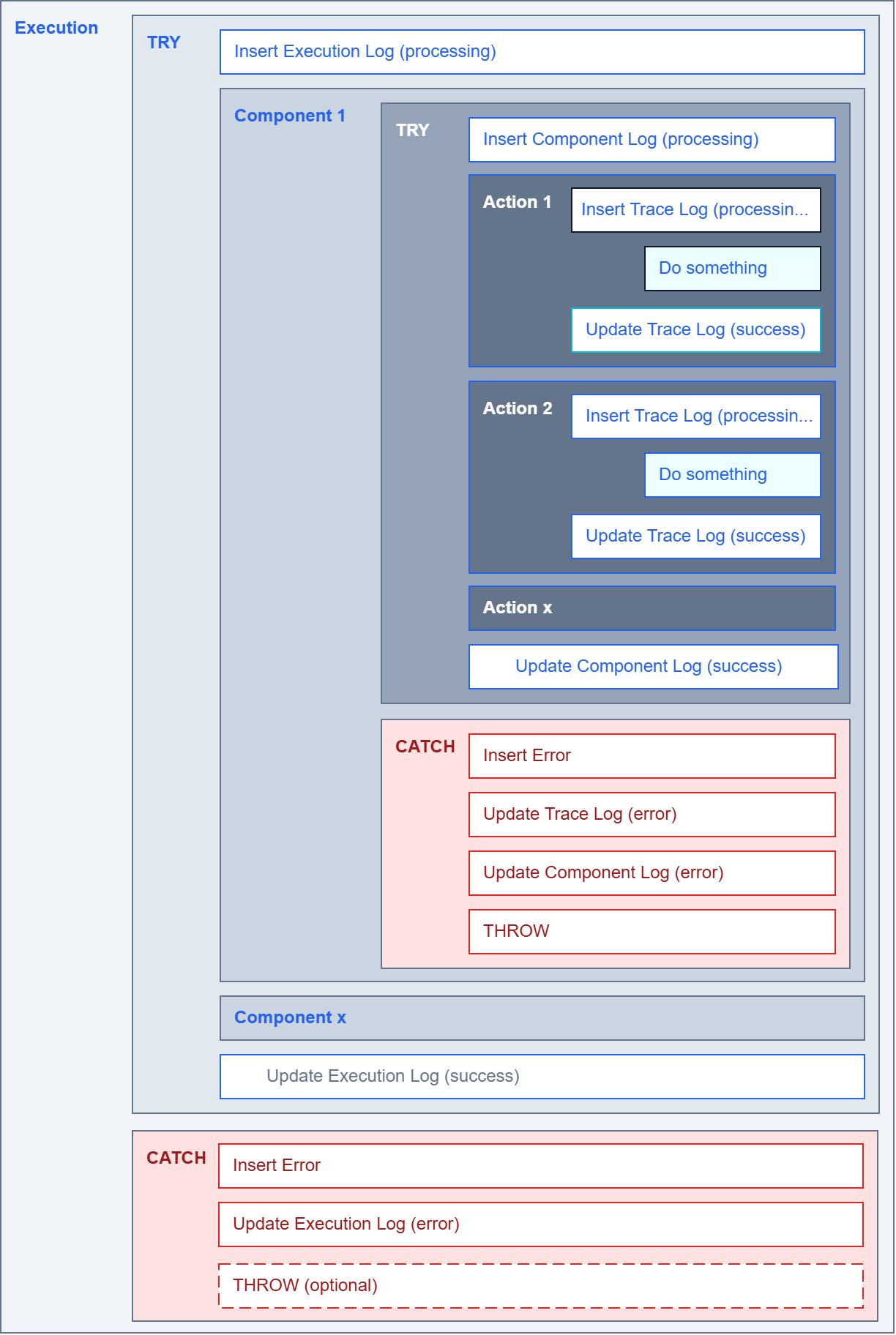
To ensure that an ETL process ends in an orderly way rather than aborting hard without proper logging, explicit exception handling is required. Orderly means in this case that the process catches a raised exception, performs an UPDATE on the relevant log record in the tables [LL].[Execution], [LL].[Component] and [LL].[Trace] — wherever applicable — setting [State] = error and [Success] = 0, and logs the exception in the table [LL].[Error]. The following diagram shows the basic mechanics of exception handling:
![Flowchart of the exception handling: Start, insert log with State processing, workload, branch on exception — the success path updates to success, the error path writes to [LL].[Error], sets State error and optionally re-raises the exception via THROW.](https://sql.marcus-belz.de/wp-content/uploads/2026/06/041005.png "041005")
Only after logging has completed may the process re-raise the exception to the caller, which would then abort the calling process hard. Re-raising the exception to the caller is not strictly necessary, however, once the error has been logged and the relevant log records have been updated to [State] = error and [Success] = 0.
Exception handling is required at least at the top level of an ETL process’s execution, which is logged in the table [LL].[Execution].
One point deserves particular attention here: the interplay of logging and transactions. If the ETL work runs inside an open transaction and the logging procedures write in the same session, a ROLLBACK in the CATCH block also rolls back the log records already written — of all cases, it is the failure case that loses its log. If an error additionally puts the transaction into the uncommittable state (XACT_STATE() = -1, the usual case for runtime errors in a TRY block under SET XACT_ABORT ON), an INSERT into the log tables fails in the CATCH block with error 3930 until the ROLLBACK has been executed (measured on SQL Server 2022). The order in the CATCH block is therefore: roll back the transaction first, then log. The example in this article works without an explicit transaction and deliberately sidesteps the problem.
And the error logging itself is not guaranteed to succeed. If one of the logging calls in the CATCH block fails — say, on missing permissions or a full log —, its exception masks the original error. Anyone who wants to guard against that wraps the logging calls in the CATCH block in a TRY/CATCH of their own: the final THROW then re-raises the original exception in every case.
The code example below shows exception handling including the logging into the tables [LL].[Execution] and [LL].[Error] in line with the diagram above:
  1: -- ----------------------------------------------------------------------------
  2: -- Exception-handling skeleton: shows the complete pattern of
  3: -- TRY/CATCH + insert error + update execution + THROW. The order in the
  4: -- CATCH block is crucial - log first, then THROW.
  5: -- ----------------------------------------------------------------------------
  6: -- Execution logging variables
  7: DECLARE @executionId     AS bigint;
  8: DECLARE @processName     AS nvarchar(max);
  9: DECLARE @version         AS int;
 10:
 11: -- Error logging variables
 12: DECLARE @componentId     AS bigint;
 13: DECLARE @traceId         AS bigint;
 14: DECLARE @source          AS nvarchar(5);
 15: DECLARE @component       AS nvarchar(128);
 16: DECLARE @task            AS nvarchar(128);
 17: DECLARE @entity          AS nvarchar(128);
 18: DECLARE @step            AS nvarchar(128);
 19: DECLARE @state           AS nvarchar(128);
 20: DECLARE @success         AS bit;
 21:
 22: -- Exception variables (lowercase by convention)
 23: DECLARE @error_message   AS nvarchar(max);
 24: DECLARE @error_number    AS int;
 25: DECLARE @error_line      AS int;
 26: DECLARE @error_state     AS nvarchar(max);
 27:
 28: BEGIN TRY
 29:     -- Initialize the execution logging variables
 30:     SET @processName  = N'Name of ETL-Process';
 31:     SET @version      = 123;
 32:
 33:     -- Initialize the error logging variables
 34:     SET @componentId  = NULL;
 35:     SET @traceId      = NULL;
 36:     SET @source       = N'sql';
 37:     SET @component    = N'Procedure Name';
 38:     SET @task         = NULL;
 39:     SET @entity       = N'Any Entity';
 40:     SET @step         = N'Do something';
 41:
 42:     EXEC [LL].[spInsertExecution] @executionId OUTPUT, @processName, @version;
 43:
 44:     -- Workload (the actual ETL work happens here)
 45:     THROW 50001, N'Any Exception', 1;
 46:
 47:     SET @state   = N'success';
 48:     SET @success = 1;
 49:     EXEC [LL].[spUpdateExecution] @executionId, @state, @success;
 50: END TRY
 51: BEGIN CATCH
 52:     SET @error_message = ERROR_MESSAGE();
 53:     SET @error_number  = ERROR_NUMBER();
 54:     SET @error_line    = ERROR_LINE();
 55:     SET @error_state   = ERROR_STATE();
 56:
 57:     SET @state   = N'error';
 58:     SET @success = 0;
 59:
 60:     IF @executionId IS NOT NULL
 61:     BEGIN
 62:         EXEC [LL].[spInsertErrorException]
 63:              @executionId
 64:             ,@componentId
 65:             ,@traceId
 66:             ,@source
 67:             ,@component
 68:             ,@task
 69:             ,@entity
 70:             ,@step
 71:             ,@error_number
 72:             ,@error_message
 73:             ,@error_line
 74:             ,@error_state;
 75:
 76:         EXEC [LL].[spUpdateExecution] @executionId, @state, @success;
 77:     END;
 78:
 79:     THROW;
 80: END CATCH;
Example: Logging and Exception Handling in an ETL Process
After these explanations of the basics of exception handling, the following diagram shows the exception handling of a simple, compact, but complete ETL process:
This example shows the logging of an ETL process built entirely from stored procedures, consisting of five stored procedures. The entry procedure [T2].[spETLProcess] calls the two procedures [T2].[spDoSomething_1] and [T2].[spDoSomething_2]. The first one logs an INSERT, an UPDATE and a DELETE step each, while the second procedure executes two further procedures, [T2].[spDoSomething_2_1] and [T2].[spDoSomething_2_2]. These procedures, too, log an INSERT, an UPDATE and a DELETE step each — the DML statements themselves are deliberately only sketched as placeholder comments in the demo procedures. During the execution of the DELETE statement in the procedure [T2].[spDoSomething_2_2], an exception is raised that leads to an orderly termination of the ETL process.
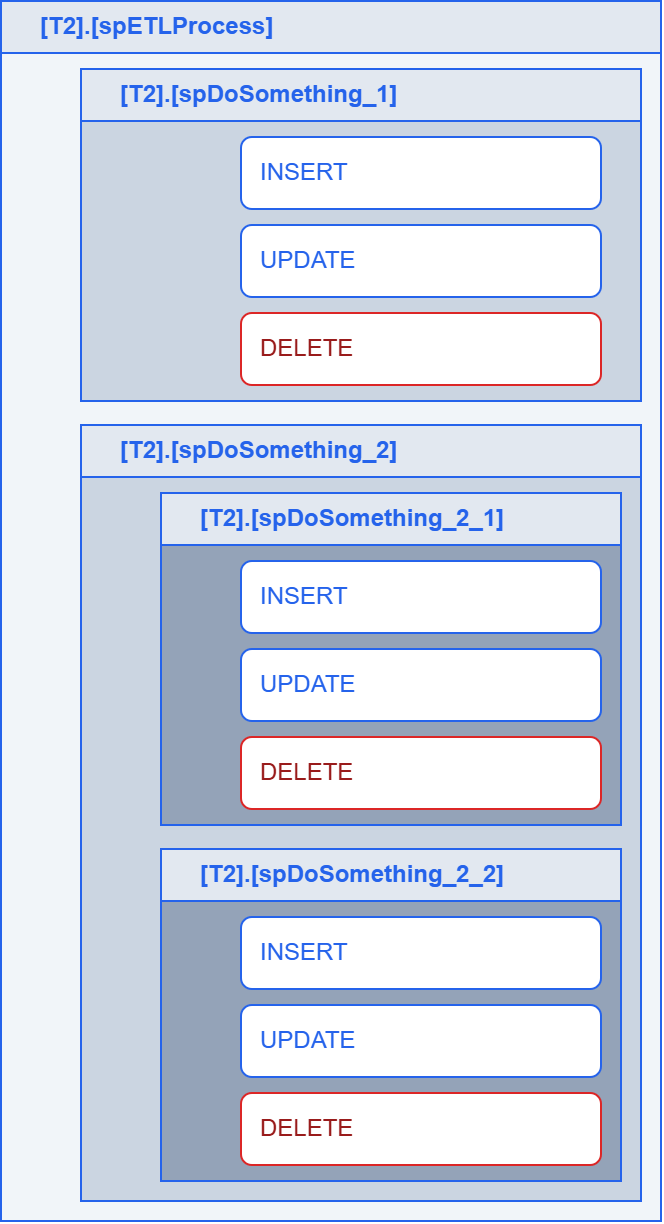
Since showing all procedures would lead to repetition, only the entry procedure [T2].[spETLProcess] and the procedure [T2].[spDoSomething_2_2] are shown here. All remaining worker procedures use the same TRY/CATCH pattern as [T2].[spDoSomething_2_2].
Two decisions in the example are deliberate. The worker procedures re-raise a caught exception via THROW, so that every level can close its own log record. The entry procedure [T2].[spETLProcess], by contrast, consumes the exception after logging is complete — the run ends in an orderly way with [State] = error, without aborting the caller hard. If an orchestrator such as SQL Server Agent is supposed to see the failure, an additional THROW belongs at the end of its CATCH block, otherwise the job ends as spuriously successful from the scheduler’s point of view.
And when passing on the row count, order matters: @@ROWCOUNT is captured into the variable @affectedRows immediately after the respective DML statement, and only that variable is passed to [LL].[spUpdateTraceSuccess]. After an EXEC, @@ROWCOUNT does not carry the business row count of the called component but the value of its last executed statement, and even a simple variable assignment sets the value to 1 (measured on SQL Server 2022). The orchestration steps in [T2].[spETLProcess] therefore log no row count of their own — the workers deliver it in their trace records. In the demo workers, SET @affectedRows = @@ROWCOUNT; deliberately remains part of the placeholder comment, and the placeholder steps pass NULL, because without real DML there would be no business row count to capture. For statements beyond 2 billion rows, ROWCOUNT_BIG() takes the place of @@ROWCOUNT. The column [AffectedRows] is sized as bigint for that.
[T2].[spETLProcess]
  1: -- ----------------------------------------------------------------------------
  2: -- [T2].[spETLProcess] - example entry procedure of the ETL process.
  3: -- Calls two worker procedures spDoSomething_1 and spDoSomething_2
  4: -- and logs both calls in [LL].[Trace].
  5: -- ----------------------------------------------------------------------------
  6: CREATE OR ALTER PROCEDURE [T2].[spETLProcess]
  7: AS
  8: BEGIN
  9:     SET NOCOUNT ON;
 10:
 11:     -- Error variables
 12:     DECLARE @error_message  AS nvarchar(max);
 13:     DECLARE @error_number   AS int;
 14:     DECLARE @error_line     AS int;
 15:     DECLARE @error_state    AS nvarchar(max);
 16:
 17:     -- Logging variables
 18:     DECLARE @component      AS nvarchar(128);
 19:     DECLARE @task           AS nvarchar(128);
 20:     DECLARE @source         AS nvarchar(5);
 21:     DECLARE @step           AS nvarchar(max);
 22:     DECLARE @entity         AS nvarchar(max);
 23:     DECLARE @message        AS nvarchar(max);
 24:
 25:     DECLARE @traceId       AS bigint;
 26:     DECLARE @componentId   AS bigint;
 27:     DECLARE @executionId   AS bigint;
 28:
 29:     DECLARE @description    AS nvarchar(max);
 30:     DECLARE @affectedRows   AS bigint;
 31:     DECLARE @action         AS nvarchar(100);
 32:     DECLARE @state          AS nvarchar(100);
 33:     DECLARE @success        AS bit;
 34:
 35:     SET @message       = NULL;
 36:     SET @description   = NULL;
 37:     SET @affectedRows  = 0;
 38:
 39:     SET @component = OBJECT_SCHEMA_NAME(@@PROCID) + N'.' + OBJECT_NAME(@@PROCID);
 40:     SET @source    = N'T-SQL';
 41:     SET @entity    = N'[].[]';
 42:
 43:     BEGIN TRY
 44:         -- Open the execution log
 45:         EXEC [LL].[spInsertExecution] @executionId OUTPUT, N'ETL process', 123;
 46:
 47:         -- Open the component log
 48:         SET @step        = N'Orchestrate ETL process';
 49:         SET @description = N'';
 50:         EXEC [LL].[spInsertComponent]
 51:              @executionId, @componentId OUTPUT, @source, @component, NULL, @entity, @step, @description;
 52:
 53:         -- ----------------------------------------------------------------
 54:         -- Call [T2].[spDoSomething_1]
 55:         -- ----------------------------------------------------------------
 56:         SET @task        = NULL;
 57:         SET @step        = N'Execute [T2].[spDoSomething_1]';
 58:         SET @action      = N'execute';
 59:         SET @description = NULL;
 60:         SET @state       = N'processing';
 61:         SET @success     = 0;
 62:         EXEC [LL].[spInsertTrace]
 63:              @executionId, @componentId, @traceId OUTPUT
 64:             ,@source, @component, @task, @entity, @step, @description
 65:             ,NULL, @action, NULL, @state, @success;
 66:
 67:         EXEC [T2].[spDoSomething_1] @executionId;
 68:
 69:         -- Orchestration step without a row count of its own - the DML rows
 70:         -- are logged by the workers in their own trace records
 71:         EXEC [LL].[spUpdateTraceSuccess] @traceId, @description, @action, NULL;
 72:
 73:         -- ----------------------------------------------------------------
 74:         -- Call [T2].[spDoSomething_2]
 75:         -- ----------------------------------------------------------------
 76:         SET @task        = NULL;
 77:         SET @step        = N'Execute [T2].[spDoSomething_2]';
 78:         SET @action      = N'execute';
 79:         SET @description = NULL;
 80:         SET @state       = N'processing';
 81:         SET @success     = 0;
 82:         EXEC [LL].[spInsertTrace]
 83:              @executionId, @componentId, @traceId OUTPUT
 84:             ,@source, @component, @task, @entity, @step, @description
 85:             ,NULL, @action, NULL, @state, @success;
 86:
 87:         EXEC [T2].[spDoSomething_2] @executionId;
 88:
 89:         EXEC [LL].[spUpdateTraceSuccess] @traceId, @description, @action, NULL;
 90:
 91:         -- Close the component log
 92:         EXEC [LL].[spUpdateComponentSuccess] @componentId, @description;
 93:
 94:         -- Close the execution log
 95:         SET @state   = N'success';
 96:         SET @success = 1;
 97:         EXEC [LL].[spUpdateExecution] @executionId, @state, @success;
 98:     END TRY
 99:     BEGIN CATCH
100:         SET @error_message = ERROR_MESSAGE();
101:         SET @error_number  = ERROR_NUMBER();
102:         SET @error_line    = ERROR_LINE();
103:         SET @error_state   = ERROR_STATE();
104:
105:         IF @executionId IS NOT NULL
106:         BEGIN
107:             EXEC [LL].[spInsertErrorException]
108:                  @executionId, @componentId, @traceId, @source, @component
109:                 ,NULL, NULL, @step
110:                 ,@error_number, @error_message, @error_line, @error_state;
111:
112:             IF @traceId     IS NOT NULL EXEC [LL].[spUpdateTraceError]     @traceId,     @description;
113:             IF @componentId IS NOT NULL EXEC [LL].[spUpdateComponentError] @componentId, @description;
114:
115:             SET @state   = N'error';
116:             SET @success = 0;
117:             EXEC [LL].[spUpdateExecution] @executionId, @state, @success;
118:         END;
119:     END CATCH;
120: END;
121: GO
[T2].[spDoSomething_2_2]
  1: -- ----------------------------------------------------------------------------
  2: -- [T2].[spDoSomething_2_2] - deepest worker procedure in the example tree.
  3: -- Called by [T2].[spDoSomething_2] (see diagram 041007.png).
  4: -- Simulates an INSERT, an UPDATE and a DELETE - the DELETE raises an
  5: -- exception to demonstrate the exception-handling pattern.
  6: -- ----------------------------------------------------------------------------
  7: CREATE OR ALTER PROCEDURE [T2].[spDoSomething_2_2]
  8: (
  9:     @p_executionId  AS bigint
 10: )
 11: AS
 12: BEGIN
 13:     SET NOCOUNT ON;
 14:
 15:     -- Error variables
 16:     DECLARE @error_message  AS nvarchar(max);
 17:     DECLARE @error_number   AS int;
 18:     DECLARE @error_line     AS int;
 19:     DECLARE @error_state    AS nvarchar(max);
 20:
 21:     -- Logging variables
 22:     DECLARE @component      AS nvarchar(128);
 23:     DECLARE @task           AS nvarchar(128);
 24:     DECLARE @source         AS nvarchar(5);
 25:     DECLARE @step           AS nvarchar(max);
 26:     DECLARE @entity         AS nvarchar(max);
 27:     DECLARE @message        AS nvarchar(max);
 28:
 29:     DECLARE @traceId       AS bigint;
 30:     DECLARE @componentId   AS bigint;
 31:
 32:     DECLARE @description    AS nvarchar(max);
 33:     DECLARE @affectedRows   AS bigint;
 34:     DECLARE @action         AS nvarchar(100);
 35:     DECLARE @state          AS nvarchar(100);
 36:     DECLARE @success        AS bit;
 37:
 38:     SET @message       = NULL;
 39:     SET @description   = NULL;
 40:     SET @affectedRows  = 0;
 41:
 42:     SET @component = OBJECT_SCHEMA_NAME(@@PROCID) + N'.' + OBJECT_NAME(@@PROCID);
 43:     SET @source    = N'T-SQL';
 44:     SET @entity    = N'[].[]';
 45:
 46:     BEGIN TRY
 47:         IF (@p_executionId IS NULL)
 48:         BEGIN
 49:             SET @message = N'The parameter ''p_executionId'' is NULL.';
 50:             EXEC [dbo].[spRaiseError] @message, @component;
 51:             RETURN -1;
 52:         END;
 53:
 54:         -- Open the component log
 55:         SET @step        = N'Do something';
 56:         SET @description = N'';
 57:         EXEC [LL].[spInsertComponent]
 58:              @p_executionId, @componentId OUTPUT, @source, @component, NULL, @entity, @step, @description;
 59:
 60:         -- ----------------------------------------------------------------
 61:         -- INSERT (succeeds)
 62:         -- ----------------------------------------------------------------
 63:         SET @task        = NULL;
 64:         SET @step        = N'Insert data';
 65:         SET @action      = N'insert';
 66:         SET @description = NULL;
 67:         SET @state       = N'processing';
 68:         SET @success     = 0;
 69:         EXEC [LL].[spInsertTrace]
 70:              @p_executionId, @componentId, @traceId OUTPUT
 71:             ,@source, @component, @task, @entity, @step, @description
 72:             ,NULL, @action, NULL, @state, @success;
 73:
 74:         -- An INSERT statement would go here, immediately followed by:
 75:         -- SET @affectedRows = @@ROWCOUNT;
 76:
 77:         EXEC [LL].[spUpdateTraceSuccess] @traceId, @description, @action, NULL;
 78:
 79:         -- ----------------------------------------------------------------
 80:         -- UPDATE (succeeds)
 81:         -- ----------------------------------------------------------------
 82:         SET @task        = NULL;
 83:         SET @step        = N'Update data';
 84:         SET @action      = N'update';
 85:         SET @description = NULL;
 86:         SET @state       = N'processing';
 87:         SET @success     = 0;
 88:         EXEC [LL].[spInsertTrace]
 89:              @p_executionId, @componentId, @traceId OUTPUT
 90:             ,@source, @component, @task, @entity, @step, @description
 91:             ,NULL, @action, NULL, @state, @success;
 92:
 93:         -- An UPDATE statement would go here, immediately followed by:
 94:         -- SET @affectedRows = @@ROWCOUNT;
 95:
 96:         EXEC [LL].[spUpdateTraceSuccess] @traceId, @description, @action, NULL;
 97:
 98:         -- ----------------------------------------------------------------
 99:         -- DELETE (deliberately raises an exception)
100:         -- ----------------------------------------------------------------
101:         SET @task        = NULL;
102:         SET @step        = N'Delete data';
103:         SET @action      = N'delete';
104:         SET @description = NULL;
105:         SET @state       = N'processing';
106:         SET @success     = 0;
107:         EXEC [LL].[spInsertTrace]
108:              @p_executionId, @componentId, @traceId OUTPUT
109:             ,@source, @component, @task, @entity, @step, @description
110:             ,NULL, @action, NULL, @state, @success;
111:
112:         -- A DELETE statement would go here - artificially raised exception:
113:         THROW 50001, N'Exception in [T2].[spDoSomething_2_2]', 1;
114:
115:         EXEC [LL].[spUpdateTraceSuccess] @traceId, @description, @action, NULL;
116:
117:         -- Close the component log
118:         EXEC [LL].[spUpdateComponentSuccess] @componentId, @description;
119:     END TRY
120:     BEGIN CATCH
121:         SET @error_message = ERROR_MESSAGE();
122:         SET @error_number  = ERROR_NUMBER();
123:         SET @error_line    = ERROR_LINE();
124:         SET @error_state   = ERROR_STATE();
125:
126:         IF @p_executionId IS NOT NULL
127:         BEGIN
128:             EXEC [LL].[spInsertErrorException]
129:                  @p_executionId, @componentId, @traceId, @source, @component
130:                 ,NULL, NULL, @step
131:                 ,@error_number, @error_message, @error_line, @error_state;
132:
133:             IF @traceId     IS NOT NULL EXEC [LL].[spUpdateTraceError]     @traceId,     @description;
134:             IF @componentId IS NOT NULL EXEC [LL].[spUpdateComponentError] @componentId, @description;
135:         END;
136:
137:         THROW;
138:     END CATCH;
139: END;
140: GO
The following script contains the statement to execute the ETL process. To obtain a compact process log, the log tables are cleared beforehand. This clearing, including DBCC CHECKIDENT, is a pure demo reset for reproducible ids — in live operation, log tables are not emptied. The closing SELECT statements produce the result shown at the beginning.
  1: -- ----------------------------------------------------------------------------
  2: -- Example run: execute the ETL process and evaluate the log.
  3: --
  4: -- Block 1 clears the log tables (TRUNCATE / DELETE + RESEED),
  5: -- block 2 starts the example ETL process, block 3 shows the result.
  6: -- The SELECT statements return exactly the three result sets shown at the
  7: -- start of the article (tables 041001, 041002, 041003).
  8: -- ----------------------------------------------------------------------------
  9:
 10: -- 01: Clear the log tables
 11: TRUNCATE TABLE [LL].[Error];
 12: TRUNCATE TABLE [LL].[Trace];
 13: DELETE FROM    [LL].[Component];
 14: DELETE FROM    [LL].[Execution];
 15: DBCC CHECKIDENT (N'[LL].[Component]', RESEED, 0);
 16: DBCC CHECKIDENT (N'[LL].[Execution]', RESEED, 0);
 17:
 18: -- 02: Start the ETL process
 19: EXEC [T2].[spETLProcess];
 20:
 21: -- 03: Evaluate the log
 22: SELECT * FROM [LL].[Execution];
 23: SELECT * FROM [LL].[Component];
 24: SELECT * FROM [LL].[Trace];
Conclusion
ETL processes are data-driven processes. If data arrives that was not expected, there is a high probability that either not all data — or even wrong data — ends up in the target system. Something this article mentions only in passing: at the lowest logging level, the number of rows affected can also be logged. Knowing the number of expected versus actually processed rows is a good indicator of the success or failure of an ETL process.
This approach thus supports the development of robust ETL processes and at the same time makes the data quality of a run assessable.
What goes without saying in software development is often neglected when building ETL processes: explicit exception handling. The exception handling presented here first ensures that a process ends in an orderly way in the event of an error. But when is there actually an error? And does an error always have to abort the process? Combined with the knowledge of the expected versus actually processed number of rows, genuine error handling can be implemented.
The approach presented here is, in a way, an invitation to engage more with the data and the expected result. The log — and in particular the knowledge of the rows processed — helps the developer judge the correctness of the work already during the development of the ETL process.
The procedures presented here merely provide a toolkit for logging. Used correctly, they produce a readable, evaluable log.
FAQ
[LL].[Component] and [LL].[Trace]? Both log steps of a run, but at different levels of granularity. [LL].[Component] holds exactly one record per called component (stored procedure, SSIS package, Talend job) — that is, “which building block ran when and with what status?”. [LL].[Trace] goes one level deeper and logs the individual actions within a component (typically every INSERT, UPDATE and DELETE) together with the number of rows affected. A component therefore usually has several trace entries.
[LL] schema instead of putting the logging tables in the default schema? The LL schema (“Logging Layer”) cleanly separates the logging infrastructure from the business data. This has practical advantages: permissions can be granted precisely (for example, write access to LL only for the ETL procedures), retention and backup of the logs can be controlled separately, and in scripts it is immediately clear that an object belongs to logging. It also prevents the logging tables from colliding with business tables of the same name.
Yes — the concept is database-neutral: the logging tables and the three-tier structure stay the same. The concrete implementation, however, has to be adapted to PL/pgSQL semantics. Instead of THROW, you re-raise the exception in PL/pgSQL with RAISE, TRY/CATCH becomes a BEGIN … EXCEPTION WHEN OTHERS THEN … END block, and @@ROWCOUNT corresponds to GET DIAGNOSTICS <var> = ROW_COUNT. One important difference remains: an EXCEPTION block forms an implicit subtransaction in PL/pgSQL. If it catches an error, all changes of the block are rolled back — including log records already written (measured on PostgreSQL 16). The error logging therefore belongs in the EXCEPTION branch — what the handler itself writes is kept. If you want to measure the execution time of individual statements without your own trace table, you can additionally draw on pg_stat_statements, as an aggregated statement statistic without the run-level correlation via execution, component and trace ids.
SQL Server Audit and pgAudit are database-side auditing mechanisms: they log database and server events — logins, DDL, also object access such as SELECT or INSERT — at the infrastructure level, without the business correlation of an ETL run via execution, component and trace ids. The pattern presented here, by contrast, is application logging — it records the business view of the ETL process: which run, which component, which action, how many rows, success or failure. The two complement each other. For the question “did the ETL run do the right thing functionally?” application logging is the appropriate tool.
Because the log INSERTs ran in the same transaction as the ETL work. A ROLLBACK in the CATCH block then also rolls back the log records already written. If the error puts the transaction into the uncommittable state (XACT_STATE() = -1, the usual case for runtime errors in a TRY block under SET XACT_ABORT ON), an INSERT in the CATCH block even fails with error 3930 as long as the ROLLBACK is outstanding. In the CATCH block, the rule is therefore: roll back the transaction first, then log — or keep the logging outside the surrounding transaction in the first place (see the Exception Handling section).
Capture the value of @@ROWCOUNT into a variable immediately after the INSERT, UPDATE or DELETE statement and pass that variable to the logging procedure — every further statement in between overwrites the value. In this pattern, the number ends up in the [AffectedRows] column of the trace record via [LL].[spUpdateTraceSuccess]. For statements with more than 2 billion rows, ROWCOUNT_BIG() takes the place of @@ROWCOUNT. The column [AffectedRows] is sized as bigint accordingly.
An SSIS package is treated like any other component: at the start it calls [LL].[spInsertComponent] (for example from an Execute SQL Task or a Script Task), performs its tasks and finishes with [LL].[spUpdateComponentSuccess], or with [LL].[spUpdateComponentError] in the error case. The returned ComponentId is passed along through an SSIS variable so that downstream trace calls can reference it. This way the package appears seamlessly alongside the T-SQL components in the same log.
Related Articles
This article is part of the ETL design-pattern cluster:
- Data Quality in an ETL Process — the root of the article series.
- Design Pattern // The Architecture of an ETL Process — provides the schema
T2used in the example of this article. - ETL vs. ELT — How to Tell Which Pattern You Actually Built — classifies the pattern logged here as ETL vs. ELT.
- Checking Data Quality with SQL — a Configurable Framework — uses the same error-table idea for generic data quality checks.
- Design Pattern // Safe Type Conversion with T-SQL
- Data Quality // Fundamentals of Type Conversion with T-SQL