
Inside a Claude Code project’s .claude/ folder, rules and skills sit side by side: Markdown files that look almost identical — and behave in exactly opposite ways. That contrast is what Claude Code skills vs rules comes down to: rules are fully in context at every session start; a skill costs next to nothing until someone invokes it. Get the two mixed up and you either stuff everything into rules and pay for it every session — or expect a skill to “just apply” without ever being invoked.
This article draws the line sharply — using the .claude/ folder of a real project, the open DI² starter kit.
The essentials up front:
- Rules (
CLAUDE.md+.claude/rules/) load automatically at session start — full content, every session. - Skills (
.claude/skills/) are on demand: only the description line sits in context; the body loads on invocation — via slash command or because Claude itself finds the description matches the task. - The context-cost table: what costs how much, and when — including the two dials
paths:(rules) anddisable-model-invocation(skills). - The decision rule: what must always apply becomes a rule; what runs on command becomes a skill.
- Why a skill still names the rules — and why rules are a living document.
Prerequisites: A Claude Code project with a .claude/ folder; the examples come from the open DI² starter kit on GitHub. Mechanics as of July 2026, verified against the official Claude Code docs — the details are version-dependent, the principle behind them is not.
Contents
- Rules: the Constitution That Is Always in Context
- Skills: the Toolbox on Demand
- The Context-Cost Question
- Rule or Skill? The Decision Rule
- Why a Skill Still Names the Rules
- Rules Are a Living Document
- FAQ
- Related Articles
Rules: the Constitution That Is Always in Context
Rules are everything Claude Code loads into context without being asked, before the first prompt is processed: the project’s CLAUDE.md (plus a personal ~/.claude/CLAUDE.md and an optional, gitignored CLAUDE.local.md) and every file under .claude/rules/. This is what it looks like in the starter kit:
.claude/
├── CLAUDE.md                  project frame (+ @imports)
├── rules/
│   ├── language.md            always loaded
│   ├── security.md            always loaded
│   └── sql/postgres/…         always loaded
└── skills/
    ├── requirements/SKILL.md  only the description in context
    ├── backend/SKILL.md       only the description in context
    └── deploy/SKILL.md        only the description in context
The consequence of the first half of this tree: rules apply to every action — including the ad-hoc request (“change table X”) that uses no skill at all. That is exactly why conventions belong there: a language policy, a security floor, a SQL style. If the same convention lived only inside a skill text, it would silently not apply outside that skill.
This loading is a snapshot: the session works with whatever the files contained at session start. This snapshot semantics will matter again at the end of the article — it explains why a rule edit does not take effect immediately.
Two details about CLAUDE.md: it can import further files via @path/to/file.md — those load at session start as if they were written inline. A regular Markdown link ([text](file.md)) does not import; it is just a reference Claude may follow when needed. And: the price for all of this is the context window — more on that in a moment.
Skills: the Toolbox on Demand
A skill is a subfolder under .claude/skills/ with a SKILL.md: a frontmatter block with name and description at the top, and below it the body with the actual instructions — a procedure, a workflow, a checklist.
  1: ---
  2: name: deploy
  3: description: Rolls out an environment — asks for the target, checks the preconditions.
  4: ---
  5: (the body starts here — it only loads into context on invocation)
At session start, almost nothing happens with this folder: only the name and description land in context — a few tokens per skill. The body stays on disk until the skill is invoked. Only then does it load into the conversation in full.
There are two ways to invoke a skill, and the second one is often overlooked: either the user types the slash command (/deploy) — or Claude invokes the skill itself, because the description matches the current task. The description is therefore not just documentation but the trigger for automatic matching: a sharp description (“Rolls out an environment …”) gets matched reliably, a vague one (“Helps with deployment stuff”) does not. To prevent self-invocation for a skill — say, because a workflow step should deliberately only start on the user’s command — set disable-model-invocation: true in the frontmatter: the skill is then invisible to Claude and costs zero context until the user invokes it explicitly.
A word on history: the older slash commands (.claude/commands/*.md) have been merged into skills — both forms work and produce the same /name, but skills can do more (their own folder with supporting files, frontmatter controls) and are the recommended form.
The Context-Cost Question
Why not just put everything into rules — then at least it always “applies”? Because every rule is paid for in every session — including the session that has nothing to do with its topic. A project without a database that still loads the full SQL ruleset burns context window for nothing. And the budget is not only a cost question: the fuller the context, the weaker the model’s adherence to each individual instruction.
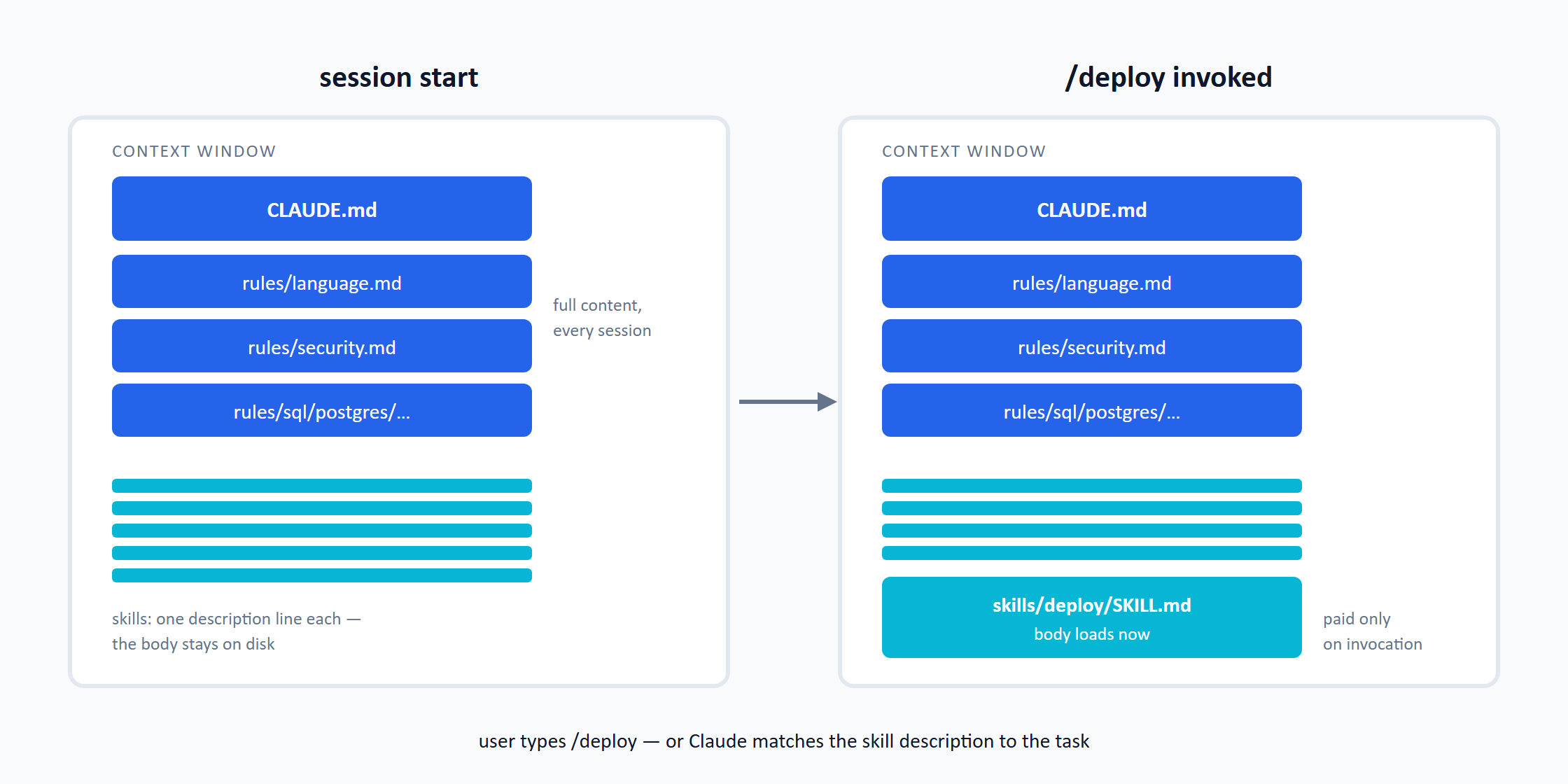
The mechanics at a glance — with the two dials that sit between “always in full” and “not at all”:
| Artifact | Load time | What sits in context | Cost while unused |
|---|---|---|---|
CLAUDE.md (+ @imports) | session start | full content | full, every session |
| Rule without frontmatter | session start | full content | full, every session |
Rule with paths: pattern | only on a matching file | full content after the match | nothing until the pattern matches |
| Skill (default) | session start, header only | name + description | a few tokens per skill |
Skill with disable-model-invocation: true | only on invocation | nothing | nothing |
| Skill, invoked | on /name or self-invocation | full body | — |
The paths: dial deserves a second look. It takes a glob pattern — a simple syntax for matching files and directories via wildcard characters instead of spelling out every filename. The name comes from the old Unix command glob (“global”), which expanded filenames. The most important wildcards:
| Pattern | Meaning | Example matches |
|---|---|---|
* | any number of characters (except /) | *.sql → customer.sql, order.sql |
** | any number of directory levels | db/** → everything below db/ |
? | exactly one arbitrary character | file?.md → file1.md, fileA.md |
[abc] | one of the characters in the brackets | v[12].sql → v1.sql, v2.sql |
{a,b} | alternatives | *.{yml,yaml} → both extensions |
You have met this syntax before — .gitignore (*.log, node_modules/) works exactly the same way. A rule with paths: ["db/**"] in its frontmatter loads only when Claude touches a file from db/ or any subdirectory below it, however deep — the official middle ground for rulesets that concern only part of the project.
Rule or Skill? The Decision Rule
The one-liner everything boils down to:
What must always apply belongs in a rule. What runs on command belongs in a skill.
Three test questions turn this into a decision:
- Must it also apply to ad-hoc requests? A naming convention, a security floor, the project language — none of that may depend on whether someone invokes a skill. → Rule.
- Is it a procedure with steps, inputs and checkpoints? Specifying a feature, rolling out an environment, filing a bug — you invoke that when it comes up. → Skill.
- Is it a fact that changes? Stack values, hosts, commands belong in the rules as fact files (they must always be at hand) — but procedures working with them re-read the file at execution time instead of relying on the context copy from session start.
In the starter kit the split looks like this: language.md, security.md and the SQL conventions are rules; /requirements, /backend, /qa and /deploy are skills — eleven workflow steps plus cross-cutting helpers, each entering the context only when its turn comes.
Why a Skill Still Names the Rules
Anyone reading real skill files stumbles over lines like “Read .claude/rules/stack.md” — and easily draws the wrong conclusion that a skill has to name the rules for them to apply at all. That is the most common misconception in this area, and it is wrong: a skill runs in the main conversation, and the rules have been loaded there all along — since session start, independent of any skill.
The mention has two other jobs:
- Freshness: the context copy of a rule is a snapshot from session start. For fact files like
stack.md, re-reading at execution time pays off — it picks up changes made since the session began. - Focus: among many loaded rules, “follow
sql/postgres/procedures.md” directs attention to the one that governs the current step — important when similar rulesets sit side by side in context.
One distinction belongs here: for subagents (separate instances the model spawns for subtasks), the same line is in fact load-bearing — a subagent does not inherit the conversation and does not automatically receive the .claude/rules/ files; without the explicit read instruction it simply does not know the convention exists. But that is its own topic with its own mechanics.
Rules Are a Living Document
A project’s rules are not a rulebook written once and then administered — they grow through use. The feedback loop is the same as for any other living document: whenever something about a result is off — a phrasing, an approach, a practice that should apply always or only in one specific case from now on — don’t just fix the one spot; tell the agent to update the rule along with it: “put that into the rule.” Every correction thus moves from the single case into the convention, and the same point never has to be raised twice.
The loading mechanics give this loop one quirk you need to know: a rule edit takes effect in the next session. The context is a snapshot from session start — the running session keeps working with the old version until you start a new one or explicitly have the changed file re-read. If you wonder why “the session ignores my new rule”, you are not seeing a malfunction but exactly this snapshot semantics.
What the loop looks like in practice is shown by the sibling article on deploying a SQL schema without a migration tool: two deploy conventions of the starter kit — convergent schema evolution and the immutability of applied transition scripts — came about exactly this way: first a discussion point about a concrete result, then a rule.
That closes the loop: good Claude Code setups usually consist of a few stable rules and many small, task-specific skills. The clearer this separation, the smaller the context stays — and the more predictably the agent works.
FAQ
Rules (CLAUDE.md and the files under .claude/rules/) load automatically and in full into the context at every session start and apply to every action. Skills (.claude/skills/) load on demand: only the description line sits in context, and the body joins on invocation — via slash command or because Claude finds the description matches the task.
What must always apply — conventions, security floors, the project language — belongs in a rule, because only rules also apply to ad-hoc requests without a skill invocation. What starts on command as a procedure with steps and checkpoints — specifying a feature, rolling out, filing a bug — belongs in a skill.
A few tokens: at session start only its name and description sit in context, the body stays on disk. With disable-model-invocation: true in the frontmatter the cost drops to zero — the skill is then completely invisible until you invoke it explicitly.
Both load automatically — the difference is organization, not mechanics. CLAUDE.md carries the project frame: what the project is, how it is structured, where things live. Conventions belong in individual files under .claude/rules/ — one topic per file, so rulesets can be pruned deliberately or limited to parts of the project via a paths: pattern.
Because the context is a snapshot from session start: the running session has the old version loaded and keeps it. After a rule edit, start a new session — or have the changed file explicitly re-read in the running one.
The names and the frontmatter, yes; the principle, no: auto-loaded base context plus tools fetched on demand shows up in practically every agent setup, just under different labels. The decision rule — always-applies versus on-command — carries over unchanged.
Related Articles
- Setting Up a Claude Code Project with a Development Workflow and Database — the overview of the setup this mechanism belongs to.
- Maximal Template Over Empty Repo — a Claude Code Setup That Prunes Itself via /init — why the kit deletes rules instead of disabling them.
- Deploying a SQL Schema Without a Migration Tool — rules and the living-document loop at work in deployment.
- AI-Assisted SQL Development with Claude Code — rules and skills in action for SQL conventions.
- AI-Assisted Coding Gave Me 799 Hardcoded Font Sizes — the measured evidence of what happens without enforced rules.
- I Gave Claude Code 27 Rule Files Instead of One CLAUDE.md — the structural side of this article’s loading mechanics: anatomy of a rule file, don’ts, inventories.
- The open DI² starter kit on GitHub — the complete
.claude/folder with 14 skills and the rules from this article.