
A single value that won’t convert — a 25.5 in an integer column, an empty string, a date like 20240230 — and the ETL run aborts mid-import. Anyone who loads text data from upstream systems knows it: the delivery doesn’t honour the agreed interface, and a bare CONVERT throws an exception instead of cleanly logging the offending value.
This article describes a design pattern for safe type conversion: an approach that makes every conversion error individually identifiable without aborting the ETL process. It rests on three paradigms, derived in the next section.
What you’ll learn here:
- Materialization — why the intermediate results belong in a persisted table, so the result stays inspectable: after an abort as well as after a successful run.
- Error identification — how a single
WHEREclause finds failed conversions without the run aborting. - Data-type subtleties — why
TRY_CONVERT(int, N'')returns a0and when that is functionally wrong. - Conversion is not validation — why a technically converted value can still be functionally wrong.
- Reusable UDFs —
fn_try_convert_*with empty-string-→-NULLhandling as a building block per target type.
Prerequisite: SQL Server / T-SQL and an ETL context where text data must be moved into typed columns. For the plain conversion functions CAST, CONVERT, TRY_CAST and TRY_CONVERT, see Type Conversion Basics with T-SQL — this article builds the pattern on top of them.
The pattern in a nutshell: The raw value stays behind as text in an _E1 column, and next to it a typed column stores the result of the fault-tolerant conversion — TRY_CONVERT, or an fn_try_convert_* function that also maps empty strings to NULL. The WHERE clause [Integer_E1] IS NOT NULL AND [Integer] IS NULL then finds the failed conversions without the run aborting. The following sections deliver the derivation, the data-type subtleties, the UDFs and the limits of the pattern.
Contents
- The Three Paradigms
- Input and Output Values
- Materializing the Extracted Data
- Identifying Conversion Errors
- Conversion by Target Data Type
- Conversion Is Not Validation
- Reusable Conversion Functions
- Critical Appraisal of the Approach
- FAQ
- Related Articles
The Three Paradigms
The approach rests on three paradigms:
NULLinstead of abort. The conversion function returnsNULLwhen the input value cannot be converted to the target data type — no runtime error, no ETL abort.- Materialize input and output value. The ETL process stores both the input value (text) and the converted output value in one table.
- Identify errors by comparison. Comparing the input and output value finds failed conversions with a simple
WHEREclause — provided thatNULLin the output value unambiguously means “not convertible”.
SQL Server delivers the first paradigm out of the box with TRY_CONVERT: when a fundamentally permitted conversion fails, the function returns NULL instead of throwing an exception. Only explicitly disallowed conversion paths still throw an error (see FAQ). Applying the function alone, however, does not guarantee a functionally correct conversion — for that you need to know the specifics of each target data type (see below). For some data types TRY_CONVERT can’t be applied sensibly at all: a yes/no value, for instance, arrives as text (J, N, Y, Yes, No, …), and date values often need pre-processing too. For these cases you write user-defined functions that satisfy the first paradigm (NULL on failure). The section Reusable Conversion Functions shows them.
The pattern is therefore deliberately two-staged: TRY_CONVERT delivers the technical fault tolerance, and the fn_try_convert_* functions add the pattern’s convention — they normalize the input and make NULL the unambiguous error signal.
Robust, safe type conversion matters especially in data migration projects, where the data to be processed is delivered as files (Excel, CSV, XML, JSON, …).
Input and Output Values
Input values are data that has been extracted and stored in a database, in tables and columns of type nvarchar. Output values are data converted from the input values into the target data types. For every input value to be processed there is also an output value.
Materializing the Extracted Data
A pure in-memory approach tempts you not to persist intermediate results at all: extraction, type conversion and error identification then run in a single processing flow in memory (SSIS with its Data Flow is a well-known example). When values can’t be converted, extensive error handling is needed mid-flow. If a record contains several errors, many projects handle and log only the first one. Faulty records end up, at best, in a text file that is rarely evaluated systematically in practice. As powerful as such tools are: in the project practice this article stems from, comprehensive error handling for type conversion was rarely implemented consistently.
It is better to separate the steps strictly and materialize the intermediate results in a database, regardless of which tool does the processing. The decisive gain is the persistence itself: the conversion result stays inspectable for as long as the T1 data isn’t overwritten or cleaned up — not only after an abort, but also after a successful run. You can look inside, trace individual errors and analyze their causes. ETL stands for Extract, Transform, Load — where the intermediate results of the three steps live is not something the acronym prescribes. This pattern deliberately opts for database tables: the data is first extracted into a database, then converted fault-tolerantly into the target data types, and in the last step error-free data is identified and processed further:
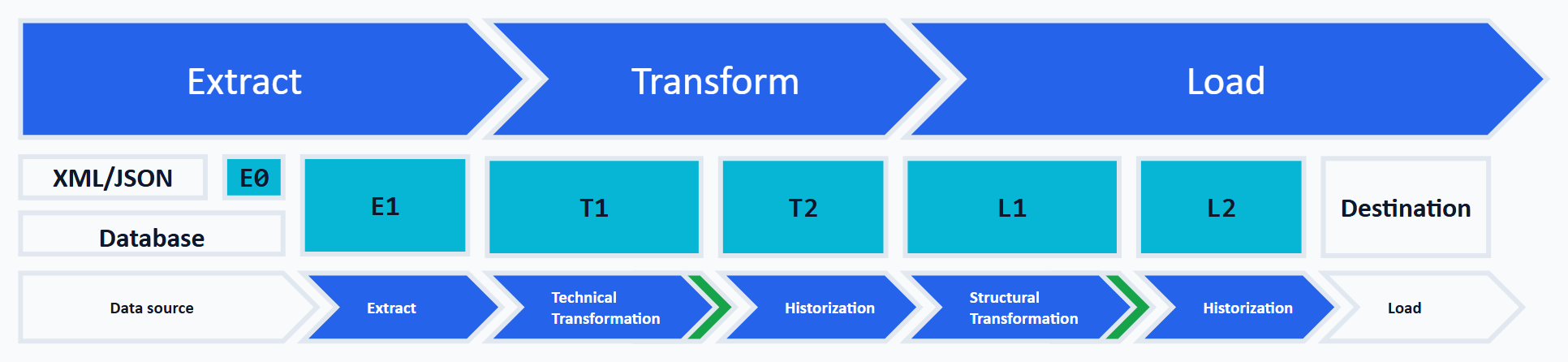
This figure shows an ETL process in which a separate database schema is created for each task to be performed:
| Schema | Meaning |
|---|---|
| E0 | Storing XML and JSON documents in the database |
| E1 | Extracting the values from the text files |
| T1 | Type conversion of the extracted values |
| T2 | Historization of error-free converted records |
| L1 | Structural transformation toward the target system |
| L2 | Storage of error-free, structurally transformed data |
The full derivation of this schema layering — from extraction (E0/E1) through transformation to loading (L1/L2) — is given in Design Pattern // The Architecture of an ETL Process. This article deepens the type-conversion step from schema E1 to T1. The two following subsections introduce these two schemas.
Schema E1
Extracted data is stored in tables of schema E1 in columns of type nvarchar. If necessary, the length of the text fields should not be restricted. It must in any case be chosen so that all data can be extracted in full. Storing the values as text decouples type conversion from extraction: conversion errors can no longer occur in this step. Errors in reading and parsing the source data itself — invalid XML, encoding problems, missing columns — remain unaffected. The extracted data is also called the input values.
Schema T1
For every table in schema E1 there is a table of the same name in schema T1. In the T1 tables the input-value columns are carried over with type nvarchar, and a second column is added per input value, this time with the target system’s data type. For pragmatic reasons these column pairs share the same column name, with the columns holding the input value receiving the suffix _E1. An example shows the structure:
  1: CREATE TABLE [T1].[Table]
  2: (
  3:     [Id]         int IDENTITY(1,1) NOT NULL
  4:    ,[PK_E1]      nvarchar(256)         NULL
  5:    ,[PK]         int                   NULL
  6:    ,[Text_E1]    nvarchar(256)         NULL
  7:    ,[Text]       nvarchar(3)           NULL
  8:    ,[Integer_E1] nvarchar(256)         NULL
  9:    ,[Integer]    int                   NULL
 10:    ,[Date_E1]    nvarchar(256)         NULL
 11:    ,[Date]       datetime              NULL
 12: );
In the table [T1].[Table] all columns except [Id] are declared nullable. This lets both the input values from an [E1].[Table] and the converted output values be stored — even when individual conversions fail. The prerequisite, however, is that all conversion functions return NULL on failure.
Identifying Conversion Errors
A data example for the table [T1].[Table] declared above shows what failed conversions look like in the column pairs:
| Id | PK_E1 | PK | Text_E1 | Text | Integer_E1 | Integer | Date_E1 | Date |
|---|---|---|---|---|---|---|---|---|
| 1 | 1023 | 1023 | S01 | S01 | 25.5 | NULL | 20240218 | 2024-02-18 |
| 2 | 1024 | 1024 | S022 | S02 | 87 | 87 | 20240230 | NULL |
| 3 | 1025X | NULL | S03 | S03 | 65 | 65 | 20240219 | 2024-02-19 |
Conversion errors can be found with a simple WHERE clause. For output values of the general type non-text, the following WHERE clauses find the type-conversion problems — the input value is populated, but the converted output value is NULL:
  1: WHERE [PK_E1]      IS NOT NULL AND [PK]      IS NULL
  2: WHERE [Integer_E1] IS NOT NULL AND [Integer] IS NULL
  3: WHERE [Date_E1]    IS NOT NULL AND [Date]    IS NULL
These clauses rely on the pattern’s convention: NULL in the output value only ever results from an empty or non-convertible input — which is exactly what the fn_try_convert_* functions below guarantee, because a raw TRY_CONVERT would let the empty string through as 0.
For output values of the general type text, inequality makes most truncated values visible:
1: WHERE [Text_E1] <> [Text]
This comparison has one subtlety: when comparing strings, SQL Server pads the shorter value with spaces. A text shortened only by trailing spaces therefore counts as equal — N'S02 ' <> N'S02' does not report an inequality (measured on SQL Server 2022). To catch this kind of truncation as well, additionally compare the stored length:
1: WHERE DATALENGTH([Text_E1]) <> DATALENGTH([Text])
Both checks require target columns of variable length (varchar/nvarchar). A char/nchar target column pads every value to the fixed length. The DATALENGTH comparison would be permanently unequal there. And because DATALENGTH counts bytes, not characters, the length comparison only holds when the input and output columns use the same character encoding. In this series’ pattern both are nvarchar, so that is given.
Why both values are persisted — and what the alternative costs: The pattern deliberately stores both the input value (_E1, text) and the converted output value side by side. In theory you could drop the output column and keep only the input values. The check routines then become more complex, however. What matters is where the conversion happens:
- Conversion materialized (this approach): the conversion result is written into the output column. The check is then a simple column comparison on the input/output pair — and you see directly in the row which specific column the error is in (in the example above: row 1 at
Integer, row 2 atDate, row 3 atPK). - Conversion only in the check: the check routine applies the actual conversion/validation logic to the input values at runtime and logs or counts the errors. That works, but the table no longer shows where the error is: you learn how many errors a record has, but not, by simply looking at the row, in which column. This very lack of visibility has caused confusion in practice. This rule-based route — applying check rules generically via dynamic SQL — is described in detail in Checking Data Quality with SQL.
Conversion by Target Data Type
SQL Server provides functions for converting data into a target data type. Apply them without examining exactly how they work, and you’ll get surprises. On closer inspection it turns out, for instance, that converting an empty string yields the number 0:
  1: SELECT TRY_CONVERT(int, N'')   -- 0
  2: SELECT TRY_CONVERT(int, N' ')  -- 0
That can be functionally correct. From a database developer’s point of view, however, no value was delivered — the value is unknown, and therefore NULL would be the correct conversion result. There are a number of such subtleties, and safe type conversion must take them into account.
The deep-dive articles in this series derive, per data type, how an input value is converted safely and correctly into the output value’s data type. The selection follows the ETL context: these are the target types that are typically populated from text sources. A complete reference of all SQL Server data types is not the goal:
| Data type | Range | Bytes |
|---|---|---|
| char | Fixed-length string. n = length in bytes: classically 1 byte per character, with a UTF-8 collation (SQL Server 2019+) a character takes 1-4 bytes | n |
| nchar | Fixed-length string, UTF-16 with 2 bytes per code unit. n counts code units, not characters | 2 * n |
| varchar | Variable-length string. n = maximum length in bytes: classically 1 byte per character, with a UTF-8 collation 1-4 bytes | variable |
| nvarchar | Variable-length string, UTF-16 with 2 bytes per code unit — supplementary characters take two code units, n counts code units, not characters | variable |
| bigint | -9,223,372,036,854,775,808 to 9,223,372,036,854,775,807 | 8 |
| int | -2,147,483,648 to 2,147,483,647 | 4 |
| smallint | -32,768 to 32,767 | 2 |
| tinyint | 0 to 255 | 1 |
| numeric [(p [, s])] / decimal [(p [, s])] | p = total number of digits (precision, at most 38), s = digits after the decimal point. The range depends on p and s, at most -10^38 + 1 to 10^38 – 1. The two data types are functionally identical. | 5-17 |
| money / smallmoney | For precision and because of money‘s special behaviour in calculations, it is recommended to use decimal instead. | 8 / 4 |
| float(n) | n = number of bits used to store the mantissa (1-53) | 4 or 8 |
| real | Synonym for float(24) | 4 |
| bit | 0 or 1 | 1 per up to 8 bit columns (packed) |
| date | 0001-01-01 to 9999-12-31 (no time) | 3 |
| datetime | 1753-01-01 to 9999-12-31, with time. Fractional seconds rounded to .000/.003/.007 (about 3.33 ms) | 8 |
| datetime2(n) | 0001-01-01 to 9999-12-31, with time. n = number of fractional-second digits (0-7) | 6-8 |
| time(n) | 00:00:00.0000000 to 23:59:59.9999999. n = number of fractional-second digits (0-7) | 5 |
The articles per data type are linked at the end of this article under Related Articles.
Conversion Is Not Validation
TRY_CONVERT answers exactly one question: can SQL Server technically turn this text into the target data type? Whether the value is functionally admissible is not something the function answers. After the conversion, every value is therefore in one of three states:
- Technically convertible and functionally valid. The normal case, the value moves on.
- Technically not convertible. The output value is
NULL. Exactly these cases are found by theWHEREclause from the section Identifying Conversion Errors. - Technically convertible, but functionally invalid. The conversion delivers a value, and yet it violates a business rule. The section on the floating-point functions below shows an example:
1.234converts without complaint to1.234— but in a German-language source, the thousands grouping1234may well have been meant.
The column-pair pattern of this article covers the second state. The third needs its own validation rules such as value ranges, patterns or plausibility checks — the rule-based framework from Checking Data Quality with SQL is the right place for that.
A second boundary comes from the NULL semantics: the fn_try_convert_* functions deliberately map empty strings to NULL as well. An input value delivered empty ('') therefore falls into the same WHERE clause as a non-convertible one. Both show up as errors. In this pattern that is intended: an empty text is not a value. NULL deliberately serves as a collective signal for “missing” and “unreadable” — that simplifies the check but does not distinguish between the two causes. Whoever needs the distinction adds a dedicated rule on the input value, or extends the pattern with an explicit status column per value pair (say, ok / empty / not convertible). The status column makes the cause directly queryable, but costs a third column per input value and then belongs consistently in every T1 table.
Reusable Conversion Functions
The first paradigm repeats for every target type: NULL instead of an exception for a non-convertible value. Rather than spelling it out in every SELECT, you encapsulate it in a user-defined function fn_try_convert_<type>. It handles two things TRY_CONVERT alone does not: mapping empty strings and inputs consisting only of spaces to NULL (instead of the 0 trap above) and — for floating-point numbers — normalizing comma decimal notation. Other whitespace characters are not removed by LTRIM/RTRIM. For the function’s promise that is harmless: inputs consisting only of tabs, line breaks or non-breaking spaces return NULL for all numeric target types of this pattern (measured on SQL Server 2022 for int, bigint, smallint, decimal and float). In detail, however, SQL Server parses per type: float, for instance, tolerates a leading tab before the number, int and decimal do not.
For the integer types, the integer representative looks like this (the siblings fn_try_convert_bigint, fn_try_convert_smallint and fn_try_convert_tinyint differ only in the target type):
  1: CREATE FUNCTION [dbo].[fn_try_convert_int] (@p_input AS nvarchar(max))
  2: RETURNS int
  3: AS
  4: BEGIN
  5:    DECLARE @normalized AS nvarchar(max);
  6:
  7:    SET @normalized = LTRIM(RTRIM(@p_input));
  8:
  9:    -- empty string / spaces only is an unknown value, not 0
 10:    IF @normalized = N'' RETURN NULL;
 11:
 12:    RETURN TRY_CONVERT(int, @normalized);
 13: END;
The parameter is deliberately declared as nvarchar(max). A tighter length would be a silent second truncation boundary: SQL Server cuts an overlong value down without comment when passing it into the parameter, and an invalid long input value can thus turn into a seemingly valid short one. The effect is easy to reproduce (SQL Server 2022):
  1: DECLARE @input AS nvarchar(300) = N'25' + REPLICATE(N' ', 254) + N'X';
  2:
  3: SELECT [dbo].[fn_try_convert_int](@input);  -- NULL: the 'X' makes the value invalid
  4: -- With @p_input nvarchar(256) the same call incorrectly returned 25 —
  5: -- the parameter cuts off the 'X' at position 257, leaving '25' plus spaces.
If you do want to limit the parameter length, set it at least to the length of the E1 columns.
For the floating-point types, comma-to-dot normalization is added so that a value written with a comma (e.g. 25,5, common in German-language source data) converts correctly (fn_try_convert_real is identical except for the target type):
  1: CREATE FUNCTION [dbo].[fn_try_convert_float] (@p_input AS nvarchar(max))
  2: RETURNS float
  3: AS
  4: BEGIN
  5:    DECLARE @normalized AS nvarchar(max);
  6:
  7:    -- comma decimal notation: comma to dot
  8:    SET @normalized = REPLACE(LTRIM(RTRIM(@p_input)), N',', N'.');
  9:
 10:    IF @normalized = N'' RETURN NULL;
 11:
 12:    RETURN TRY_CONVERT(float, @normalized);
 13: END;
The comma replacement presupposes an input grammar: decimal-comma notation without thousands separators. A value like 1.234,56 becomes 1.234.56 after the replacement and shows up as NULL. Trickier is 1.234: the value converts without complaint as dot notation to 1.234, although the source may have meant the thousands grouping 1234 (measured on SQL Server 2022). That is the third state from Conversion Is Not Validation — only a format rule on the input value can catch it.
With these functions, the conversion in schema T1 becomes a simple, abort-safe expression: for this pattern’s nvarchar-to-number paths, [dbo].[fn_try_convert_int]([Integer_E1]) returns the typed value or NULL — even an overflow like 99999999999999 becomes NULL. The only special case are explicitly disallowed conversion paths (see FAQ).
The data-type-specific subtleties (ranges, rounding for decimal, J/N mapping for bit, date formats) are derived per type in the linked articles of this series.
With large data volumes, the execution of such scalar functions deserves scrutiny, because classically SQL Server calls them once per row. Since SQL Server 2019 the optimizer can automatically inline suitable scalar UDFs. The form shown here is excluded from that, because it contains two RETURN statements — since SQL Server 2019 CU5, inlineable scalar UDFs may only have a single RETURN statement, while IF/ELSE itself is no obstacle (sys.sql_modules.is_inlineable reports 0 for the form shown, measured on SQL Server 2022). If you apply the functions to millions of rows, write the body as a single RETURN CASE WHEN … THEN NULL ELSE TRY_CONVERT(…) END — this variant behaves identically and reports is_inlineable = 1. Even then: is_inlineable = 1 only describes the function’s suitability. Whether a concrete query actually inlines it is the optimizer’s case-by-case decision.
Critical Appraisal of the Approach
This article has laid out the basic approach to safe type conversion. Implementing it in an ETL process looks laborious at first: SELECT statements that read data from the schema E1 tables and store it typed in the schema T1 tables can become complex for tables with many columns.
It therefore makes sense to solve this task once with a generic, metadata-driven procedure: a procedure that generates the conversion SELECT dynamically from the T1 table structures reduces the development effort per table to essentially one line of code. This very pattern — configurable bad-data detection via dynamic SQL — is described in Checking Data Quality with SQL.
This places the article clearly: it is the practical rule guide for conversion error checking. The architectural frame — the schema layering E0–L2 — is provided by The Architecture of an ETL Process. The generalization to arbitrary data-quality rules is handled by the framework just mentioned. This article covers the piece in between: how to concretely detect errors at the type-conversion step.
FAQ
TRY_CONVERT directly in the SELECT? TRY_CONVERT alone has two pitfalls: an empty string becomes 0 instead of NULL, and on failure the information about which value was non-convertible is lost. The pattern solves both — the fn_try_convert_* function maps empty values to NULL, and the E1/T1 materialization keeps the original value next to the conversion result.
The basics article compares the functions themselves — CAST, CONVERT, TRY_CAST and TRY_CONVERT. This article builds the design pattern on top: the ETL approach of materialization, error identification via WHERE clause and reusable UDFs. The basics are the tool, this is the method.
With a WHERE clause on the column pair: for non-text types the conversion failed if the input value is populated but the output value is NULL ([x_E1] IS NOT NULL AND [x] IS NULL). For text types, inequality ([x_E1] <> [x]) reveals truncated values — texts shortened only by trailing spaces are only caught by an additional DATALENGTH comparison (see Identifying Conversion Errors).
TRY_CONVERT still abort an ETL process? Yes, in one special case. NULL instead of an error only applies to conversions SQL Server permits in principle. If a conversion path is explicitly disallowed — xml to int, for instance — even TRY_CONVERT raises an error (error 529, measured on SQL Server 2022). For the nvarchar-to-target-type conversions covered in this article, this special case is not relevant. There the function returns the converted value or NULL.
With a generic, metadata-driven procedure that generates the conversion SELECT dynamically from the table structures. The pattern is worked out in Checking Data Quality with SQL. There it runs as configurable bad-data detection via dynamic SQL.
Conceptually yes. The three paradigms are engine-neutral. Postgres has no TRY_CONVERT, but the same idea can be implemented with a PL/pgSQL function that wraps the cast in a BEGIN … EXCEPTION block and there specifically handles the SQLSTATE error classes relevant to the target type — for numbers, say, invalid_text_representation and numeric_value_out_of_range, for date values additionally invalid_datetime_format and datetime_field_overflow. A blanket WHEN OTHERS, by contrast, also swallows genuine programming errors. And the route isn’t cheap: every EXCEPTION block costs a subtransaction per call. Especially relevant for data migration to PostgreSQL.
Related Articles
Basics:
- Data Quality // Type Conversion Basics with T-SQL —
CAST,CONVERT,TRY_CASTandTRY_CONVERTcompared.
Safe conversion by data type:
- TRY_CONVERT for bigint, int, smallint and tinyint
- TRY_CONVERT for decimal and numeric
- TRY_CONVERT for money and smallmoney
- TRY_CONVERT for float and real
- TRY_CONVERT for date, datetime, datetime2 and time
- TRY_CONVERT for bit — converting yes/no values
In the ETL, data-quality and migration context:
- The Architecture of an ETL Process — the schema layering
E0–L2into which this pattern places theE1→T1conversion step. - Data Quality in an ETL Process — the higher-level view of data quality in the process.
- Checking Data Quality with SQL — generic bad-data detection via dynamic SQL.
- Data Migration: SQL Server to PostgreSQL — the context where safe type conversion matters most.