
A single date string that cannot be parsed, and the entire ETL run aborts. The design pattern for ETL process architecture presented here prevents exactly that: bad data is isolated, not passed along.
TL;DR — what this article covers:
- Work packages and schema layering E0–L2 — how to decompose the ETL process into distinct, self-contained packages, each with its own database schema.
- Technical vs. structural transformation — why separating type conversion and foreign-key resolution into two passes is safer and easier to debug than doing both in one.
- Data quality at the schema boundaries — erroneous records are caught at the transitions; the main stream keeps flowing cleanly.
- Historization as an optional layer — driven by business requirements (SCD 1 / SCD 2), with an extra technical benefit for delta loads.
Prerequisite. Basic familiarity with ETL processes. This is a conceptual article — not a step-by-step tutorial. The technology examples are SQL Server-centric; the Postgres equivalents are covered in the FAQ. Starting point of the article series: Data quality in an ETL process. The present article covers the architecture part.
Contents
Tasks of the ETL Process
An ETL process consists of the three general steps E = Extract, T = Transform and L = Load. What exactly has to happen within each of these top-level steps, however, is a matter of definition.
Extraction
In this step, data is extracted from various data sources. Sources can be databases, files, or APIs. The data to be extracted may be structured or unstructured and may come in different formats. This article series deals exclusively with structured data. Structured data sources include relational databases, but also CSV documents as well as XML and JSON documents — as long as their data elements follow a logical structure. Unstructured data such as text from social networks is out of scope here.
This generic definition leaves open what extraction concretely means. The following sections describe a concrete shape for the extraction process:
- Materialization of the extracted data
- Extended extraction tasks
- No typing into target types during extraction
Materialization of Extracted Data
The design pattern presented here stores all extracted data in a database. Storage must be designed so that a single invalid value cannot make it fail. An extraction step may only abort when the delivery itself is unprocessable (corrupted or unparsable files, unexpected encoding) or the infrastructure gives out (storage, network). Writing data to the database is referred to here as the materialization of the data.
Extraction and the materialization of extracted data give three main benefits:
- The source system is read only once and as briefly as possible.
- All extracted data is available in a database for subsequent processing.
- After-the-fact error analysis on concrete records becomes possible.
Reading from the source system can put it under enough load that its performance and response times suffer. Extracting first minimizes the duration of that access.
Once all extracted data sits in a database, downstream steps can work on it using SQL. No additional ETL tool is required just to integrate heterogeneous source systems. This lowers technical hurdles, and downstream processes are often substantially faster — both in execution and in development.
Extended Extraction Tasks
For text files in XML and JSON format (and possibly CSV), materialization works a bit differently. XML and JSON documents are themselves stored in the database before the data they contain is extracted. As an extended extraction task, the attributes are then extracted from the stored documents using T-SQL functions such as OPENJSON or OPENXML and written to the database.
No Typing Into Target Types During Extraction
Text-file deliveries are particularly problematic. The data they contain is not type-safe by any means. A date delivered as text may or may not be convertible into a date value. There has to be an agreement between the delivering process and the ETL process about, for example, which date format is used (yyyy-MM-dd, dd.MM.yyyy, etc.). Converting values during extraction is a source of errors and risks aborting the entire ETL run. In this pattern, typing into the business target types is therefore not permitted during extraction: input values are first materialized in a deliberately tolerant text format and only converted into the required target types during the technical transformation.
Transformation
A common definition of the transformation step goes something like: transformation converts the extracted data into the desired format. Another possible definition sums up the required tasks under the term data integration. Both definitions — and the term data integration itself — say everything and nothing. They offer no guidance on the concretely required measures.
Starting from the extracted data, the design pattern presented here defines two mandatory tasks and one optional task:
- Typing of the extracted data
- Data quality check
- Optional: historization
When data arrives as text files, the extracted attributes must first be converted into the target data types. That is often also true when data is extracted from databases whose data types diverge from those in the target system. This section, however, focuses on text files as the data source. As described above, values extracted from text files are first stored as text. The target system expects strongly typed data. A date, for example, will routinely have to be converted into a date value.
The data quality check is, on top of that, a critically important task that fundamentally shapes the outcome of an ETL run. It starts with checking whether a delivered value can be converted into the data type of the corresponding target field. Where required, deliveries must also be checked for duplicates. Further rules cover value ranges, dependencies between fields, reference data, and business plausibility.
In the historization step, source data identified as changed (new, modified, or deleted records) is rolled forward in separate tables, so it is always traceable when a record was inserted, modified, or deleted. This step is optional. A colleague once called the historized data the brain of the ETL process. With complete historization and reproducible transformation and mapping rules, the data of the downstream target system can be reconstructed from the historized data. Of course, historization comes with additional maintenance tasks such as backups.
The term data integration is, in fact, closer to what we will call structural transformation. There, data from various sources is filtered, merged, and aggregated. Although that is also a transformation task, the design pattern presented here does not perform it during T of the ETL process — it happens during L. At this point, it pays to draw a sharp terminological line between the transformation tasks described in this section and structural transformation. The transformation tasks described here, performed during T, are referred to as technical transformation. The transformation tasks performed during L are referred to as structural transformation.
The boundaries between the three top-level ETL steps are fluid and, in the end, a matter of definition.
Typing of Extracted Data
If the data source is a database such as SQL Server or Oracle, the data will typically already be strongly typed. Even then, type conversion may still be necessary to match the data types of the target system.
Example: Typical cases are the length of text fields and the storage of a point in time without a time zone. Application developers do not always pay close attention to input length limits. As a result, an address field in a source system might be able to hold entire novels. Users who notice such a gap will — empirically — happily use it to dump information that simply does not belong there. If the source delivers a point in time without a time-zone offset, it must be clarified before conversion in which time zone that point in time is to be interpreted from a business perspective. In SQL Server, depending on the requirement, datetime2 or datetimeoffset is the target type of choice.
When processing attributes extracted from a text file, typing the extracted values into the target data types is always required.
Example: During extraction, attributes are stored as values of type text. A text that looks like a date is not necessarily convertible into a date value. For instance, 30-02-2023 is not a valid date. Another example: 03-05-2023 cannot be interpreted as a date without additional context about the data source. Read in the American style (MM-dd-yyyy), it yields March 5, 2023; read in the style common in Germany (dd-MM-yyyy), it yields May 3, 2023. Correct interpretation requires knowledge of the date format — that is, the format string. Similar challenges arise for numeric values with respect to decimal and thousands separators.
Data Quality Check
The data quality check inspects the extracted and converted data for completeness and correctness. These checks cover a wide field. Examples are:
- Type conversion check
- Duplicate identification
- Spelling and orthography check on text values
- Foreign key check
- Mandatory field missing value check
- Business logic validation
The article Data quality in an ETL process introduces the term technical data quality. The check on technical data quality operates on the typed data. For data quality checks on typed data, simple logical conditions can be set up, identifying errors on a value or per-record basis. A data quality rule is technically expressed as a WHERE predicate in the ETL process and applied to the typed data — the predicate is formulated so that it selects exactly the erroneous records. Every hit carries an error in the inspected field the rule refers to.
Type Conversion Check
Whether the type conversion succeeds or fails has direct impact on all downstream tasks. If an input value cannot be converted into the target data type, the offending record may have to be excluded from further processing. The design pattern presented here checks for every delivered source record whether its input values can be converted into the respective target data types.
Duplicate Identification
Duplicate identification can be arbitrarily complex. This article series limits itself to a combination of fields that, per the delivery contract, must follow a defined cardinality or must be unique (cardinality = 1).
Spelling and Orthography Check on Text Values
Phone numbers, for instance, have many possible notations. The German DIN 5008 standard prescribes that the area code be written without parentheses and separated from the rest of the number by a single space. Format rules like these can serve as check rules within the technical transformation. Which notation counts as correct, however, is not a question of the standard but a convention to be defined per target system.
Foreign Key Check
If the delivered data contains a foreign key relationship, only the syntactic validity of a delivered foreign key value is checked here — that is, format, presence where required, and data type. The actual foreign key resolution against the target system (mapping source-system code → target surrogate key) only happens later, as part of the structural transformation. Only there is referential validity established against the reference table. The reason for the split: resolution needs context from the target system (such as a Countries table), whereas format and presence checks can be answered from the record alone.
Mandatory Field Missing Value Check
If an attribute is a mandatory field in the target system, the typed data must be inspected to ensure that a corresponding value was delivered.
Business Logic Validation
Checking business logic is itself a wide field that can become arbitrarily complex. But even checking simple business rules improves data quality noticeably. A simple example is a customer’s date of birth: it must not lie in the future.
Loading
In the final step of the ETL process, the typed data is structurally transformed to match the data structures of the target system, optionally re-checked for data errors, filtered, aggregated, historized, and finally loaded into the target system. The tasks involved are:
- Structural transformation
- Data quality check
- Filtering
- Aggregation
- Optional: historization
- Loading the data into the target system
The previously technically transformed data can be loaded into different target systems. The target can be, for example, a CRM system or a data warehouse. The structural transformation task is specific to the chosen target system. That is why the structural transformation happens during L of the ETL process.
Structural Transformation
The structural transformation works exclusively on the typed, quality-checked, and possibly historized data that was found to be error-free. Technically, the structural transformation corresponds to a SELECT statement joining the historized tables via JOINs and shaping the output to match the target system’s data structures. Among other things, this step resolves foreign keys and lookup values:
The output of the structural transformation is — as with extraction and the technical transformation — materialized in the database, so this data, too, is available for analysis and error diagnosis. The data structures of the structurally transformed data largely correspond to the structures in the target system. In particular, the column names and data types of the output are chosen to match those expected by the target.
Foreign Key Resolution
If foreign keys cannot be determined from the extracted data alone, they must be resolved against the target system’s data.
Example: Target systems often store countries in a separate table. The country United States is then identified both by its country name and — typically — by a technical key (e.g., a GUID). When structurally transforming a customer whose source data identifies the country as the text United States, this text must be translated to the primary key of that country in the target system and stored as a foreign key with the customer record.
Foreign key resolution requires direct read access to the Countries table in the target system. If direct access is not available, that table must be read in advance, and its data must be made available in a database. At that point, reading the Countries table is itself an extraction task.
Lookup Value Resolution
Source and target systems often use different codings for the value of a dropdown field. A dropdown field, for example, could be a list field for selecting a customer’s salutation.
In the database, what is shown and selected in the application is rarely stored verbatim. A salutation of Mr. might be stored as the value 1 and Ms. as 2. The codings used in source and target systems typically differ.
These coded attributes are often not stored in separate tables. Translating the source-system code into the target-system code therefore requires explicit knowledge of the translation rules. Following terminology used in Microsoft Dynamics CRM, this translation is called lookup value resolution. To resolve lookup values, the codes used by source and target systems must be determined and stored in a mapping table that is consulted during the structural transformation.
Data Quality Check
Experience from real projects shows that foreign key resolution and lookup value resolution are major sources of errors — typically rooted in incomplete or incorrect mappings of source-system codes to target-system codes.
Filtering
Unless the target system is being initially populated with data, only records with specific properties should be loaded into the target. Filtering for the records actually destined for loading should — where possible — already happen during the technical transformation. If that is not feasible there, filtering happens during the structural transformation.
Aggregation
Data may need to be aggregated before loading into the target system.
If end-to-end traceability of every processing step in the ETL pipeline is required, aggregation should be considered as a separate processing step downstream of the structural transformation. Aggregated data would then be stored in separate tables of the staging database.
Historization
As in the technical transformation, the structurally transformed and checked data can be rolled forward in separate tables. New records are inserted, changed records are updated, and deleted records are flagged as deleted.
Loading Data Into the Target System
The final loading of the changed data into the target system therefore works on quality-assured, structurally transformed, and historized data. Only error-free records — those for which foreign keys and lookup values were successfully resolved — are loaded.
Technologically, this article focuses on loading change data into a target database. The target database is updated via SQL statements, that is, via INSERT, UPDATE, and where applicable DELETE statements. Other target systems — such as Microsoft Dynamics 365 — require the use of a proprietary API, both for writing data into and reading data from the target. In that case, an API-capable integration mechanism is needed: SQL Server Integration Services with suitable components, a custom API client, or another ETL/ELT tool.
Architecture of the ETL Process
The pattern fits in one sentence: Each work package has its own database schema, checks data quality at its boundary, and passes on only error-free records. The architecture presented here is broadly transferable and can be used regardless of the kind of source data or target system, in relational data migration and data integration projects alike. It also fits the data-loading workflow of a data warehouse. The ETL process is decomposed into small, self-contained work packages with sharply defined tasks. At the end of the pipeline, quality-assured data sits in data structures similar to those of the target system and can be loaded there without further business transformations.
Work Packages of the ETL Process
The following diagram illustrates the work packages of the ETL process presented here:
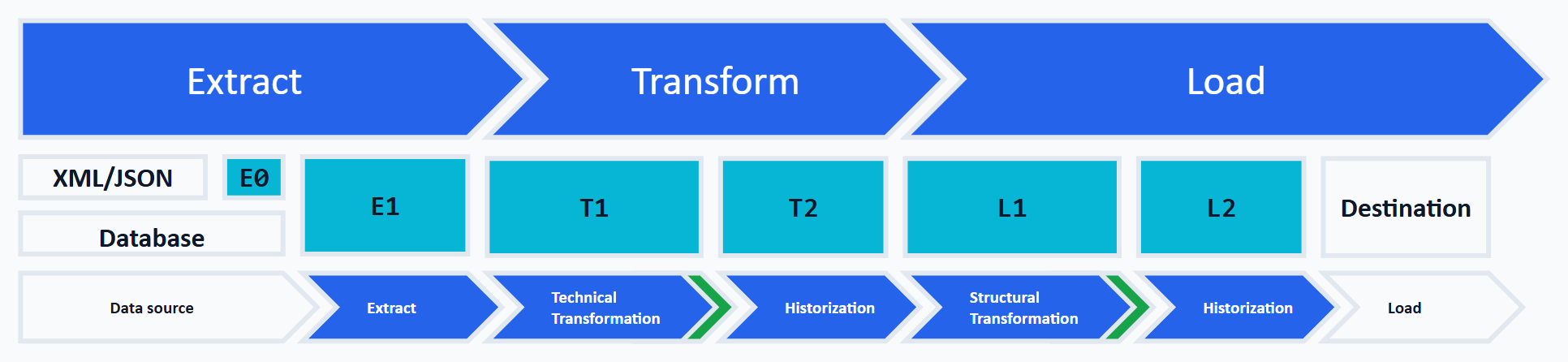
The top lane of the diagram shows the top-level steps from the ETL acronym: Extract, Transform, and Load. The bottom lane names the concrete work packages of the ETL process and maps each to one of the top-level steps. Each work package is paired with a database schema. The middle lane labels the database schemas used per work package (E0–L2). During processing, data is handed from work package to work package, that is, from schema to schema. The ETL process consists of the following work packages:
- Data extraction
- Technical transformation
- Historization of the technically transformed data
- Structural transformation
- Historization of the structurally transformed data
- Loading the data into the target system
The six schemas at a glance:
| Schema | Purpose | Error class at the boundary | Persistence |
|---|---|---|---|
| E0 | raw documents (XML/JSON) | format/parser errors | only for document sources |
| E1 | extracted raw data, untyped | infrastructure/extraction errors | yes |
| T1 | typed and checked data | technical data quality (type errors) | yes |
| T2 | history of the technically transformed data | — | optional |
| L1 | target-system-like structures | structural data quality (FK/lookup) | yes |
| L2 | history of the structurally transformed data plus load flags | — | optional |
The Technical Transformation and Structural Transformation work packages check the data quality of the transformed data and hand over only error-free data to the next package. In the diagram, these checks are indicated by the dark arrow heads. The sections below summarize the steps within each work package and provide an overview of the technology used to carry them out.
Extraction
The goal of extraction is to first store all data to be processed in the staging database. Within extraction, it matters whether the source data is read from a database or from documents with table-like structures (for example, Excel or CSV documents), or whether documents with complex logical structures (for example, XML or JSON) are to be processed.
Extraction From a Database
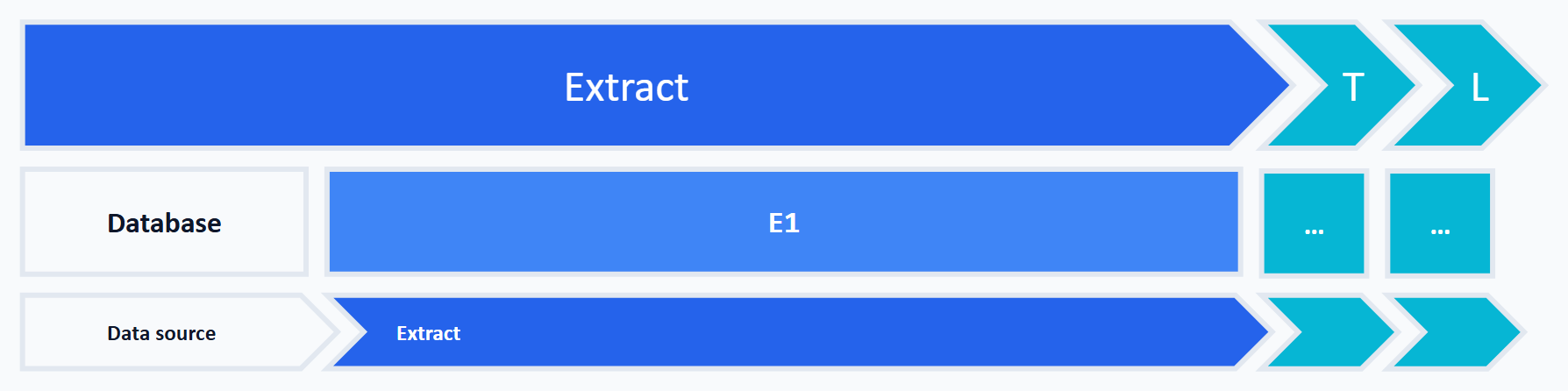
When reading from a database or from table-like structures, the attributes / columns are first materialized into tables of schema E1. The structures of the tables in schema E1 closely match the structures in the source system. When extracting from a database, the data is stored using the data types from the source system. If the source-system data types are not supported by SQL Server, the data is stored in schema E1 as nvarchar. That works for values that can be represented as text. Binary or special types (such as geodata) need a deliberate strategy instead — for example varbinary(max) or a raw format.
Extraction From Documents With Table-Like Structures
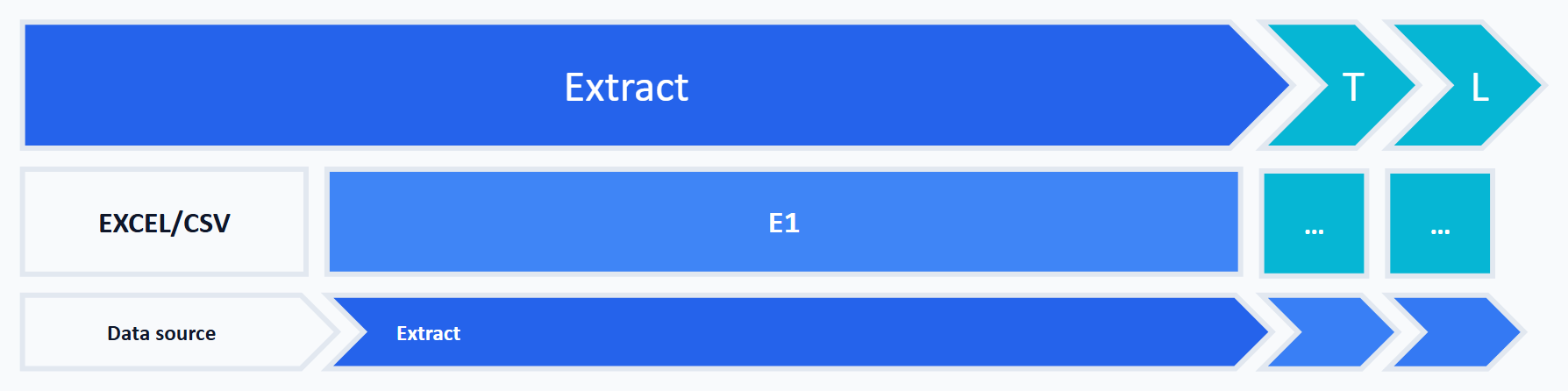
Data from documents with table-like structures, such as Excel and CSV documents, arrives without guaranteed typing. A CSV file transports no data types — every delivered value is text at first. Excel does not enforce typing either: individual rows of a column set up as a date can still contain a number or free text. Even a delivery agreement about the column format is an expectation, not a guarantee. Checking remains the ETL process’s job, all the more since these documents are often created and maintained by hand. To make sure that all values from these documents can be materialized in the staging database in tables of schema E1, all data is first stored as nvarchar. Use generous text lengths — nvarchar(max) where no upper bound is known — so that materialization does not fail on length.
Extraction From Documents With Complex Logical Structures
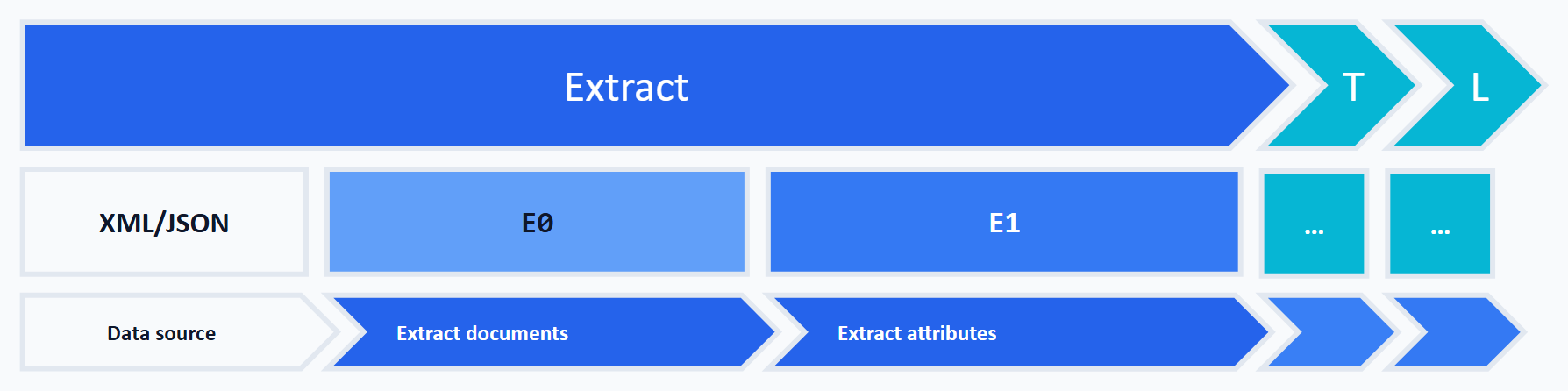
When XML or JSON documents are to be processed, the documents themselves are first stored in tables of schema E0. The attributes are then extracted into tables of schema E1. The attribute extraction works on the documents stored in schema E0 in the first step.
Attributes from text files are stored in schema E1 as nvarchar. Use generous text lengths, nvarchar(max) where no upper bound is known.
Technology
Extraction of data from a database or from table-like structures can be done with Microsoft’s SQL Server Integration Services (SSIS) or any other ETL tool. To extract XML or JSON documents, SSIS first loads them into tables of schema E0. OPENJSON extracts the attributes from JSON documents. For XML, the methods of the xml data type (.nodes(), .value()) or the older OPENXML are available — OPENXML uses its own memory and parsing model (sp_xml_preparedocument) and is mostly found in legacy code.
Summary
This extraction approach has several advantages. Using an ETL tool such as SSIS, which supports a high degree of parallelism in data processing, the data can be materialized into the schemas E0 and E1 with high throughput. Upstream systems are minimally impacted, and the data is available for further processing — such as attribute extraction from XML and JSON documents via the T-SQL functions OPENXML or OPENJSON — in the staging database. The materialized data also enables root-cause analysis when errors arise.
Technical Transformation
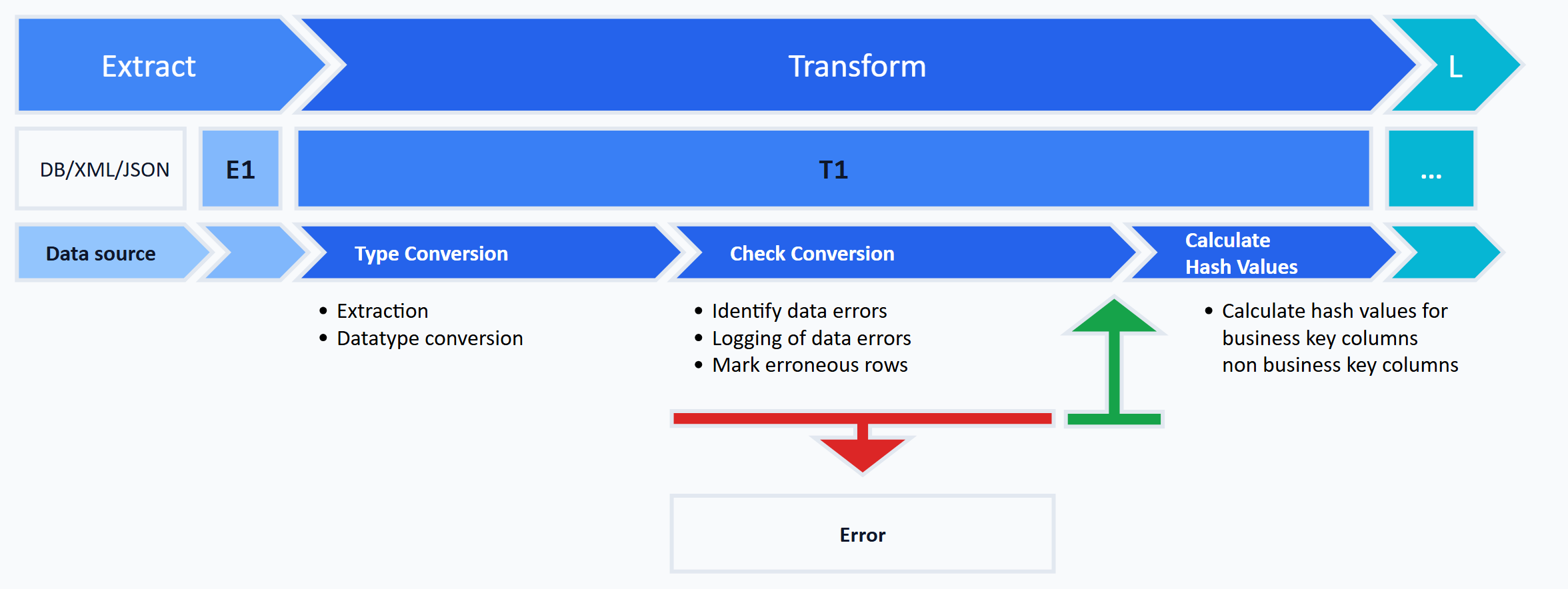
Within the top-level transformation step, this design pattern runs the technical transformation described above. It consists of the following sub-steps:
- Type conversion
- Technical data quality check
- Data error logging
- Flagging of erroneous records
- Hash value computation
Type Conversion
The output of the technical transformation is typed data that matches the target system’s expectations. Typing can be driven by metadata via generic user-defined stored procedures and materializes the data into tables of schema T1.
Per attribute from schema E1, two columns are provided in schema T1. The first column holds the extracted value in the data type used in schema E1. The second column holds the typed value in the target data type, provided the value can be converted. If the value cannot be converted, the second column stores NULL — in T-SQL, TRY_CONVERT and TRY_CAST provide exactly that behavior, returning NULL on a failed conversion.
Technical Data Quality Check
After typing, the result is checked by comparing the column pairs for type-conversion problems. A conversion error exists exactly when the input column holds a value but the typed column is NULL. A NULL input remains a legitimate NULL in the target and is not a conversion error — whether the field may be empty at all is the mandatory-field check’s job. How empty strings are treated (as NULL or as a value in their own right) must be defined up front. Because the type conversion is purely technical, this check is also called the technical data quality check. The error check can already be extended here to cover simple, record-local business rules.
Data Error Logging
Detected data errors are logged in a readable, queryable form in an error table.
Flagging of Erroneous Records
If a record contains at least one error, it is flagged as erroneous so it can be excluded from further processing. The flag lives in a column that stores the count of detected errors. Error-free records carry NULL in this column.
Hash Value Computation
The last sub-step of the technical transformation is computing and storing two hash values per record. The first hash represents the business-key columns of the record; the second hash represents all remaining columns. Through these two hashes, the next work package — Historization of Technically Transformed Data — can identify change records. Hash values are computed only for error-free records.
Two things must be unambiguously defined for this: the serialization of the columns (column order, delimiter, NULL handling, encoding, and the representation of dates and decimals: without an unambiguous delimiter, ('AB','C') and ('A','BC') produce the same hash input) and the algorithm — for SQL Server SHA2_256 or SHA2_512 (all older HASHBYTES algorithms have been deprecated since SQL Server 2016). Strictly speaking, an equal hash does not prove equal data, because different inputs can produce the same hash value. With SHA2_256, this residual risk is practically zero. With short checksums such as CHECKSUM (32 bits), collisions become likely at a few tens of thousands of rows (around 50 % at roughly 77,000 distinct inputs). As the sole basis for change detection, they are therefore unsuitable.
Technology
Conversion of extracted values into target data types, error checks, flagging of erroneous records, and hash value computation can all be implemented as generic stored procedures that build the appropriate dynamic SQL statements from metadata. This requires one-time investment in implementing those procedures. Once they exist, the tasks above reduce to simple procedure calls. In the long run, this reduces development effort and maximizes reuse.
Scope of the dynamic part. Dynamic SQL in the strict sense only appears in the data-quality check — one rule maps to one WHERE clause applied to the typed table at run time. Beyond that, the procedures listed above (type conversion, DQ check, flagging, hash-value computation) are metadata-generatable, because they follow the same structural pattern for every target table. This generation covers the corridor from extraction up to technical historization (schema T2). From schema L1 onward — the structural transformation — the JOIN statements are target-system-specific and are developed manually. The same applies to the historization procedures for schema L2 (see the corresponding sections below).
How these generic checks are implemented in practice is shown in Checking Data Quality with SQL — a configurable framework that handles the tasks listed above through metadata-driven procedures.
Historization of Technically Transformed Data
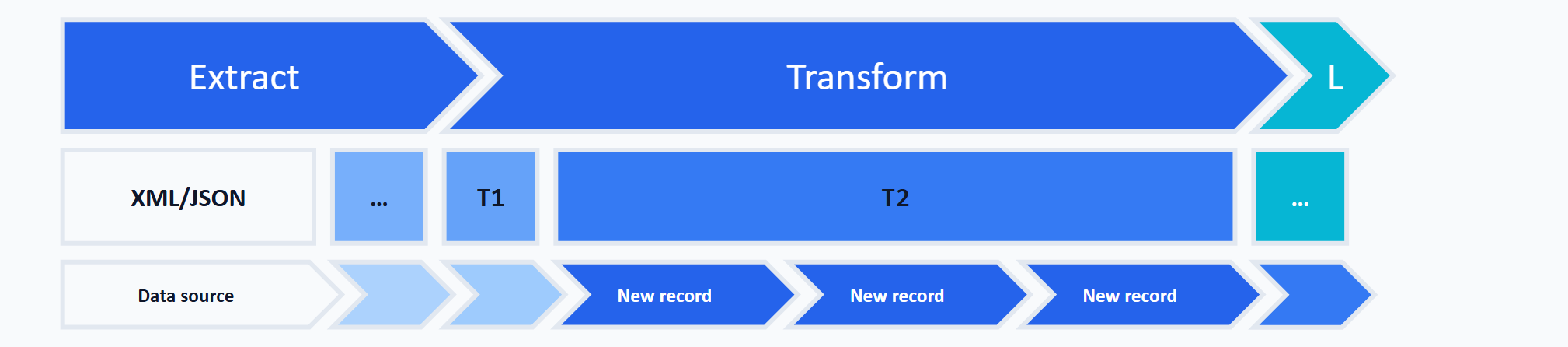
Historization consists of the following sub-steps:
- Historization
- Identification of change records
- Identification via hash values
- Storing hash values
- Promoting only error-free records
Historization
Historization means that delivered data is rolled forward in a database. In the data warehousing world, Slowly Changing Dimensions describes several types of historization that specify exactly how the rolling-forward works. Slowly Changing Dimensions is also commonly abbreviated as SCD. Ralph Kimball describes SCD techniques from Type 0 through Type 7. Two of them matter most for this pattern:
- SCD 1 — strictly speaking, no real historization at all. A record loaded earlier is simply overwritten by its changed counterpart. Only the most recent state of each record is ever stored.
- SCD 2 — on a relevant change, a new version of the record is added (Add New Row). To implement this, every historized table here gets two extra columns
valid_fromandvalid_till, indicating the record’s validity interval (they correspond to Kimball’s row effective date and row expiration date). The intervals are half-open —[valid_from, valid_till):valid_fromis part of the validity,valid_tillmarks the start of the successor version. Currently valid records are open-ended, indicated byNULLinvalid_till. Common implementation variants are a far-future date such as9999-12-31instead of theNULL, and an additional current-row flag. When a change record arrives for a currently valid record, the previously valid record’svalid_tillis set to the date from which the change record becomes valid, and the change record itself is inserted withvalid_till=NULL.
Historization is optional. It helps most with delta loads, when downstream objects depend on unchanged master data — even there, it is not strictly required. Suppose a customer places a new order. In a delta load, the order is delivered, but not the customer, who has not changed. Resolving the foreign-key relationship between order and customer cannot be done from the delivered data alone. To resolve it, either the customer data has to be extracted from the target system, or customers must be historized in the database so they are available on subsequent ETL runs.
In the context of the ETL process presented here, historization means that only error-free, changed records are historized. Rolling forward can follow either SCD 1 or SCD 2 — bearing in mind that SCD 1 keeps no historical versions, only the current state.
Identification of Change Records
Historization requires that change records can be recognized in the source system and, subsequently, in the historized tables. Source systems often provide no information — or only unreliable information — about when a record was inserted, modified, or deleted. When a CSV file is generated from a hand-edited Excel document, for example, it must be assumed that no reliable change information is available. Against that backdrop, this design pattern always derives change records from the data itself. The hash values computed during the technical transformation are used for this.
Identification via Hash Values
In the Technical Transformation section, two hash values were computed for error-free records — one over the business-key columns, one over all remaining columns. The core idea: T2 accumulates the complete history of the delivered data across the runs, and every new delivery (full or delta) is analyzed against that history. The comparison set is exclusively the currently valid version per business key (for SCD 2, the rows with valid_till = NULL), never the historical versions. New, modified, and deleted records are identified by comparing the hash values between the technically transformed data (schema T1) and the currently valid version in the historized data (schema T2):
| Hash (business key) | Hash (attributes) | Type of change |
|---|---|---|
| present in T1 and T2, equal | equal | no change |
| present in T1 and T2, equal | not equal | record was modified |
| only in T1 (extracted) | — | new record |
| only in T2 (historized) | — | record was deleted (assumes a full delivery — see below) |
Limits of delete detection. The fourth row only holds for a full delivery: if every run delivers the complete population, a record missing from T1 really was deleted — the deletions emerge as the difference between delivery and history. In a delta load, the same absence only means that the record was not delivered as a change. Two cases must therefore be distinguished for delta deliveries. If the source system soft-deletes and ships the delete flag, the deletion is processed like any other change and marked as deleted in T2. If the source system deletes physically and ships nothing about it, deletions are fundamentally undetectable from the delivered data. This special case needs a separate mechanism: a periodic full reconciliation (which can also run on the business keys alone) or, where the source system offers it, a change feed such as CDC or Change Tracking. A detected delete is implemented under SCD 2 by closing the currently valid version (valid_till is set) and marking it as deleted. Whether an additional dedicated delete version is created is a separate modeling decision.
Storing Hash Values
When a record is inserted into the historized tables, updated, or flagged as deleted, the hash values of the new, modified, or deleted record are stored or updated there as well. This ensures that the hash values stored there always represent the status quo of the source systems and that change records can be identified via hash values at any later point (in subsequent ETL runs).
Promoting Only Error-Free Records
Promoting an erroneous record — and later loading it into the target system — could cause an error and potentially abort the entire ETL run. Therefore, only error-free change records from schema T1 are stored in schema T2.
Structural Transformation
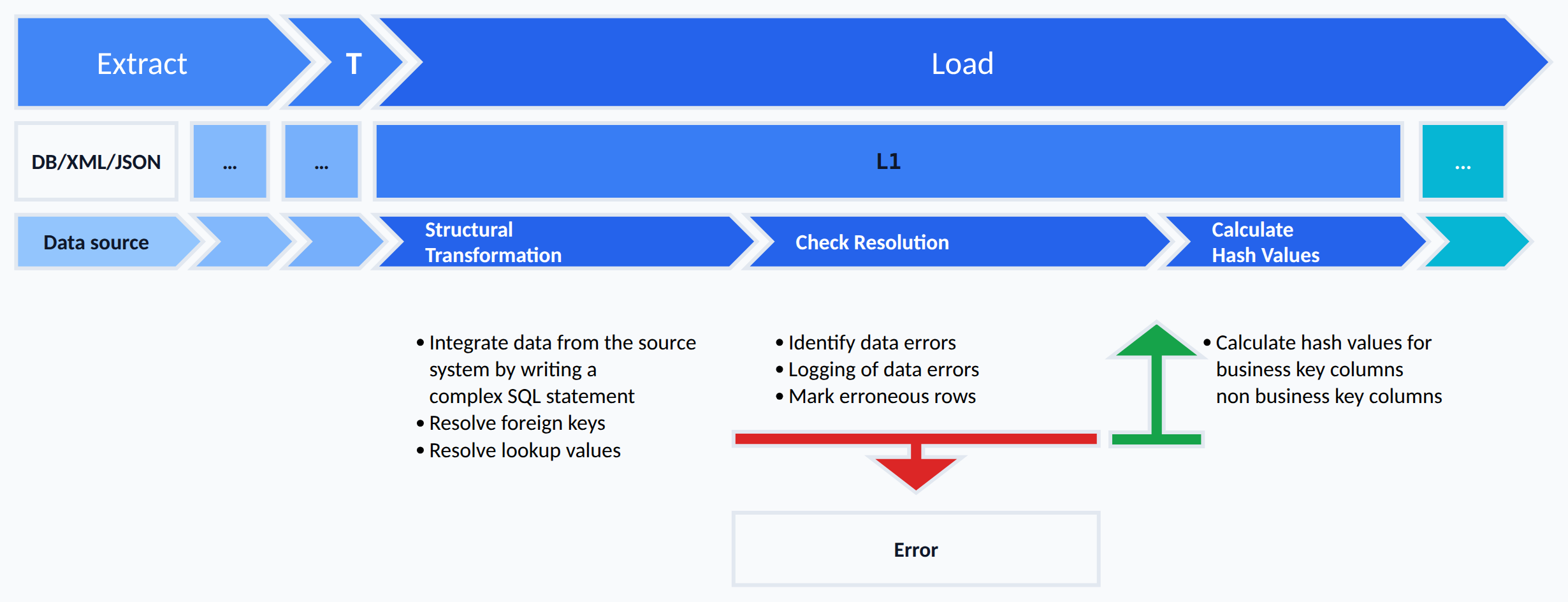
The structural transformation consists of the following sub-steps:
- Structural transformation and resolution of foreign-key relationships and lookup values
- Structural data quality check
- Data error logging
- Flagging of erroneous records
- Hash value computation
Structural Transformation and Resolution of Foreign Key Relationships and Lookup Values
The output of the structural transformation is data in table structures matching the target system. SQL statements with the required JOINs in the FROM clause implement the structural transformation. Developing those statements requires solid knowledge of the data, the relationships among entities, and especially the foreign-key relationships among tables in the source system — or among the source systems being integrated.
Besides the actual structural transformation of source data, the structural transformation resolves foreign-key relationships for the target system and determines the codes to store for lookup values. The result is stored in tables of schema L1, whose structure, column names, and data types resemble those of the target system.
Structural Data Quality Check
After the structural transformation, the result is checked: could all foreign-key relationships and lookup values be resolved? If no foreign key or no lookup code can be determined for a record, the record counts as erroneous. Since this check concerns the outcome of the structural transformation, it is called the structural data quality check here.
Data Error Logging
Detected data errors are logged in a readable, queryable form in an error table.
Flagging of Erroneous Records
If a record contains at least one error, it is flagged as erroneous so it can be excluded from further processing. The flag lives in a column that stores the count of detected errors. Error-free records carry NULL in this column.
Hash Value Computation
The last sub-step of the structural transformation is computing two hash values per record. The first hash represents the business-key columns of a structurally transformed record; the second hash represents all remaining attribute columns. Both hashes let the next work package — Historization of Structurally Transformed Data — identify change records.
Historization of Structurally Transformed Data
Historization of the structurally transformed data covers the same sub-steps as historization of the technically transformed data. It is an optional step, because — as long as the data from the technical transformation is historized — the structurally transformed data can always be reconstructed via the structural transformation.
The structurally transformed data from tables in schema L1 is historized into tables of schema L2. The approach is identical to historizing data from schema T1 into schema T2. Only error-free change records are historized from L1 into L2. New, changed, and deleted records are additionally marked with a flag indicating that they still need to be loaded into the target system. If the data of schema L2 is historized as well, it must never be deleted and should be backed up by a maintenance process. This makes it traceable when the ETL process handled which change. The actual time of change in the source system can only be read from this if the source delivers corresponding metadata.
The procedures required to historize data into schema L2 must be developed manually.
Loading
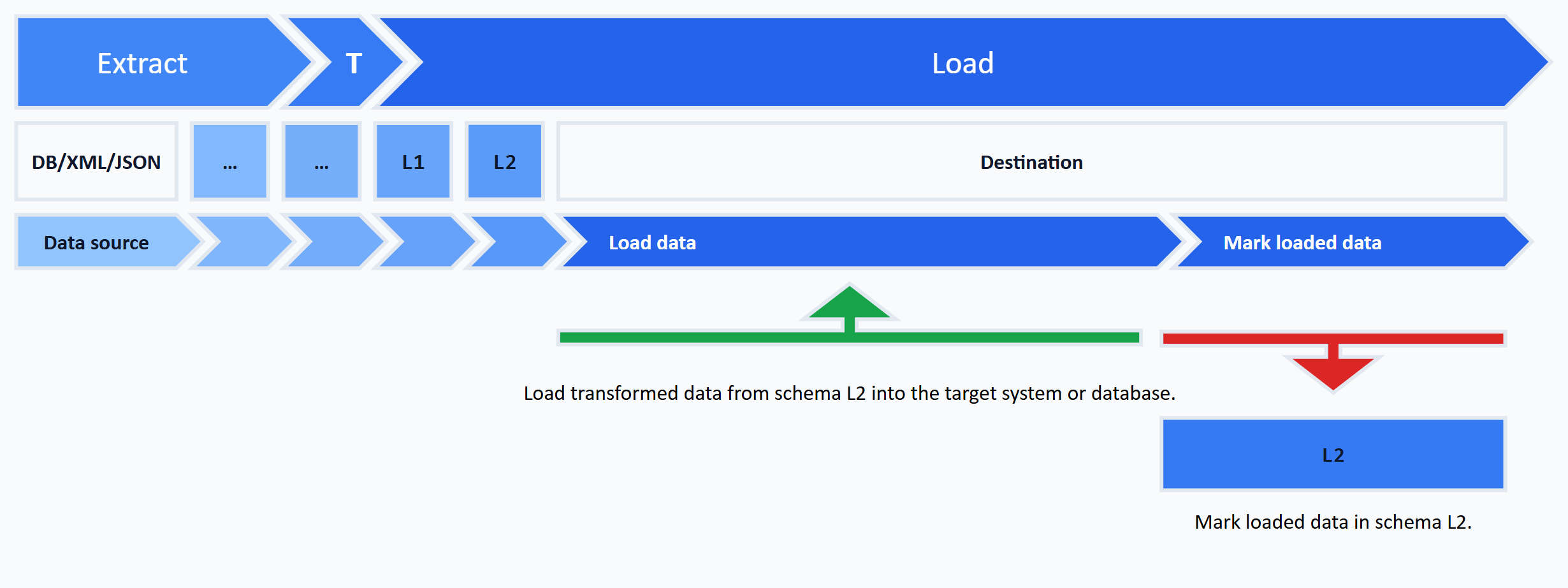
The transformed and quality-checked data in schema L2 can now be loaded into the target system using a technology of choice. If historization in L2 is not enabled, loading happens directly from schema L1. When loading from L2, the change records to be loaded are identified via a flag indicating whether the record has already been loaded. Records loaded successfully into the target system are flagged accordingly.
Conclusion
At the end stands the ground rule that runs through all work packages: each work package has its own schema, checks data quality at its boundary, and passes on only error-free records. Bad data stays isolated where it was detected — along with a log that narrows error diagnosis down to individual records. A single unconvertible value no longer has to abort the ETL run.
The E0-to-L2 layering is a construction kit, not a dogma. If you do not need historization, drop T2 and L2. If storage is tight, implement individual layers as views (see the FAQ for the trade-offs). In effect, the pattern works as persistent staging: the essential transformations run inside the database. The implementation layer beneath this architecture is shown in Checking Data Quality with SQL. Where the pattern sits between ETL and ELT is covered in ETL vs. ELT — How to Tell Which Pattern You Actually Built.
The pattern reaches its limits where per-package persistence does not pay off: streaming and low-latency requirements, extreme data volumes without matching storage, and simple one-way pipelines without reprocessing or audit needs.
FAQ
The technical transformation works on each record in isolation: it converts input values into the target data types (text → date, decimal, …) and runs a first data-quality check at the value level, both without looking at other tables. The structural transformation, by contrast, needs context from the target system — resolving foreign keys, mapping lookup values — and therefore happens in its own work package after the technical transformation. Splitting them lets the two classes of errors be logged and fixed separately.
Materialization — writing each work package’s output to a database table — decouples three things: The source system is read only once and stays untouched by the downstream packages. Every step becomes restartable without rerunning the entire ETL pipeline. And a traceable audit trail emerges for diagnosing errors on individual records. The additional storage and I/O cost is real and grows with data volume. It is the price for restartability, auditability, and error diagnosis — a worthwhile trade in this pattern’s typical scenarios (migration and integration projects). At large volumes, it deserves a deliberate trade-off (see the next question on the persistence layers).
Not strictly. The full E0/E1/T1/T2/L1/L2 layering pays off mostly where audit trail, per-package restartability, and after-the-fact error analysis are hard requirements — typically in classical migration and CRM-integration projects with data volumes in the low to medium range. For large volumes or modern platforms such as Snowflake, Databricks, or BigQuery, some intermediate layers are often implemented as views rather than materialized tables — the architectural logic stays the same, storage and I/O drop, but the transformation cost is paid again on every access. Rule of thumb: L1 is the first candidate for virtualization, because it can always be regenerated from the historized data in schema T2. L2 only qualifies if its load flags and its own history are given up. T2 itself stays materialized — a history cannot be reconstructed from a current snapshot.
Historization is primarily a business requirement: it is needed when state trajectories, historical reporting, or reproducible snapshots are required — regardless of the load type. Delta loads add a technical benefit on top: there, the order record is delivered but not the related customer, if the customer has not changed. Without historized customer data, the foreign-key relationship cannot be resolved. With full snapshot loads and no business need for history, SCD is dispensable.
The core concepts of the pattern — work packages, schema layering E0–L2, data quality at the boundaries, hash-based SCD — are not tied to SQL Server and can be implemented in any relational database. The technology stack presented here, however, is consistently SQL Server-centric (SSIS, OPENXML, OPENJSON, HASHBYTES, metadata-driven procedure generation). The most important Postgres equivalents are: xmltable() for XML, jsonb_to_recordset() or JSON_TABLE (available since PostgreSQL 17) for JSON, and digest(…, 'sha256') from pgcrypto for hashes. For bulk imports into the staging tables, Postgres offers COPY (it does not replace the orchestration of an SSIS), and loading into the target can be modeled with MERGE. Structural adaptation can go deeper than just renaming functions — for example, the E0/E1 split for XML/JSON can often be dropped in Postgres because xmltable() extracts directly from the source read. Whether the raw layer E0 is dropped remains a trade-off between storage and reproducibility.
There are conceptual parallels — business key, hash-based delta detection, persistent layers, auditability. The pattern does not implement Data Vault modeling, though: there are no hubs, links, or satellites with their modeling rules, no mandatory insert-only history, and no raw-vault-versus-business-vault separation. For classical migration and CRM-integration projects with audit requirements, the lighter pattern is pragmatic. For pure data-warehouse loading with multi-source integration, Data Vault 2.0 is worth a look.
Related Articles
Upstream:
- Data quality in an ETL process — root of the article series.
- Data Quality // Fundamentals of Type Conversion with T-SQL — foundational article on
TRY_CONVERT.
Implementation layer:
- Checking Data Quality with SQL — a Configurable Framework — spotting bad data generically and classifying it by severity.
- Design Pattern // Safe Type Conversion with T-SQL —
fn_try_convert_*UDFs for the technical transformation. - Design Pattern // Logging an ETL process with T-SQL — cluster sibling covering the logging layer.
Positioning:
- ETL vs. ELT — How to Tell Which Pattern You Actually Built — classifies the architecture presented here as persistent-staging ELT.