
Three ways to model the same ETL task in SSIS. One takes 10 minutes and is straightforward. One takes hours, 40 components in the data flow, and won’t survive the next requirements change. The question “how much SQL belongs in an SSIS package?” decides maintainability, readability, and development speed — not tool loyalty.
In this article:
- Three approaches to a real hierarchy/ranking task on
[DimEmployee]from AdventureWorks (stored procedure, OLE DB Source, pure SSIS building blocks). - Evaluation along five dimensions: development time, readability, maintainability, performance, functionality — as a case study, not a benchmark.
- Strategic context “ETL 2026”: where SSIS still fits and where modernisation alternatives (Azure Data Factory, dbt, Airflow, Postgres native tooling, Talend Open Studio) work better today.
- Take-away and FAQ with the four most common SSIS-vs.-SQL questions at the end.
Prerequisites: SQL Server 2017+ and SSIS 2017+ (Visual Studio with SSDT), AdventureWorksDW2017 as the sample database. The argument carries over to current SSIS versions (2019/2022) and to Postgres with modern ETL tooling.
Note on the screenshots: The screenshots still show the historical table naming (
[dbo].[post00210001]…) and alternative ranking axes in Solution 3 (HireDate/BirthDateinstead ofVacationHours/SickLeaveHours) — the prose and code samples use the modernised naming.
Contents
- How this article started
- The three approaches
- Evaluation
- ETL 2026 — how much SQL belongs in an SSIS package today?
- Take-away
- FAQ
- Related articles
How this article started
SQL Server Integration Services (SSIS) is a powerful tool set for building ETL pipelines. There are plenty of good reasons to use SSIS, and just as many against. Within the Microsoft product stack, the alternative for building complex ETL pipelines is essentially Transact-SQL (T-SQL).
This article is part of a series of articles on the important decision criteria for choosing the right technology — SSIS and/or T-SQL.
With source control in mind, the article SSIS vs. SQL: Source Code Management lays out the advantages of SQL scripts over SSIS, specifically those of SQL Server Stored Procedures. Changes to a stored procedure are easy to inspect by comparing two versions in Visual Studio. A similar comparison of two versions of an SSIS package shows a confusing number of changes in the underlying .dtsx document type, even for minor modifications. That makes it barely possible to tell what actually changed between versions.
There, a T-SQL statement derives the hierarchy levels of employees from the table [AdventureWorksDW2017].[DimEmployee] and then computes a ranking of vacation hours and sick leave hours across levels 1 to 5. The ranking uses the window functions NTILE() and DENSE_RANK(). The NTILE classification produces three classes.
Solving this task in T-SQL took just a few minutes. A Common Table Expression (CTE) can reference itself and thus walk hierarchies, and the ranking was quickly built with the window functions.
To weigh T-SQL procedures and scripts against SSIS packages with respect to source control, a functionally equivalent SSIS implementation had to be built. The expectation was naive but plausible: somewhat more effort than in T-SQL, yet well within reason.
That expectation did not survive contact with reality.
For the two key requirements there is, as far as can be told, no simple solution, let alone standard tasks or functions that could be used in an Expression:
- Recursive determination of hierarchy levels
- Calculation of the ranking
A simple approach for the recursive hierarchy-level determination was nowhere to be found in the usual blog posts, nor could one be derived on the fly. The attempt to compute the NTILE() ranking through Expressions was quickly abandoned. That part of the task ended up in Script Tasks. Despite the complexity of the artefact, the result stayed reasonably clean. It is, however, a static solution limited to five hierarchy levels.
Along the way the same question kept popping up: why isn’t the relevant SQL statement simply sitting in the OLE DB Source — how much SQL do you really want?
In this article, three approaches are described and compared with this question in mind:
- Solution 1 — Complex SQL in a Stored Procedure. A stored procedure runs a SELECT statement and writes the result into a target table. The procedure is invoked from an Execute SQL Task in the SSIS control flow. One control flow, nothing else.
- Solution 2 — Complex SQL in an OLE DB Source. The SQL statement can instead live in the OLE DB Source of an SSIS data flow, followed by an OLE DB Destination that writes the data into the target table. The solution contains one control flow and, inside it, a single Data Flow Task with exactly two components.
- Solution 3 — Simple SQL in an OLE DB Source. The extreme alternative without SQL (other than a trivial SELECT in the OLE DB Source) uses, in the variant built here, a “temporary” table for intermediate results, one control flow, two Data Flow Tasks, and many components inside them, connected by non-trivial Conditional Splits and Precedence Constraints.
These three alternatives are evaluated along the following dimensions:
- Development time
- Readability
- Maintainability
- Performance
- Functionality
The three approaches
The three solutions are introduced below. All of them were developed with Microsoft Visual Studio 2017 and SQL Server 2017.
Solution 1 — Complex SQL in a Stored Procedure
This solution is based on a complex SQL statement that writes data into the target table [dbo].[fct_employee_hierarchy_ranking]. At its core is the recursive use of a Common Table Expression (CTE) to compute the hierarchy levels. The statement is preceded by a TRUNCATE TABLE to empty the target table before the INSERT. The procedure is named [dbo].[sp_insert_employee_hierarchy_ranking] and is invoked via an Execute SQL Task in the SSIS control flow.
  1: CREATE OR ALTER PROCEDURE [dbo].[sp_insert_employee_hierarchy_ranking]
  2: AS
  3: BEGIN
  4:    SET NOCOUNT ON;
  5:
  6:    TRUNCATE TABLE [dbo].[fct_employee_hierarchy_ranking];
  7:
  8:    WITH CTE_Employee AS
  9:    (
 10:       -- Anchor of the recursive CTE: the CEO as the top-level employee
 11:       -- with no manager. [Level] = 1 marks the root of the hierarchy.
 12:       SELECT
 13:           [EmployeeKey]
 14:          ,[FirstName]
 15:          ,[LastName]
 16:          ,[Title]
 17:          ,[ParentEmployeeKey]
 18:          ,[VacationHours]
 19:          ,[SickLeaveHours]
 20:          ,1 AS [Level]
 21:       FROM
 22:           [AdventureWorksDW2017].[dbo].[DimEmployee]
 23:       WHERE
 24:           [ParentEmployeeKey] IS NULL
 25:       AND [Status] = N'Current'
 26:
 27:       UNION ALL
 28:
 29:       -- Recursive step: every employee whose [ParentEmployeeKey] points
 30:       -- to an employee already in the CTE. [Level] is incremented by 1
 31:       -- per depth. T-SQL joins anchor and recursive member
 32:       -- with UNION ALL.
 33:       SELECT
 34:           T01.[EmployeeKey]
 35:          ,T01.[FirstName]
 36:          ,T01.[LastName]
 37:          ,T01.[Title]
 38:          ,T01.[ParentEmployeeKey]
 39:          ,T01.[VacationHours]
 40:          ,T01.[SickLeaveHours]
 41:          ,T00.[Level] + 1 AS [Level]
 42:       FROM
 43:          [AdventureWorksDW2017].[dbo].[DimEmployee] AS T01
 44:       INNER JOIN
 45:          CTE_Employee AS T00
 46:          ON
 47:            T01.[ParentEmployeeKey] = T00.[EmployeeKey]
 48:       WHERE
 49:          T01.[Status] = N'Current'
 50:    )
 51:    INSERT INTO [dbo].[fct_employee_hierarchy_ranking]
 52:    (
 53:        [ParentEmployeeKey]
 54:       ,[EmployeeKey]
 55:       ,[LastName]
 56:       ,[FirstName]
 57:       ,[Title]
 58:       ,[Level]
 59:       ,[VacationHours]
 60:       ,[SickLeaveHours]
 61:       ,[VacationHours_NTILE]
 62:       ,[VacationHours_DENSE_RANK]
 63:       ,[SickLeaveHours_NTILE]
 64:       ,[SickLeaveHours_DENSE_RANK]
 65:    )
 66:    SELECT
 67:        [ParentEmployeeKey]
 68:       ,[EmployeeKey]
 69:       ,[LastName]
 70:       ,[FirstName]
 71:       ,[Title]
 72:       ,[Level]
 73:       ,[VacationHours]
 74:       ,[SickLeaveHours]
 75:       ,NTILE(3)     OVER (PARTITION BY [Level] ORDER BY [VacationHours],  [EmployeeKey]) AS [VacationHours_NTILE]
 76:       ,DENSE_RANK() OVER (PARTITION BY [Level] ORDER BY [VacationHours])                 AS [VacationHours_DENSE_RANK]
 77:       ,NTILE(3)     OVER (PARTITION BY [Level] ORDER BY [SickLeaveHours], [EmployeeKey]) AS [SickLeaveHours_NTILE]
 78:       ,DENSE_RANK() OVER (PARTITION BY [Level] ORDER BY [SickLeaveHours])                AS [SickLeaveHours_DENSE_RANK]
 79:    FROM
 80:       CTE_Employee;
 81: END;
 82: GO
The recursive CTE produces the [Level] value for every active employee. It matters that anchor and recursive member filter on the same population: both restrict to [Status] = N'Current'. If only the recursive member filtered, a departed employee could surface as the root of the hierarchy while departed employees below the root drop out. That would be a silent asymmetry in the input data.
The subsequent INSERT … SELECT computes the NTILE and DENSE_RANK values per hierarchy level, separated by [VacationHours] and [SickLeaveHours]. SQL Server delivers both as window functions directly out of the statement. The two functions treat ties differently on purpose: DENSE_RANK() orders by the hours alone, so employees with an identical value share a rank. NTILE(3) additionally gets [EmployeeKey] as a second sort key, because the assignment to one of the three buckets would otherwise not be reproducible on ties.
Solution 2 — Complex SQL in an OLE DB Source
The second solution relies on an SSIS Data Flow that contains nothing but an OLE DB Source and an OLE DB Destination.
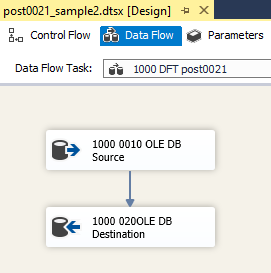
The OLE DB Source defines the data source as a SQL statement — the same complex statement from procedure [dbo].[sp_insert_employee_hierarchy_ranking], but without the INSERT INTO part. The data stream is written to the target table by the downstream OLE DB Destination.
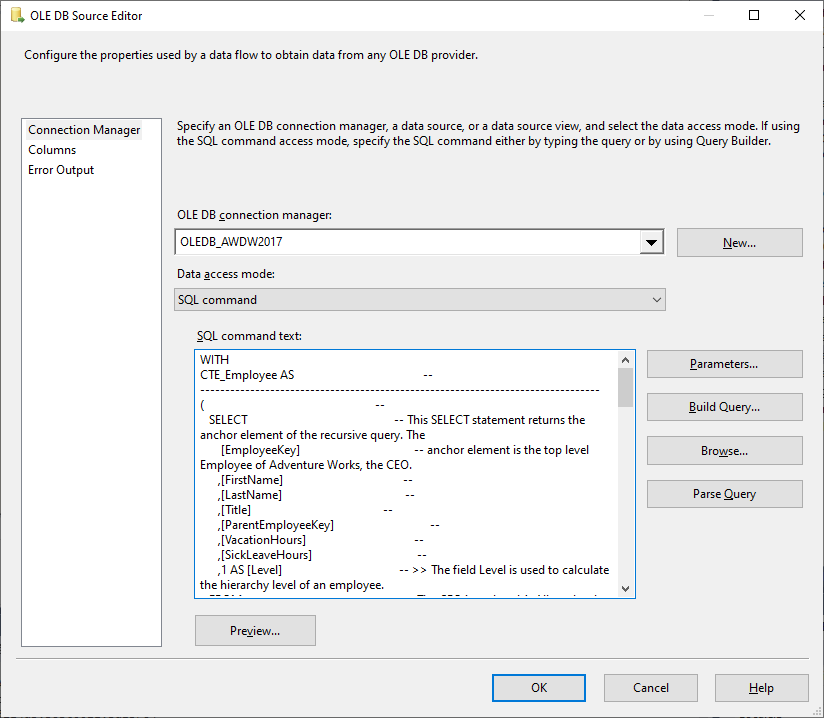
No further transformations are carried out in the data flow.
Solution 3 — Simple SQL in an OLE DB Source
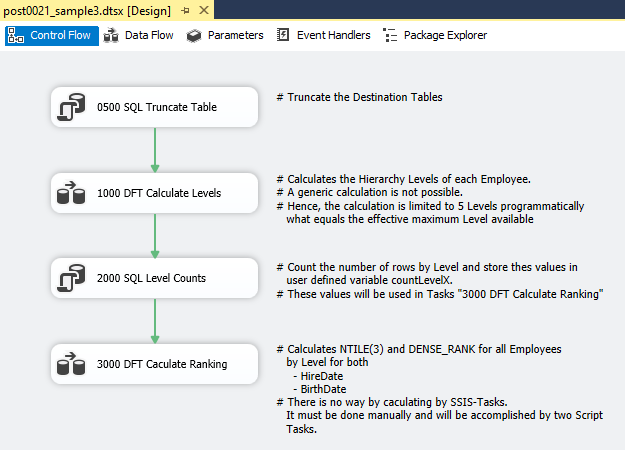
The third solution uses SSIS native building blocks exclusively for computing the hierarchy levels and the ranking. The chosen solution comprises one control flow, two Data Flow Tasks, and two tables. The control flow contains two Execute SQL Tasks and the two Data Flow Tasks with the following responsibilities:
- 0500 SQL Truncate Table. This task truncates the two tables required by the solution:
[dbo].[stg_employee_levels](staging for the computed hierarchy levels) and[dbo].[fct_employee_hierarchy_ranking](target fact table). - 1000 DFT Calculate Levels. This data flow computes the hierarchy level for every employee. The calculation is not generic — it is limited to the five existing hierarchy levels.
- 2000 SQL Level Counts. Computing the ranking via the windowed function
NTILE()requires knowing the number of employees per hierarchy level. This SQL Task runs five SELECT statements to count employees per level and stores the results in dedicated variables. - 3000 DFT Calculate Ranking. The second data flow computes the ranking using Script Tasks and writes the final result to the target table
[dbo].[fct_employee_hierarchy_ranking].
Control Flow
1000 DFT Calculate Levels
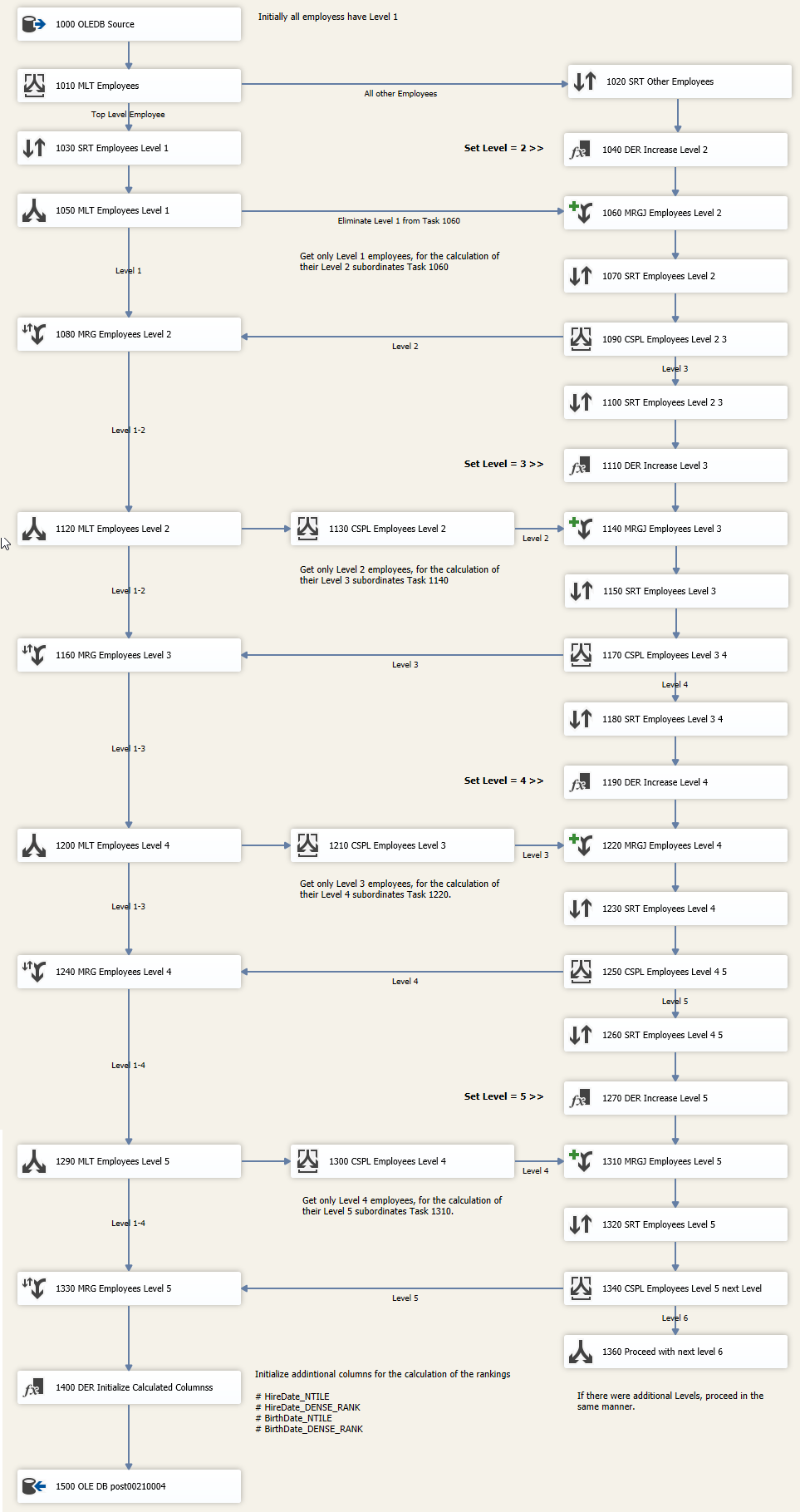
The data source 1000 OLEDB Source holds a simple SQL statement with no further calculations.
![Configuration of the OLE DB Source “1000 OLEDB Source” in Solution 3: a lean SELECT against [DimEmployee] with eight columns and the initialisation [Level] = 1, no window functions and no recursion.](https://sql.marcus-belz.de/wp-content/uploads/2020/05/post00210007.png "post00210007")
3000 DFT Calculate Ranking
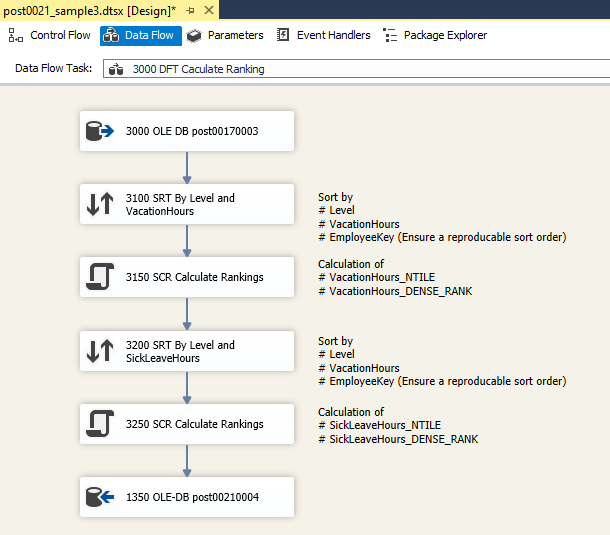
Evaluation
A note up front: what follows is a comparison of experience and design on this exact task, not a general benchmark. The verdicts were formed on a hierarchy/ranking computation on [DimEmployee] and do not transfer unexamined to arbitrary ETL pipelines.
Development time
| Solution 1 | Solution 2 | Solution 3 | Verdict |
|---|---|---|---|
| A few minutes | A few minutes | Several hours | T-SQL clearly ahead |
Complex SQL in a Stored Procedure
As mentioned above, the development had two challenges: determining the hierarchy levels of employees and computing the ranking. T-SQL offers concepts and constructs for both that make implementation straightforward and fast. Hierarchically structured data is easy to query using a recursive Common Table Expression. The windowed functions NTILE() and DENSE_RANK() handle the second challenge in a few lines. The SQL statement was built in just a few minutes.
Complex SQL in an OLE DB Source
The second solution uses the same complex SQL statement as the data source in an OLE DB Source. The SSIS package contains only a single Data Flow Task with two components: a data source and a data destination. No further transformations are needed. The bulk of the effort goes into writing the SQL statement — which, as explained above, is a matter of minutes. The SSIS package itself is built with minimal effort.
Simple SQL in an OLE DB Source
This solution was developed under the constraint that both the hierarchy level calculation and the ranking had to be implemented using SSIS native tasks. The data source is defined by a simple SELECT statement. All further transformations live in components inside the data flow. Unlike T-SQL, there is no single ideal solution path here. This example solution rested on the fallacy that both challenges could be solved in SSIS just as comfortably as in T-SQL. By current knowledge, they cannot. For the non-generic hierarchy-level determination and the ranking calculation, more than 40 components were configured inside the two Data Flow Tasks and linked with complex Precedence Constraints and Merge Join transformations. Development took several hours.
Summary
In this example, the requirements are implemented much faster in T-SQL than in (only) SSIS. Where T-SQL all but dictates the solution path, the SSIS approach had to be designed from scratch. The effort to write the SQL statement was a fraction of what the SSIS solution required.
For database-adjacent, set-based transformations, more SQL shortens development time noticeably, because recursion, joins, and window functions come straight from the database engine. For procedural special-case logic, file access, or API calls, that advantage does not apply.
Readability
| Solution 1 | Solution 2 | Solution 3 | Verdict |
|---|---|---|---|
| Great in SSMS editor | Hard inside the “peephole” of the OLE DB Source | Tedious — 40+ components to inspect | T-SQL clearly ahead |
Complex SQL in a Stored Procedure
The actual SQL INSERT statement of the first solution spans roughly 80 lines when generously structured. With reasonable formatting on top, the chosen solution is quickly grasped. The statement above is easy to read.
Complex SQL in an OLE DB Source
The second solution reuses parts of the SQL statement from the stored procedure [dbo].[sp_insert_employee_hierarchy_ranking] of the first solution. While the statement itself is easy to understand, it is hard to read inside the SQL command text field of the OLE DB Source. The field uses a proportional font, and on top of that it is little more than a peephole. Complex statements are very hard to read through this dialog.
Simple SQL in an OLE DB Source
In the SSIS-based third solution, a simple SQL statement defines the data source. The complexity lives in the 40+ components of the two Data Flow Tasks. While a SQL statement can be read more or less top-to-bottom, reading a complex SSIS package requires significant action: every component must be opened, its configuration inspected. A large part of the logic lives in Precedence Constraints and Merge Join transformations and has to be worked out. Grasping the logic of this solution is considerably more effort than reading the complex SQL statement.
Summary
Well-structured and well-formatted T-SQL statements are vastly more readable than SSIS packages that perform the same task.
The degree of readability also depends on where the SQL statement is stored and in which “editor” the statement is displayed by default. A procedure or statement is highly readable in SQL Server Management Studio, but not in the dialog of the OLE DB Source.
Maintainability
| Solution 1 | Solution 2 | Solution 3 | Verdict |
|---|---|---|---|
| SP diff readable, versionable | SQL hidden in .dtsx | .dtsx diff effectively unreadable | T-SQL clearly ahead; SSIS only wins on provider switches |
Readability
If maintainability is measured by readability, the point clearly goes to T-SQL as well. Both the locations to change and those where new functionality is added can be identified quickly in a SQL script.
Future requirements
Maintainability is fundamentally about future changes — and here a few aspects make a simple assessment harder.
The number of hierarchy levels in the dimension [AdventureWorksDW2017].[DimEmployee] is effectively limited to five. A future change to six levels would mean no additional effort for Solution 1 (complex statement). No matter how deep the hierarchy is structured, T-SQL handles it. Mind the recursion limit: statements with a recursive Common Table Expression default to MAXRECURSION 100. OPTION (MAXRECURSION n) raises the limit up to 32,767, and 0 allows unbounded recursion.
Things look very different when SSIS does most of the heavy lifting. Extending it by additional hierarchy levels means a substantial change to the SSIS package. The extra effort can be substantial when a complex SSIS data flow has to be modified somewhere in the middle — possibly forcing every downstream Data Flow Task to be redeveloped from scratch.
The assessment can flip if the driver for future change is a switch of the database provider. Moving the database management system from, say, SQL Server to Oracle offers no guarantee that the SQL dialect used in your statements is supported on the new platform. In the worst case, a statement cannot be migrated to the new environment, or only with substantial effort. For Solution 3, a platform change means no functional change to the SSIS package, provided the new database provider is supported by SSIS.
Comparing two versions of an artefact
A prerequisite for building maintainable artefacts is versioning them in source control. For every shipped and deployed version of a piece of software or an ETL pipeline, the corresponding code must be identifiable in the repository. In case of a defect, code changes must be traceable in order to identify root causes. Which version introduced the buggy implementation? What changed between versions? Comparing two versions of an artefact usually leads to an answer quickly. The article SSIS vs. SQL: Source Code Management works through the comparability of T-SQL statements and SSIS packages in detail. An XML diff of two .dtsx versions is barely usable because of GUIDs, layout, and metadata churn. From that angle, SSIS packages are very hard to maintain.
Summary
In practice, a large share of transformations ends up as SQL statements inside the OLE DB Source anyway. Hardly anyone wants to rebuild a complex statement that joins multiple tables as an SSIS data flow instead. The effort would be disproportionate, and the performance would likely be considerably worse. From a maintainability standpoint, though, the next question is fair: why does the statement sit inside the OLE DB Source at all? Wouldn’t it be better to encapsulate it in a view, a table-valued function, or a stored procedure? As a database object it can be versioned in an SSDT database project, and changes flow into deployment traceably via Schema Compare.
When weighing SQL against SSIS along maintainability, here too the verdict comes out clearly in favour of SQL.
One small exception: when future changes are driven by infrastructure shifts (a different database provider, a distributed environment, etc.), the trade-offs of both technologies need to be weighed in detail.
Performance
| Solution 1 | Solution 2 | Solution 3 | Verdict |
|---|---|---|---|
| Engine-native, fast | Similar to Solution 1 | Roughly 2× slower | T-SQL for synchronous workloads; SSIS for async/file-heavy |
Many factors influence performance and would need to be taken into account in a robust comparison. For the sake of simplicity, these factors stay out of scope here. The measured execution times therefore support only a tendency: when a transformation can run entirely inside the same database, the SQL implementation is often more efficient, because the relational optimizer can plan the processing and no extra pass through the SSIS pipeline is needed.
A basic example is the simple joining of tables. In SSIS, the inputs of the Merge Join transformation must arrive sorted. A Sort transformation used for that purpose is an asynchronous, blocking step: it has to buffer its entire input before the first row moves on. Compared to a join planned by the SQL optimizer inside the database, that adds cost as a rule.
In the configuration measured here, Solution 3 (SSIS only) ran roughly twice as long as Solution 1 (SQL only). That is a deliberately rough statement. It rests on exactly one comparison under one configuration and does not qualify as a general benchmark.
For completeness it should be mentioned that there are tasks SSIS handles substantially better than a SQL statement.
Summary
For database-adjacent, set-based transformations, a pure SQL implementation is often more efficient than a functionally equivalent SSIS data flow. Whether that holds in a given case has to be measured.
Functionality
| Solution 1 | Solution 2 | Solution 3 | Verdict |
|---|---|---|---|
| Full engine feature set | Same as Solution 1 | Full SSIS flexibility (sources, parallelism) | T-SQL for SQL-solvable tasks; SSIS for non-SQL (Fuzzy, files) |
This article deals with a task that, among other things, strikingly shows how differently the chosen technologies perform. What can be solved with a relatively simple SQL statement here requires a fairly complex approach in SSIS. That does not show SSIS is unfit in general — it shows that recursive hierarchy processing and window-function semantics are not among the strengths of the classic data flow. Nor is this meant as a fundamental plea for T-SQL. There are plenty of requirements that cannot be solved with T-SQL, or at least not as easily. SSIS is far more flexible regarding data sources, parallelisation, file operations, and many other aspects.
Summary
The more durable question is not “SQL or SSIS?” but: which processing belongs in which layer? As rules of thumb from this comparison:
- joins, window functions, recursive hierarchies → SQL
- set-based transformations on data already in the database → SQL
- file and API access, foreign formats → SSIS
- moving data between systems without a linked server → SSIS
- flow control, error handling, notifications → SSIS
Split along these lines and you get lean packages whose SQL stays versionable — while SSIS does the work it is actually good at.
ETL 2026 — how much SQL belongs in an SSIS package today?
The core question of this article is: how much SQL belongs in an ETL pipeline, how much in the engine? In 2026 that is no longer a pure SQL-Server question. The Microsoft stack is one option among others, and the answer “more SQL is better” carries over to all modern stacks. Three perspectives on the tool landscape that shape the maintainability argument today (product states: August 2026).
The Microsoft stack today
The fact first: SQL Server Integration Services remains part of SQL Server 2022 and is supported, in Standard and Enterprise editions alike. Advanced adapters for Oracle, Teradata, SAP BW, and Fuzzy Lookup are Enterprise-only. Mainstream support for SQL Server 2022 runs until 2028, extended support until 2033. Calling it a dead end is premature.
The assessment second: the centre of gravity of product development is visibly no longer on SSIS. Major innovation has shifted to the cloud counterparts: Azure Data Factory and Synapse Pipelines offer the same drag-and-drop paradigms with added cloud-native connectors (Blob Storage, Cosmos DB, Snowflake, Databricks). Anyone migrating an SSIS stack to Azure can keep running existing packages via SSIS Integration Runtime inside ADF — a migration path, not an end-of-life.
The maintainability question from this article comes up there just the same: in ADF/Synapse, too, a Copy Data activity with an embedded SQL statement is more readable than a nested pipeline graph with 20+ Mapping Data Flow steps. The tool changes. The architectural question stays.
The Postgres world
There is no direct SSIS counterpart on the Postgres side — the world there is more open and more SQL-centric. Three building blocks shape the architecture:
Database native tooling. COPY for bulk loads from CSV, text, and binary, INSERT ... ON CONFLICT for upserts, RETURNING for chaining. COPY supports the formats text, csv, and binary. A native FORMAT json does not exist, so JSON is loaded line-wise as text and then converted to jsonb. For the example in this article, a single Postgres statement is enough — recursive CTE, NTILE, and DENSE_RANK have been built-ins since Postgres 8.4:
  1: WITH RECURSIVE cte_employee AS
  2: (
  3:    SELECT
  4:        employee_key         AS employee_key
  5:       ,parent_employee_key  AS parent_employee_key
  6:       ,vacation_hours       AS vacation_hours
  7:       ,sick_leave_hours     AS sick_leave_hours
  8:       ,1                    AS hierarchy_level
  9:    FROM
 10:       public.dim_employee
 11:    WHERE
 12:       parent_employee_key IS NULL
 13:   AND status = 'Current'
 14:
 15:    UNION ALL
 16:
 17:    SELECT
 18:        T01.employee_key
 19:       ,T01.parent_employee_key
 20:       ,T01.vacation_hours
 21:       ,T01.sick_leave_hours
 22:       ,T02.hierarchy_level + 1
 23:    FROM
 24:       public.dim_employee AS T01
 25:       INNER JOIN cte_employee AS T02
 26:       ON
 27:          T01.parent_employee_key = T02.employee_key
 28:    WHERE
 29:       T01.status = 'Current'
 30: )
 31: INSERT INTO public.fct_employee_hierarchy_ranking
 32: SELECT
 33:     employee_key
 34:    ,hierarchy_level
 35:    ,vacation_hours
 36:    ,sick_leave_hours
 37:    ,NTILE(3)     OVER (PARTITION BY hierarchy_level ORDER BY vacation_hours,   employee_key)
 38:    ,DENSE_RANK() OVER (PARTITION BY hierarchy_level ORDER BY vacation_hours)
 39:    ,NTILE(3)     OVER (PARTITION BY hierarchy_level ORDER BY sick_leave_hours, employee_key)
 40:    ,DENSE_RANK() OVER (PARTITION BY hierarchy_level ORDER BY sick_leave_hours)
 41: FROM
 42:    cte_employee;
Same language constructs as in Solution 1, the same single statement, just idiomatic snake_case and no [bracket] quoting.
dbt as the transform layer. dbt (“data build tool”) is SQL-centric: each model is a .sql file holding a SELECT, and the materialisation (table, view, incremental, snapshot) is steered by a config directive. The same statement as a dbt model:
  1: {{ config(materialized = 'table') }}
  2:
  3: WITH RECURSIVE cte_employee AS
  4: (
  5:    SELECT
  6:        employee_key
  7:       ,parent_employee_key
  8:       ,vacation_hours
  9:       ,sick_leave_hours
 10:       ,1                   AS hierarchy_level
 11:    FROM
 12:       {{ ref('dim_employee') }}
 13:    WHERE
 14:       parent_employee_key IS NULL
 15:   AND status = 'Current'
 16:
 17:    UNION ALL
 18:
 19:    SELECT
 20:        e.employee_key
 21:       ,e.parent_employee_key
 22:       ,e.vacation_hours
 23:       ,e.sick_leave_hours
 24:       ,c.hierarchy_level + 1
 25:    FROM
 26:       {{ ref('dim_employee') }} AS e
 27:    INNER JOIN cte_employee AS c
 28:    ON
 29:       e.parent_employee_key = c.employee_key
 30:    WHERE
 31:       e.status = 'Current'
 32: )
 33: SELECT
 34:     employee_key
 35:    ,hierarchy_level
 36:    ,vacation_hours
 37:    ,sick_leave_hours
 38:    ,NTILE(3)     OVER (PARTITION BY hierarchy_level ORDER BY vacation_hours,   employee_key) AS vacation_hours_ntile
 39:    ,DENSE_RANK() OVER (PARTITION BY hierarchy_level ORDER BY vacation_hours)                 AS vacation_hours_dense_rank
 40:    ,NTILE(3)     OVER (PARTITION BY hierarchy_level ORDER BY sick_leave_hours, employee_key) AS sick_leave_hours_ntile
 41:    ,DENSE_RANK() OVER (PARTITION BY hierarchy_level ORDER BY sick_leave_hours)               AS sick_leave_hours_dense_rank
 42: FROM
 43:    cte_employee;
dbt compiles the model and applies the configured materialisation through adapter-specific SQL, for table typically a CREATE TABLE AS SELECT. It creates the database objects for materialisation, builds a DAG over all models from the {{ ref() }} references, and delivers versionable diffs — the same maintainability lever as a stored procedure, just stack-agnostic (Postgres, Snowflake, BigQuery, Redshift, Databricks).
Orchestration. Airflow, Prefect, and Dagster are commonly used to orchestrate dbt and data pipelines. A task there can run arbitrary work, from Python to APIs to Spark. In a SQL-centric architecture, though, the actual transformation stays in the database. The SSIS-typical “data stream flows through the pipeline” semantics is absent from these tools. For classic analytical transformations, set-based processing in the database also simply scales better than row-wise processing in an ETL pipeline.
Talend Open Studio. The closest true SSIS counterpart on the Postgres side used to be Talend Open Studio, likewise drag-and-drop and job-centric. Qlik discontinued the free variant on 31 January 2024, and it is no longer hosted or updated by the vendor. Only community forks with uncertain status remain. For new projects that is no longer a viable path, and existing jobs are migration candidates toward dbt and Airflow.
The question remains: how much SQL?
No matter the stack in use, be it SSIS, ADF, dbt, Airflow, or Talend: the maintainability punchline doesn’t move. The statement belongs in the database when the database can execute it efficiently. The ETL engine should orchestrate where the database can compute. SSIS certainly transforms on its own — the question is not whether it can, but whether it does the job more efficiently than the engine underneath. That is exactly what the modern tools are built around: dbt at its core is “SQL as code”, and ADF Copy Data activities perform best when they delegate the transformation to the SQL engine instead of crunching it inside a Mapping Data Flow.
The article’s original question, “how much SSIS do you really want?”, translates into the modern tool stack as “how much ETL engine do you really want?”. The answer remains: as little as possible, as much as needed.
Take-away
- When the database can execute the statement efficiently, the statement belongs in the database — not in the ETL engine. This is the strategic architectural decision, not a matter of taste.
- A data flow with 40+ components is maintainability debt, not a feature. Every future requirements change will cost more than it has to.
- Version control is a maintainability criterion. Stored-procedure diffs are readable,
.dtsxdiffs are not. Hiding ETL logic in the engine destroys auditability. - The tool question (SSIS, ADF, Talend, dbt, Airflow) is secondary. The split between database engine and ETL pipeline is the decision that matters. The specific tool is an implementation detail.
FAQ
Stored Procedure — almost always. A procedure is visible in the database repository, can be versioned, transferred into a Visual Studio database project via Schema Compare, and edited comfortably in SQL Server Management Studio. The SQL statement in the SQL command text field of the OLE DB Source disappears into the .dtsx package: no syntax highlighting, no sensible diff between versions, no direct access from other applications.
Three common triggers: (1) The pipeline already runs mostly on SQL statements. Then dbt formalises that into a transform layer without touching the SQL substance. (2) The orchestration requirements outgrow SSIS native capabilities (retry logic, backfill, external triggers, parallel scheduling across many pipelines). Then Airflow, Prefect, or Dagster are a better answer than SSIS Sequence Containers. (3) The stack needs to become cloud- and multi-database-ready. SSIS is SQL-Server-centric, dbt and Airflow are dialect-agnostic.
.dtsx package? Pragmatically: you don’t. .dtsx files are XML, but the XML diff is muddied by GUID reorderings and position properties. Workable approaches: (1) BIDS Helper / SSDT diff extension for Visual Studio shows a structural-tree diff instead of an XML diff. (2) Screenshot diff of the Control Flow and Data Flow designers. (3) Accompanying SQL scripts offloaded into stored procedures, so the content diff lives in a versionable SQL script and the .dtsx only handles orchestration. Option 3 is the strategic answer and the actual point of this article.
As a single statement — see the “The Postgres world” section above. A recursive CTE for the hierarchy levels, NTILE and DENSE_RANK as window functions per level, written into a target table via INSERT INTO ... SELECT. Postgres has all three constructs natively. An SSIS-like drag-and-drop layer isn’t needed at all.
As a rule, plain T-SQL, provided the transformation can run entirely inside the same database. The database engine can use the optimizer, parallel plans, and memory-resident operators there, while SSIS moves the data through pipeline buffers in the data flow and adds overhead per transformation. This article deliberately gives no reliable factor: the only comparison measured here comes from a single configuration, and the ratio depends on data volume, transformation type, hardware, and parallelism. SSIS has its strengths where data moves between systems: pipelines that read and write in parallel, transfers between databases without a linked server, file-centric routes (bulk-insert from 50 CSV files with schema detection). Whether that turns into a performance advantage is decided by the concrete pipeline. So the question “SSIS or T-SQL” is less about performance and more about architecture.
Related articles
SSIS-vs.-SQL cluster:
- SSIS vs. SQL — the cluster root with the overarching tool discussion.
- SSIS vs. SQL: Impersonation — sister article on the
EXECUTE ASpattern. - SSIS vs. SQL: Source Code Management — the versioning argument of this article in detail.
ETL context:
- Data quality in an ETL process — data quality building blocks that need to be added to each of the three solutions.
- Design Pattern // Logging an ETL process with T-SQL — a logging pattern that amplifies the
.dtsxdiff advantage of SQL even further.