
A SQL Server Agent job that needs to read a CSV file from a file share fails with Access is denied — the agent’s service account has no permission on that share. Instead of piling ever more rights onto the service account, the job step switches identity: impersonation at runtime, configured in SQL Server Agent through a proxy. One limit remains: plain Transact-SQL Script steps know no proxy and therefore no Windows identity switch. The workaround leads through an SSIS package or a CmdExec step. Whether it holds up is decided by a question that’s easy to overlook: who actually reads the file?
What you’ll take away:
- Which security context a job step without a proxy runs in — service account for proxy-capable steps, job owner for T-SQL steps — and why neither is usually the right fit.
- How to configure the chain
Credential→Proxy→Job step, side-by-side in the SSMS GUI and in T-SQL. - Why plain
Transact-SQL Scriptsteps don’t support a proxy, whyEXECUTE ASis no substitute there — and how to close the gap with an SSIS wrapper orCmdExecrunningsqlcmd.exe, including the question of which process actually reads the file. - What impersonation looks like beyond the on-prem world: Group Managed Service Accounts (gMSA), Azure SQL Managed Instance, Azure Data Factory with managed identity, SQL Server on Linux, container/pod identity.
Prerequisites: SQL Server 2017+ on Windows, SSMS for the GUI configuration, and a login with sufficient rights. CREATE CREDENTIAL requires the server permission ALTER ANY CREDENTIAL; creating and granting a proxy through sp_add_proxy and sp_grant_login_to_proxy is reserved for the sysadmin server role by default. EXECUTE on these msdb procedures can be delegated, but those grants may be reset during a SQL Server upgrade.
Contents
- Overview
- The service-account problem
- The solution: credential + proxy user
- Step by step: configuration
- Dead end:
Transact-SQL Scriptstep has noRun As - Impersonation beyond the on-prem agent
- Take-away
- FAQ
- Related articles
Overview
SQL Server Integration Services (SSIS) is a powerful toolset for building ETL pipelines. There are plenty of good reasons to use SSIS, and plenty against. Within the Microsoft stack, the alternative for complex ETL pipelines is essentially Transact-SQL (T-SQL).
This article belongs to a series of articles on the important decision criteria for choosing between SSIS and T-SQL.
When a SQL Server Agent job starts, a step without a configured proxy runs by default in the security context of the service account of the SQL Server Agent. The exception is the Transact-SQL Script step: it runs in the SQL security context of the job owner, effectively unrestricted for sysadmin owners (more on that below). The service account itself is set during setup — either as an explicit domain or machine account, or as the local system account NT AUTHORITY\System.
Whichever account is chosen, it ends up with a fixed set of permissions that rarely fit every job. The local system account NT AUTHORITY\System has extensive rights on local resources and is a member of the Windows group Administrators. On network access, however, it appears as the machine’s computer account (DOMAIN\MACHINE$) — and a file share, a foreign instance or a cross-domain resource granting access to precisely that computer account is the exception, not the rule.
Following the need-to-know principle — every account gets exactly the rights it needs for its task, nothing more and nothing less — a job step should run under a dedicated account whose permissions match the actual task. Since a typical SQL Server Agent hosts dozens of jobs with very different requirements, a single service account can never satisfy all of them at once.
Microsoft’s answer is impersonation (in German Identitätswechsel) at runtime. Concretely: a single job step can run under a different login than the service account by assigning a proxy user (a SQL Server Agent Proxy in Microsoft’s wording).
The service-account problem
The friction becomes tangible as soon as a job step needs to access resources outside the SQL Server instance:
- A file share holding CSV or Excel source files, where the service account has no permission.
- Data sources on other SQL Server instances where the service account has no login.
- Domain resources (LDAP queries, Active Directory lookups) that only a dedicated service account is authorized for.
- Cloud endpoints (storage accounts, external APIs) that demand a different auth token than the one the service account can provide.
The naive fix would be to give the service account more permissions. That doesn’t scale: every additional grant enlarges the attack surface and mixes the rights of different job worlds. As soon as one job is allowed to read only and another is supposed to write and delete, the requirements collide.
The solution: credential + proxy user
Microsoft splits the identity configuration into two objects:
Credential— an instance-level object (in the SSMS pathSecurity→Credentials) that encapsulates a Windows identity (a domain account, a local account) together with its secret. The credential lives on the server, not on the agent.Proxy— an agent-level object (in the SSMS pathSQL Server Agent→Proxies→<subsystem>, for exampleSSIS Package Execution) that links a credential to a specific subsystem and exposes that link to job steps.
In the Run As field of the job step, the proxy replaces the service account. As soon as the step starts, the agent switches internally to the Windows identity stored in the credential and runs the step in that identity’s security context.
Step by step: configuration
The configuration takes three steps, shown below in both variants, through the SSMS GUI and through T-SQL. Either path leads to the same final state. Which variant fits better depends on whether the setup is a one-off manual operation or has to live reproducibly in a script.
Step 1 — Create the credential
In the SSMS Object Explorer, navigate to Security → Credentials and pick New Credential… from the right-click menu. The dialog asks for a credential name, an identity (typically a domain account in the form DOMAIN\account) and the matching password.
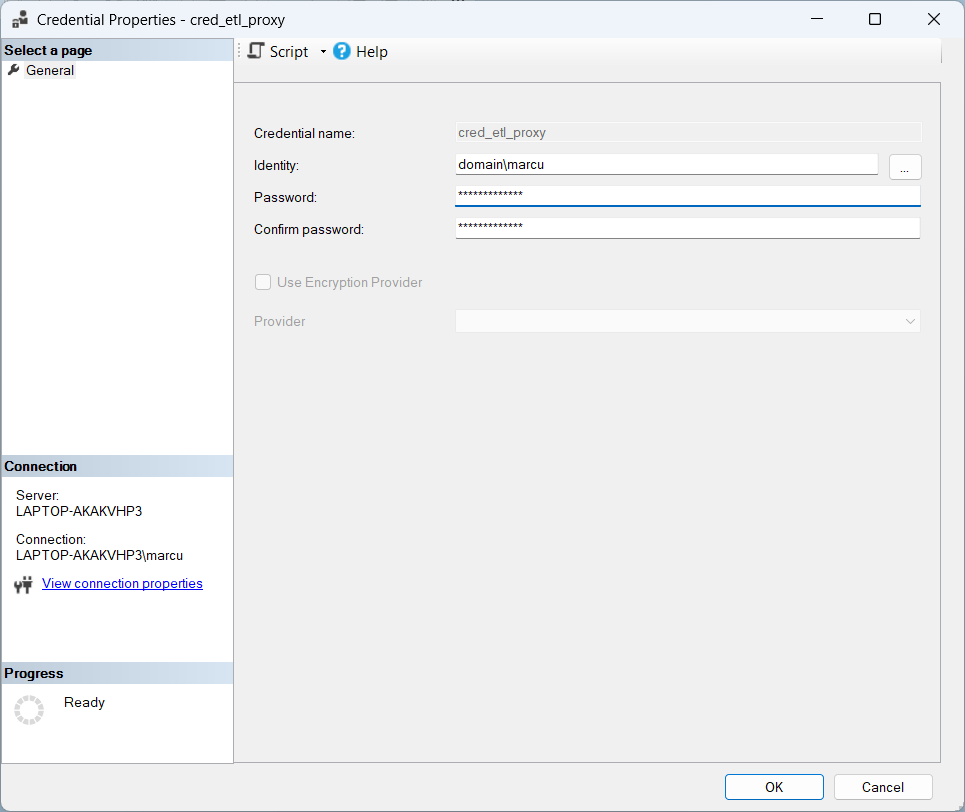
Programmatically:
  1: USE [master];
  2: GO
  3:
  4: CREATE CREDENTIAL [cred_etl_proxy]
  5: WITH
  6:     IDENTITY = N'DOMAIN\svc_etl_proxy'
  7:    ,SECRET   = N'<password>';
  8: GO
The <password> is just a placeholder — a hard-coded clear-text password in the script is a clear anti-pattern in production. In a real setup the secret is loaded from a safer source at deployment time, such as Azure Key Vault or an encrypted configuration file. The file holding the clear-text never ends up in the repository. One thing the credential always needs, though, is a password: accounts without a retrievable password (such as gMSAs, see below) can’t be stored here.
Step 2 — Create the proxy user
The corresponding GUI path in SSMS goes through SQL Server Agent → Proxies → SSIS Package Execution and a right-click on New Proxy…. The dialog takes the proxy name, the associated credential and the subsystem (SSIS Package Execution). Under “Principals” it additionally captures which logins are allowed to pick the proxy when configuring a job step in the first place.
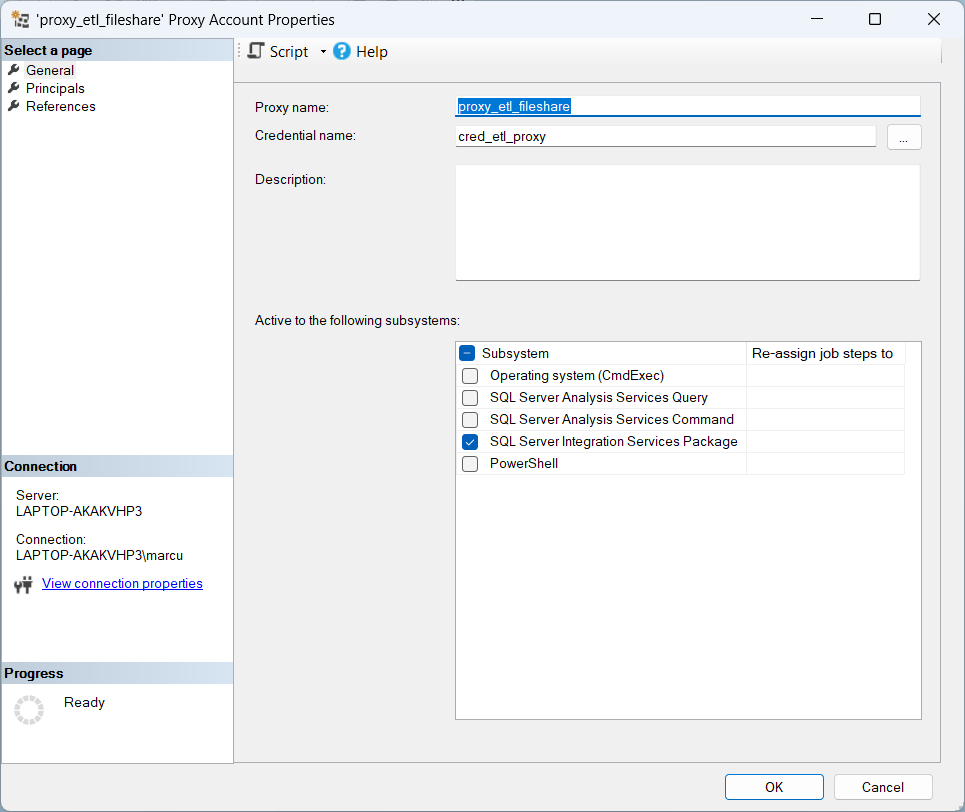
Programmatically:
  1: USE [msdb];
  2: GO
  3:
  4: -- Create the proxy
  5: EXEC dbo.sp_add_proxy
  6:     @proxy_name      = N'proxy_etl_fileshare'
  7:    ,@credential_name = N'cred_etl_proxy'
  8:    ,@enabled         = 1;
  9: GO
 10:
 11: -- Grant the proxy to the SSIS subsystem (ID 11 — SSMS scripts the ID)
 12: EXEC dbo.sp_grant_proxy_to_subsystem
 13:     @proxy_name   = N'proxy_etl_fileshare'
 14:    ,@subsystem_id = 11;
 15: GO
 16:
 17: -- Allow a login to pick the proxy when configuring a job step
 18: EXEC dbo.sp_grant_login_to_proxy
 19:     @proxy_name = N'proxy_etl_fileshare'
 20:    ,@login_name = N'DOMAIN\bi_developer';
 21: GO
One stumbling block hides in the subsystem parameter: the subsystem names are not documented consistently across the agent procedures. sp_add_jobstep documents the value SSIS for SSIS steps, while sp_grant_proxy_to_subsystem documents the historical name Dts. The script above therefore follows the route SSMS itself takes when scripting a proxy — the documented numeric @subsystem_id (11 for SSIS packages). To be safe, check the value pair on your own instance first: SELECT subsystem_id, subsystem FROM msdb.dbo.syssubsystems;.
A proxy should always be granted only to the subsystems it actually needs. A blanket grant across all subsystems enlarges the attack surface unnecessarily and contradicts the need-to-know principle.
Step 3 — Point the job step at the proxy
In the job step editor (reachable through SQL Server Agent → Jobs → <job_name> → Steps → <step_name> → Edit…) the Run As dropdown is changed from the default entry SQL Server Agent Service Account to the newly created proxy.
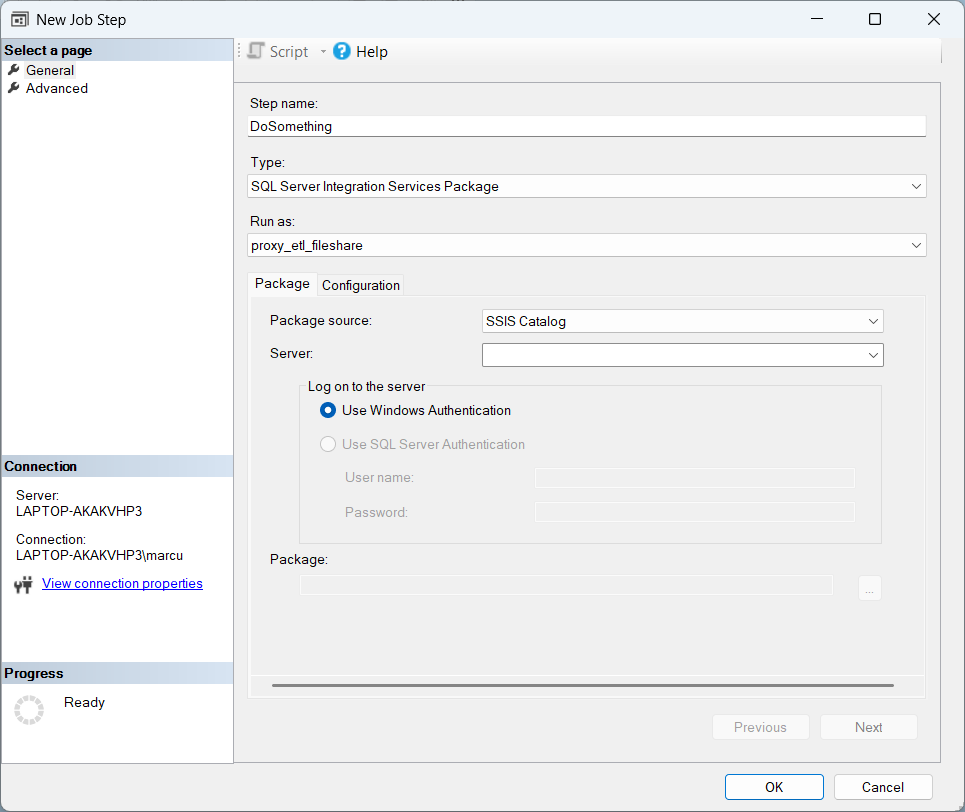
Programmatically:
  1: USE [msdb];
  2: GO
  3:
  4: EXEC dbo.sp_update_jobstep
  5:     @job_name   = N'job_etl_load_daily'
  6:    ,@step_id    = 1
  7:    ,@proxy_name = N'proxy_etl_fileshare';
  8: GO
On the next job run the agent executes this step no longer under the service account but in the security context of the Windows identity stored in the credential, DOMAIN\svc_etl_proxy.
Dead end: Transact-SQL Script step has no Run As
The Run As property is not available for every step type, however. Which subsystems allow the configuration and which don’t is summarised in the table below:
| Step type (subsystem name) | Run As (proxy) supported? |
|---|---|
SQL Server Integration Services Package (SSIS) | ✓ |
PowerShell (PowerShell) | ✓ |
Operating System / CmdExec (CmdExec) | ✓ |
Analysis Services Command/Query (ANALYSISCOMMAND / ANALYSISQUERY) | ✓ |
Replication subsystems (Distribution, Merge, QueueReader, Snapshot, LogReader) | ✓ |
Transact-SQL Script (TSQL) | ✗ |
The subsystem names in the table follow the vocabulary of sp_add_jobstep — for the proxy grant, the naming deviation from step 2 applies (Dts there, or the @subsystem_id).
Transact-SQL Script steps run without any proxy mechanics at all: they execute directly inside the database engine, in the SQL security context of the job owner, not the service account. If the owner is sysadmin, the step runs unrestricted and can be scoped down to a different database user through the @database_user_name parameter. What this subsystem lacks is the proxy assignment — and with it the switch to a different Windows identity.
EXECUTE AS is not an agent proxy
The objection suggests itself: T-SQL does have EXECUTE AS LOGIN = '…' — isn’t that the same identity switch? No, these are two different layers. EXECUTE AS (like @database_user_name) switches the SQL security context inside the instance: permissions on tables, procedures, databases. The Windows token of the process remains untouched. For the opening scenario with the CSV file on the file share the service account can’t read, EXECUTE AS therefore doesn’t help. A pure T-SQL pipeline built from stored procedures and scripts cannot be impersonated at the Windows level this way.
In practice, two workarounds have established themselves for this gap:
Workaround 1: SSIS package as a wrapper. TThe actual T-SQL stays in stored procedures, and the SSIS package only contains one or a few Execute SQL Task containers that call those stored procedures. The job step is back to type SSIS Package Execution and supports Run As. How far the wrapper carries, though, depends on which process actually reads the external resource — more on that in a moment. The reasoning and the diff pragmatics behind this approach are deepened in the companion article SSIS vs. SQL: Readability and Maintainability.
Workaround 2: CmdExec step with sqlcmd.exe. Here the step is of type Operating System (CmdExec) (subsystem name CmdExec) and therefore also supports Run As. What gets executed is sqlcmd.exe with the T-SQL script as a parameter:
sqlcmd.exe -E -S server\instance -d database -i path\to\script.sql
Caveats:
-Erequires Windows authentication against the SQL Server, using the identity of the proxy credential. That works as soon as the credential wraps a Windows account.-U <login>-P <password>is the SQL-authentication variant. A clear-text password in the step command line is a production anti-pattern.- Logging is reduced to the step output (
stdout/stderr). The rich SSIS-style ETL logging trails (execution log tables, SSISDB reports) are gone.
Who reads the file — step process or engine?
Both workarounds share the same subtlety that decides whether they hold up in practice: the proxy switches the Windows identity of the step process, not of the database engine. If the SSIS package reads the CSV file itself (a Flat File Source in the data flow), the SSIS process accesses the share under the proxy identity — the wrapper holds. If the step merely calls a stored procedure that loads the file via BULK INSERT or OPENROWSET(BULK …), it’s the SQL Server engine that reads the file, and the engine keeps running under its own service account.
The case isn’t entirely lost. If the step connects through Windows authentication, the engine impersonates the caller — the proxy identity — for the file access. For UNC paths on a third machine, however, that’s the classic double hop, which only works with Kerberos delegation configured (the Microsoft docs cover this under “security account delegation,” including error 4861). Anyone unwilling to go there moves the file access to where the proxy acts directly: into the step process.
| Scenario | Who reads the file? | Does the proxy help? |
|---|---|---|
| SSIS data flow reads CSV (Flat File Source) | SSIS process | ✓ directly |
CmdExec runs bcp.exe | bcp.exe (client) | ✓ directly |
PowerShell step reads a file | PowerShell process | ✓ directly |
SSIS Execute SQL Task calls an SP with BULK INSERT | SQL Server engine | ⚠️ only with Windows auth + Kerberos delegation |
sqlcmd script with BULK INSERT | SQL Server engine | ⚠️ only with Windows auth + Kerberos delegation |
Whoever doesn’t want to give up the comfort of the SSIS logging world is much better off with workaround 1. sqlcmd is the right choice when the setup is supposed to run without an SSIS stack anyway.
Impersonation beyond the on-prem agent
The proxy concept dates back to SQL Server 2005, which introduced credentials and agent proxies, and fits the classic on-prem stack with a Windows domain. In a 2026 setup the auth landscape looks rather different:
- Group Managed Service Accounts (gMSA). Since Windows Server 2012 Microsoft recommends gMSAs as the modern replacement for statically configured service accounts: automatic password rotation, no clear-text storage, bound to computer or service accounts. The place to use one is the agent service account itself — with SQL Server Agent running as a gMSA, every step without a proxy runs under an identity that has no static password. As a proxy credential, on the other hand, a gMSA does not work: a credential requires a stored secret, and a gMSA’s password is managed by Active Directory and cannot be retrieved. Windows Server 2025 adds delegated Managed Service Accounts (dMSA) to the picture: a hardened variant for individual services bound to a specific machine, additionally protected against pass-the-hash and pass-the-ticket attacks. dMSA isn’t a gMSA replacement but a second tool in the same toolbox.
- Azure SQL Managed Instance. Ships a SQL Server Agent with a reduced feature set — proxies are not supported in MI. Identity bridges for SSIS packages or external resource access run instead through the managed identity of the MI itself or through an Azure Data Factory integration with its own managed identity. PowerShell and CmdExec steps remain available. Analysis Services, Merge Replication and Queue Reader are missing.
- Azure Data Factory. Replaces classic agent jobs with triggers and activities. Instead of a proxy user with a credential, the factory is assigned a system-assigned or user-assigned managed identity, which is then authorised in target systems (storage, SQL, Key Vault) as an identity. No more static secret, no separate proxy configuration. Microsoft positions Data Factory in Microsoft Fabric as the successor platform. Azure Synapse Pipelines remain technically available but are strategically being folded into Fabric.
- SQL Server on Linux. Supports SQL Server Agent, but the proxy concept for Windows authentication doesn’t carry over one-to-one — Linux auth against file shares typically runs through the OS mount (CIFS, NFS) rather than through the agent proxy.
- Containerized SQL Server (Docker, Kubernetes). The service-account model shifts onto pod identity / workload identity. The classic proxy stack loses ground there.
The same point runs through all variants: anyone setting up a new system today reaches for managed identity or a gMSA service account rather than for a static domain account with a password. Existing on-prem setups keep living with proxy and credential — but at the next service-account refresh it’s worth asking whether a gMSA as the agent account would simplify the setup noticeably.
Take-away
- A proxy separates the security contexts as soon as a job step needs resources the service account has no rights to — and shouldn’t be given any. Piling ever more rights onto the service account doesn’t scale and enlarges the attack surface.
Credential+Proxyis the classic on-prem pattern, applied in three steps: first the credential in theSecuritytree, then the proxy in theSQL Server Agenttree per subsystem in use, and finally the job step that’s switched over to that proxy.Transact-SQL Scriptsteps remain the gap, because they don’t support a proxy —EXECUTE ASonly switches the SQL context, not the Windows identity. Whoever needs Windows impersonation there falls back either onto an SSIS package as a wrapper or onto aCmdExecstep withsqlcmd.exe. In both cases the proxy acts on the step process — engine-side file access (BULK INSERT) additionally needs Kerberos delegation.- In the 2026 world, managed identity (in Azure) and gMSA as a service account (on-prem) increasingly take over the role of the classic domain account with a password. New setups start straight there. Existing systems can prepare the move step by step.
FAQ
Transact-SQL Script step support Run As? The TSQL subsystem runs the script directly inside the database engine, not through a separate worker process the way SSIS, PowerShell or CmdExec do. There simply is no OS process the agent could hand a different Windows identity to. The SQL security context is still controllable: the step runs as the job owner, and sysadmin owners can set a different database context through @database_user_name or EXECUTE AS. That’s SQL impersonation, though, not Windows impersonation — it doesn’t help with file shares or other external resources.
Yes, that’s even the default. With Run As set to SQL Server Agent Service Account, the step starts without an identity switch and runs in the service-account context. That works fine as long as the service account holds all the permissions involved. As soon as it doesn’t, typically for file-share access or cross-instance sources, the proxy enters the picture.
As many as necessary, as few as possible — typically one per job world with its own resource profile. A common split is: one proxy for ETL loads with file-share access, one for cross-instance sources, and a third for cloud storage. Each proxy is granted only to the subsystems it actually uses. Collector proxies covering every subsystem run against the need-to-know principle.
The credential lives at instance level and encapsulates a Windows identity (a domain account, a local account) together with its secret. It is the identity source. The proxy lives at agent level and links exactly one credential to one or more subsystems (SSIS, PowerShell, CmdExec, …). It additionally controls which SQL logins are allowed to pick the proxy when configuring a job step. A single credential can be reused across multiple proxies, for example one proxy for SSIS and another for PowerShell, both backed by the same identity.
Unlike on-prem: the agent in Managed Instance doesn’t support proxies. Anyone needing job steps to run under a different identity in MI goes through the managed identity of the MI itself or through an Azure Data Factory integration with its own managed identity — the target system in question (storage, SQL, Key Vault) is then authorised against that identity. The classic Credential + Proxy configuration described in this article doesn’t apply there. For pure Azure-native pipelines, Azure Data Factory is the strategic choice anyway, because managed identity hangs directly on the triggers/activities model there.
CmdExec step with sqlcmd.exe instead of an SSIS wrapper? The CmdExec workaround is legitimate and sometimes exactly the right call, especially when the stack is supposed to run without SSIS anyway. Three reasons usually argue for the SSIS wrapper, though. First, the logging is richer, because SSISDB reports and execution log tables offer more than stdout and stderr. Second, the auth bridge runs cleanly through Windows auth (-E) against the proxy credential, whereas the SQL-auth variant with -U and -P brings the clear-text password problem back. And third, an SSIS wrapper can be extended later with pre-/post-tasks or conditional branching, without having to reshape the step configuration inside the agent.
The configuration has to stay particularly clean in three spots. First, the credential secret should not be maintained as a clear-text password. The alternatives are Azure Key Vault or an encrypted configuration file. A gMSA is no option as the credential identity anyway, because its password cannot be retrieved. The T-SQL example in step 1 above only carries the clear-text as a placeholder. Second, subsystem permissions are granted granularly. A proxy is only opened to the subsystems it actually needs. A blanket grant across all subsystems enlarges the attack surface unnecessarily. And third, a dedicated audit trail pays off. For credentials, SQL Server Audit covers the ground with the action group SERVER_OBJECT_CHANGE_GROUP, which captures CREATE/ALTER/DROP on server objects. Proxy changes, by contrast, are no DDL operations but calls to the msdb procedures — they don’t show up in any DDL audit group. What remains is checking against the msdb tables (sysproxies, sysproxysubsystem, sysproxylogin) or auditing the procedure calls themselves.
Related articles
SSIS-vs.-SQL cluster:
- SSIS vs. SQL — the cluster root with the overarching tool discussion.
- SSIS vs. SQL: Readability and Maintainability — the maintainability companion to the SSIS-wrapper workaround in this article.
- SSIS vs. SQL: Source Code Management — the diff pragmatics of the SSIS wrapper (why a thin
.dtsxwith offloaded SQL substance is the best of both worlds).
ETL context:
- Data quality in an ETL process — data-quality building blocks that need to run alongside every ETL pipeline.
- Design Pattern // Logging an ETL process with T-SQL — a logging pattern that complements the Run-As setup.