
An SSIS package fails, and the execution log is supposed to point to the cause. Instead it presents a tree in which the tasks do not appear in the order they ran, but alphabetically by name. For complex packages that log becomes plainly unreadable. The good news is that a well-considered naming convention makes it readable again, purely through the way tasks are named.
The essentials up front:
- The problem: SSIS logs tasks alphabetically by task name per container, not in execution order — evidenced by screenshots from Visual Studio 2017, in the Progress tab as well as in the Integration Services Catalog reports (see the version note below).
- Numbering as a prefix makes the intended execution order visible in the log.
- A type prefix (
DFT,SQL,SCR, …) makes the task type recognizable in a purely textual log. - A meaningful name plus the overall syntax
XXXX [YYYY] ZZZ Namemakes every task name unique and self-explanatory. - SSIS today runs on the VS 2022/2026 extension. The convention remains valid, and its principle carries over to modern ETL tools (Azure Data Factory, Fabric, dbt, Airflow).
Prerequisite: an SSIS project in Visual Studio (with the SQL Server Integration Services Projects extension). The screenshots are from Visual Studio 2017. The convention itself is not tied to a particular SSIS version. The statements about the logging behaviour refer to that tested state (see the version note).
Contents
- Why SSIS Tasks Need a Naming Convention
- Numbering Tasks According to Their Execution Order
- Use a Prefix for Each Task Type
- Task Names
- Naming Convention
- SSIS Today: Tooling Update and Context
- Conclusion
- FAQ
Why SSIS Tasks Need a Naming Convention
Naming conventions are worth having only when they pay off in daily work. Usually the argument runs through the readability and maintainability of code. With SQL Server Integration Services (SSIS), another aspect comes into play: the way the execution of a package is logged in the Execution Results and Progress tab in Visual Studio. That execution is logged as a tree. For complex packages with child packages, For Each Loop containers, Sequence containers and the like, the tree quickly grows long and deep. Following the execution order of the tasks in it is hard, and so is identifying the cause quickly when something fails.
The reason for that is neither the complexity of a package nor its nesting depth. In the environment tested here (Visual Studio 2017), SSIS did not display the executed tasks in the order they ran. Instead it arranged them alphabetically by task name within each container. (For how this relates to Microsoft’s current documentation, see the version note in the section “SSIS Today”.)
The screenshot below shows a supposedly clear control flow after a run in Visual Studio 2017:

Worth noting here:
- The Sequence Containers are named so that the container with the suffix 2 runs before the container with the suffix 1.
- Inside the Sequence Containers, the Control Flow Tasks are named so that the tasks with the prefix 2 run before those with the prefix 1.
- Between the two Sequence Containers, three Script Tasks run whose prefixes C, B and A contradict their execution order.
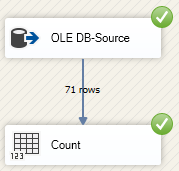
Both data flows contain identical Data Flow Tasks. They are named so that they run against the alphabetical order of their task names. OLE-DB Source runs first, Count only afterwards.
In the Progress tab of the executed package, the Control Flow and Data Flow Tasks were logged not in the order they actually ran, but in the alphabetical order of the task names within each container:
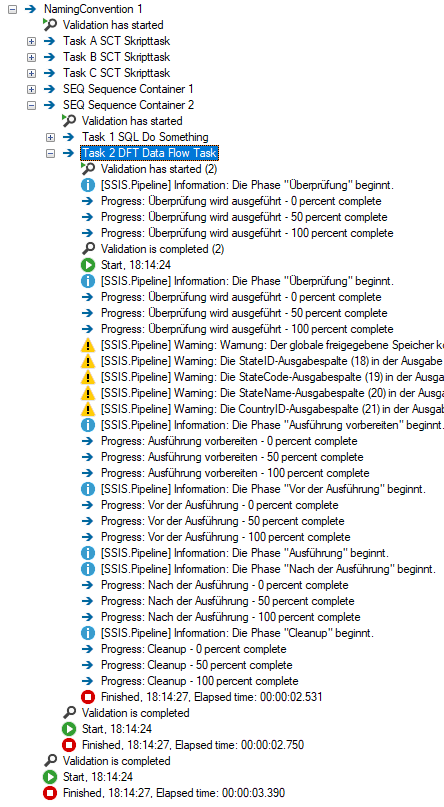
For large and complex transformation processes, matching a log entry to the actual sequence of execution becomes needlessly hard. The screenshots so far cover the development of SSIS packages. What about running SSIS solutions in production, once they are deployed to the Integration Services Catalog? The execution log of a deployed package can be opened through the standard reports
right-click on project/package > Reports | Standard Reports | All Executions
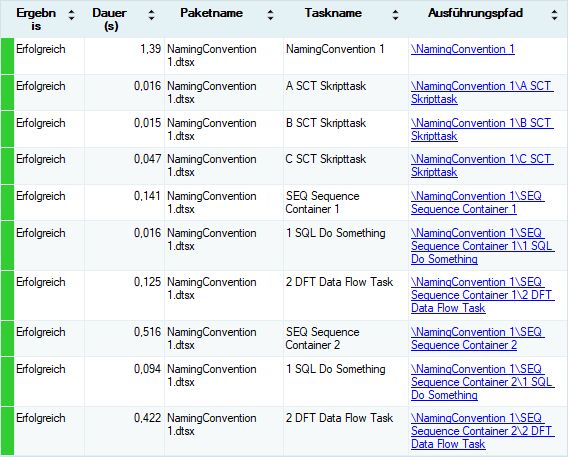
And in the same tested state, this standard report also showed the executed tasks out of their actual order (the screenshot below is the evidence). The underlying SSISDB does store start and end times for every executed element, so a query of one’s own could reconstruct the real sequence. The standard presentation simply did not make it directly readable:
That calls for a way of naming tasks that makes the log follow the order of execution. Three widely used building blocks improve the readability of a package at design time as well as the readability of its log at run time:
- Number every task according to its execution order
- Use a prefix for each task type
- Give every task a name that says what it does
Numbering Tasks According to Their Execution Order
For the numbering, Control Flow Tasks and Data Flow Tasks need to be treated separately.
Control Flow Tasks
Every task should carry an ascending number as a prefix that matches the execution order. Where branches run in parallel there is no single linear order, and the numbering then reflects the sequence as it was modelled. A four-digit range (numbers up to 9999) with leading zeros for smaller values has proven practical. The numbering should leave gaps, so that a changed order can take new numbers without renaming all the tasks that follow. Numbering tasks does take effort. Experience from multi-developer projects shows that the convention is widely accepted and pays off.
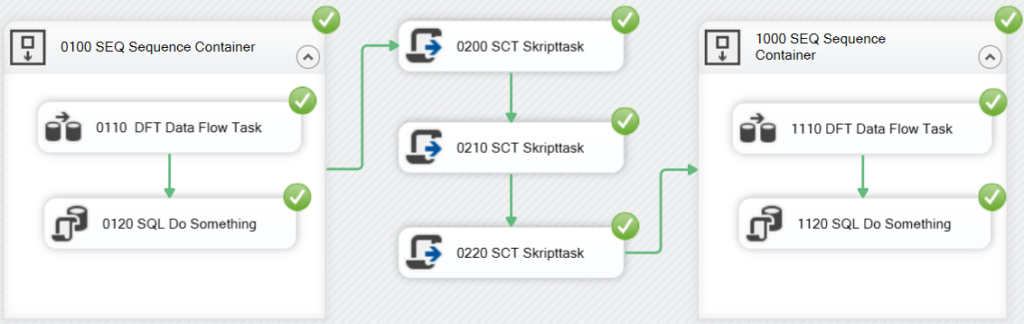
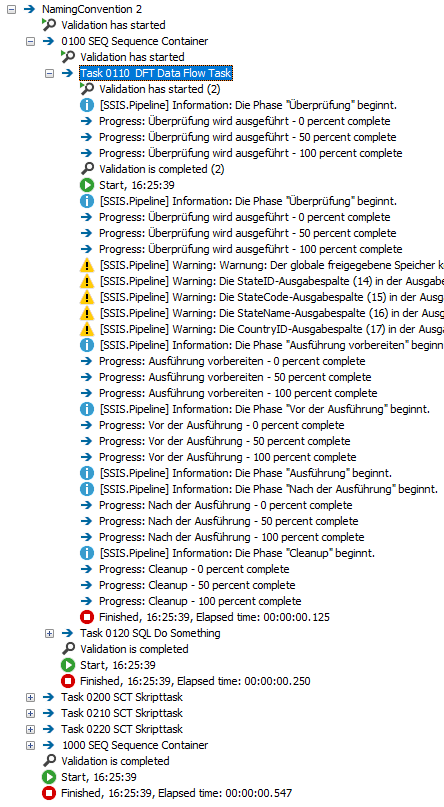
The execution log below now lists the tasks in the order they ran, which makes it far more readable than the first version:
Data Flow Tasks
In the Progress and Catalog context looked at here, the data flow itself is logged as a task. Its individual components do not appear there as separate task entries. Naming them is therefore less about sorting than about identifying them unambiguously when something fails. It is worth carrying the scheme described above into data flows as well, and extending it a little:
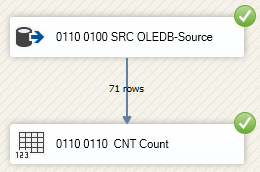
The first Data Flow Task to run carries the number 0110 as its prefix. Every task inside that data flow keeps this prefix and adds a second number of its own, which makes each of them uniquely identifiable. Every Data Flow Task name therefore starts with two numbers.
- Control flow number
- Data flow number
When something goes wrong, the log names the Data Flow Task that caused the error. Unique numbers make that task easy to pin down, and above all quick to find:

Use a Prefix for Each Task Type
In Visual Studio every task type has its own pictogram. The size available for those icons limits how much a stylised image can convey. On top of that, a pictogram is a visual device, and the execution log has none. Telling the tasks apart in the Execution Results and Progress tab therefore calls for a prefix that identifies the type of the task.
To improve readability, it has proven useful to prefix task names with an abbreviation that depends on the task type:
DFTfor Data Flow TaskSCRfor Script TaskSQLfor Execute SQL Task- …
The internet holds a number of suggestions for such prefixes. The two lists below show the prefix convention that has proven itself in the projects behind this article, an example convention rather than a current reference catalogue. They reflect the component landscape of the time they were written: the Azure components require the Azure Feature Pack, the SQL Server Compact Destination is no longer supported in current Visual Studio versions, and the KingswaySoft entries are third-party components (see the “Supplier” column).
Prefixes for Control Flow Tasks
| Task | Prefix |
|---|---|
| Back Up Database Task | BACKUP |
| CDC Control Task | CDC |
| Check Database Integrity Task | CHECKDB |
| Data Profiling Task | DPT |
| Execute SQL Server Agent Job Task | AGENT |
| Execute T-SQL Statement Task | TSQL |
| History Cleanup Task | HISTCT |
| Maintenance Cleanup Task | MAINCT |
| Notify Operator Task | NOT |
| Rebuild Index Task | REBIT |
| Reorganize Index Task | REOIT |
| Shrink Database Task | SHRINKDB |
| Update Statistics Task | STAT |
| For Loop Container | FLC |
| Foreach Loop Container | FELC |
| Sequence Container | SEQC |
| ActiveX Script | AXS |
| Analysis Services Execute DDL Task | ASE |
| Analysis Services Processing Task | ASP |
| Bulk Insert Task | BLK |
| Data Flow Task | DFT |
| Data Mining Query Task | DMQ |
| Execute Package Task | EPT |
| Execute Process Task | EPR |
| Execute SQL Task | SQL |
| Expression Task | EXPR |
| File System Task | FSYS |
| FTP Task | FTP |
| Message Queue Task | MSMQ |
| Script Task | SCR |
| Send Mail Task | SMT |
| Transfer Database Task | TDB |
| Transfer Error Messages Task | TEM |
| Transfer Jobs Task | TJT |
| Transfer Logins Task | TLT |
| Transfer Master Stored Procedures Task | TSP |
| Transfer SQL Server Objects Task | TSO |
| Web Service Task | WST |
| WMI Data Reader Task | WMID |
| WMI Event Watcher Task | WMIE |
| XML Task | XML |
Prefixes for Data Flow Tasks
| Task | Prefix | Type | Supplier |
|---|---|---|---|
| ADO NET Source | ADO_SRC | Source | |
| Azure Blob Source | AB_SRC | Source | |
| CDC Source | CDC_SRC | Source | |
| DataReader Source | DR_SRC | Source | |
| Excel Source | EX_SRC | Source | |
| Flat File Source | FF_SRC | Source | |
| HDFS File Source | HDFS_SRC | Source | |
| OData Source | ODATA_SRC | Source | |
| ODBC Source | ODBC_SRC | Source | |
| OLE DB Source | OLE_SRC | Source | |
| Raw File Source | RF_SRC | Source | |
| SharePoint List Source | SPL_SRC | Source | |
| XML Source | XML_SRC | Source | |
| Aggregate | AGG | Transformation | |
| Audit | AUD | Transformation | |
| Balanced Data Distributor | BDD | Transformation | |
| Cache Transform | CCH | Transformation | |
| CDC Splitter | CDCS | Transformation | |
| Character Map | CHM | Transformation | |
| Conditional Split | CSPL | Transformation | |
| Copy Column | CPYC | Transformation | |
| Data Conversion | DCNV | Transformation | |
| Data Mining Query | DMQ | Transformation | |
| Derived Column | DER | Transformation | |
| DQS Cleansing | DQSC | Transformation | |
| Export Column | EXPC | Transformation | |
| Fuzzy Grouping | FZG | Transformation | |
| Fuzzy Lookup | FZL | Transformation | |
| Import Column | IMPC | Transformation | |
| Lookup | LKP | Transformation | |
| Merge | MRG | Transformation | |
| Merge Join | MRGJ | Transformation | |
| Multicast | MLT | Transformation | |
| OLE DB Command | CMD | Transformation | |
| Percentage Sampling | PSMP | Transformation | |
| Pivot | PVT | Transformation | |
| Row Count | CNT | Transformation | |
| Row Sampling | RSMP | Transformation | |
| Script Component | SCR | Transformation | |
| Slowly Changing Dimension | SCD | Transformation | |
| Sort | SRT | Transformation | |
| Term Extraction | TEX | Transformation | |
| Term Lookup | TEL | Transformation | |
| Union All | ALL | Transformation | |
| Unpivot | UPVT | Transformation | |
| ADO NET Destination | ADO_DST | Destination | |
| Azure Blob Destination | AB_DST | Destination | |
| Data Mining Model Training | DMMT_DST | Destination | |
| Data Streaming Destination | DS_DST | Destination | |
| DataReaderDest | DR_DST | Destination | |
| Dimension Processing | DP_DST | Destination | |
| Excel Destination | EX_DST | Destination | |
| Flat File Destination | FF_DST | Destination | |
| HDFS File Destination | HDFS_DST | Destination | |
| ODBC Destination | ODBC_DST | Destination | |
| OLE DB Destination | OLE_DST | Destination | |
| Partition Processing | PP_DST | Destination | |
| Raw File Destination | RF_DST | Destination | |
| Recordset Destination | RS_DST | Destination | |
| SharePoint List Destination | SPL_DST | Destination | |
| SQL Server Compact Destination | SSC_DST | Destination | |
| SQL Server Destination | SS_DST | Destination | |
| Microsoft Dynamics 365 CE/CRM Source | CRM_SRC | Source | KingswaySoft Software |
| Microsoft Dynamics 365 CE/CRM Destination | CRM_DST | Destination | KingswaySoft Software |
| Oracle Eloqua Source | ELO_SRC | Source | KingswaySoft Software |
| Oracle Eloqua Destination | ELO_DST | Destination | KingswaySoft Software |
Task Names
Finally, the task name itself should describe briefly what the task does, for example Import Customer or Check Data Types.
Naming Convention
For troubleshooting, all task names within an SSIS package should be unique, whether they belong to a Control Flow Task or a Data Flow Task. The following naming convention ensures that and follows this syntax:
XXXX [YYYY] ZZZ Name
with
XXXX
- Numbering of the Control Flow Tasks.
- The numbering of Control Flow Tasks should have four digits.
- Smaller numbers are written with leading zeros.
- The numbering should leave gaps, so that new numbers can be inserted when the control flow order changes (precedence constraints), without renaming all the tasks that follow.
YYYY
- Numbering of the Data Flow Tasks.
- The numbering of Data Flow Tasks always carries as its prefix the number of the Control Flow Task of type Data Flow (XXXX).
- The numbering of Data Flow Tasks should have four digits.
- Smaller numbers are written with leading zeros.
- The numbering should leave gaps, so that new numbers can be inserted when the control flow order changes (precedence constraints), without renaming all the tasks that follow.
ZZZ
- Prefix that identifies the type of the Control Flow or Data Flow Task.
- See the list of prefixes above.
Name
- A short and meaningful description of what the task does.
Two complete examples: 0100 SQL Truncate Staging for an Execute SQL Task in the control flow, and 0110 0200 LKP Lookup Customer for a Lookup component in the data flow of the control flow task 0110.
SSIS Today: Tooling Update and Context
The screenshots in this article come from Visual Studio 2017, and the convention itself has remained valid ever since. What has changed is the tooling: SSIS packages are built today with the separately installed SQL Server Integration Services Projects 2022+ extension, which supports Visual Studio 2022 and 2026 and covers target versions up to SQL Server 2025 (from SQL Server 2019 according to the SSDT documentation, from SQL Server 2017 according to the release notes of the extension). The basic concepts of execution monitoring are still in place, with the Progress and Execution Results tabs and the Catalog reports. How they present and sort the entries in detail is worth checking for the version in use.
Version note: The screenshots in this article document the behaviour of the Progress tab in Visual Studio 2017. The logged tasks appear there alphabetically by name within each container, not in the order they actually ran. Microsoft’s current documentation, by contrast, describes the Progress tab as showing entries “in execution order”. Whether or when that behaviour changed is not apparent from the sources. For newer SSIS versions a short test of your own is therefore worthwhile. The naming convention makes sense regardless, because it makes tasks easier to identify at design time and in the log alike.
The convention stays useful in either case, because its three building blocks work independently of the exact sort order. A numbering makes the log scannable, a type prefix makes the task type recognizable in plain text, and a unique name allows unambiguous attribution when something fails, no matter how the entries are arranged.
Where ETL Is Heading
SSIS remains the established on-premises ETL engine and is still maintained. For new projects the centre of gravity is shifting, though. In the Microsoft world, Azure Data Factory and Microsoft Fabric take over cloud orchestration. In the open-source and Postgres ecosystem, dbt (transformation) and Apache Airflow (orchestration) have become established. The core idea of this article carries over directly. There, too, consistent naming of steps and models decides whether a run log stays readable.
Conclusion
In the state tested here (Visual Studio 2017), SSIS logged the tasks alphabetically by name within each container, in the Progress tab as well as in the Catalog reports. A naming convention built from three parts makes the log readable regardless: a four-digit numbering with gaps makes the intended execution order visible, a type prefix makes the task type recognizable in plain text, and a meaningful name attributes every entry unambiguously when something fails. Together they form the syntax XXXX [YYYY] ZZZ Name. The convention costs a little discipline while building a package and pays off at every hunt for an error, whatever the Visual Studio version, and in principle in modern ETL stacks from Azure Data Factory to Airflow as well.
FAQ
In the state tested here (Visual Studio 2017), SSIS sorted the tasks in the execution log alphabetically by task name within each container, both in the Progress and Execution Results tab and in the reports of the Integration Services Catalog. Microsoft’s current documentation, by contrast, describes the Progress tab as showing entries “in execution order” (see the version note above). A numbering prefix helps either way, because it brings the alphabetical sort into line with the intended execution order.
Every Data Flow Task gets two four-digit numbers as a prefix: first the number of the parent Control Flow Task of type Data Flow, then a number of its own within the data flow. That keeps every task uniquely identifiable in the error log as well. Both number ranges should leave gaps, so the order can be changed later without renaming all the tasks.
There is no official Microsoft specification. The two tables above list the example convention used here (DFT for Data Flow Task, SQL for Execute SQL Task, SEQC for Sequence Container and so on). What matters is less the exact abbreviation than consistency across the team: agree on the list once and then stick to it.
Yes. The naming convention is one building block of maintainable SSIS solutions, alongside logging an ETL process, the source code management of SSIS packages, and the fundamental trade-off of SSIS vs. T-SQL and how much SQL belongs in an SSIS package.