
In many projects the database schema lives in the database instead of the repository — grown out of years of hand-run ALTERs, fully documented nowhere. It only becomes visible when a second environment is needed or a deploy breaks. Postgres database CI/CD flips that relationship: the repository describes the desired state, and every environment — from the throwaway database in CI to production — is built from the same versioned scripts. This article walks the complete lifecycle in six stations, deliberately without a migration framework.
The key points up front:
- The lifecycle in six stations: bootstrap, object deploy, tests, evolution with data, CI gate, teardown.
- Each station solves a concrete problem — and has its own deep-dive article in this cluster.
- The tools: Bash,
psql, and GitHub Actions — deliberately without Flyway or Liquibase. - The honest limit: when a migration tool is the better choice — and which stations it still will not take off your hands.
- Everything runs: the command sequence comes from the open starter kit and is verified end-to-end against Postgres 17.
Prerequisite: Postgres, a bash, and a GitHub repository; Docker if you want to replay the lifecycle locally. All building blocks come from the open DI² Starter Kit on GitHub — the scripts, the example schema tree, and the CI pipeline live there in context.
Contents
- The Lifecycle in Six Stations
- Station 1: Bootstrap — Creating Database, Roles, and Schema Reproducibly
- Station 2: Object Deploy — the Directory Is the Migration Plan
- Station 3: Apply-Smoke and Object Tests
- Station 4: Evolution with Data
- Station 5: CI as the Gate — GitHub Actions
- Station 6: Teardown
- When Does a Migration Tool Make Sense?
- FAQ
- Related Articles
The Lifecycle in Six Stations
“Introducing database CI/CD” often gets translated as “installing a migration tool”. That falls short — a tool answers only part of the question. The complete lifecycle of a database environment has six stations, and each of them needs an answer, framework or not:
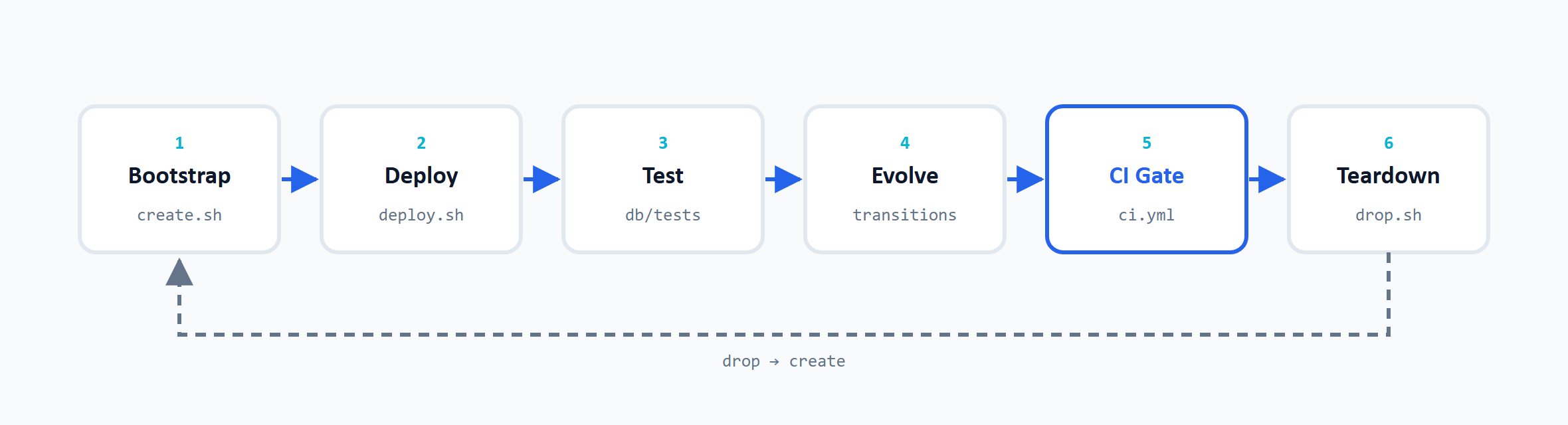
As a command sequence, the whole cycle is unspectacular — and that is precisely the ambition:
  1: bash db/scripts/create.sh local        # Station 1: bootstrap — database, roles, schema
  2: bash db/scripts/deploy.sh all local    # Station 2: object deploy — all schema objects
  3: bash db/tests/run.sh                   # Station 3: object tests against a throwaway DB
  4: bash db/scripts/deploy.sh all local    # second run: idempotency check + run-once skip
  5: bash db/scripts/drop.sh local          # Station 6: teardown — database and roles gone for good
These five lines are verified end-to-end against Postgres 17 in a throwaway Docker container: bootstrap, full deploy, and all object tests run green, the second deploy acknowledges the run-once scripts with skipped (already applied), and after the teardown, database and roles are gone without a trace — pg_database no longer contains an entry for the created database, pg_roles none of the created roles. Station 4 (evolution with data) and station 5 (CI gate) have no commands of their own: the evolution lives in the deployed files themselves, and the gate runs the same sequence automatically on every pull request.
The following sections walk through the stations — each with the problem the station solves and a pointer to the article that provides the depth.
Station 1: Bootstrap — Creating Database, Roles, and Schema Reproducibly
Before any schema object can be deployed, the environment has to exist: the database itself, the extensions, the application schema, and the roles. The bootstrap creates all of that with one script call — create.sh <env> — and it does so for every environment with the same scripts. local, dev, and prod differ only in a small configuration file with connection coordinates, not in the procedure.
Two decisions shape this station. First, the role separation: four roles emerge, each with a clear job — the database owner, the schema owner (under which every later deploy runs), a read-write group role, and the service account the application connects with. Passwords never end up in files: the script only needs the existing superuser password; for the three new roles you choose your own passwords and, ideally, put them straight into the password manager.
Second, the drop-and-recreate semantics: the bootstrap is deliberately not idempotent. If the database or roles already exist, a preflight aborts and points to the teardown — a half-overwritten setup would be worse than an aborted one. Reproducibility here means: an environment is built entirely from the versioned scripts — not adjusted by hand after the fact.
Station 2: Object Deploy — the Directory Is the Migration Plan
The object deploy is the centerpiece of the model. Every schema object — table, function, procedure, trigger, view — lives as its own file in the repository and describes its desired state, phrased idempotently: CREATE TABLE IF NOT EXISTS and CREATE OR REPLACE where the engine offers them; where it does not — for triggers or constraints — DROP … IF EXISTS plus re-creation does the same job, at the price that the object briefly disappears and is recreated during the deploy. The deploy runner loads these files in a fixed section order straight from the directory structure — tables before functions, functions before triggers — and within each section by file-name number. There is no separate deploy plan to maintain (and forget): the directory is the migration plan.
The essential advantage over a classic migration chain: the DDL core of every schema object sits in one place, readable as one file — not spread across forty change scripts building on each other. And every deploy is the same call, whether against an empty or a current database: deploy.sh all <env>.
Why this model works without a migration chain, what the directory convention looks like in detail, and where its limits are, is laid out in Deploying a SQL Schema Without a Migration Tool — the foundation all further stations build on.
Station 3: Apply-Smoke and Object Tests
A merged DDL change that does not run on an empty database is broken by definition — it just does not fail where it was written, but on the next environment that gets built from zero. What helps against this error class is a discipline, not a tool: before every merge, the complete deploy runs once against an empty throwaway database — the apply-smoke.
On top of that come the object tests: one SQL file per schema object with DO $$ … ASSERT blocks checking the happy path, expected error guards, and constraints. Both together run locally in a self-cleaning Docker container (db/tests/run.sh) — and identically once more in the CI gate of station 5. Whoever forgets the smoke locally is reminded in the pull request at the latest.
Station 4: Evolution with Data
Before go-live, schema evolution is trivial: teardown, bootstrap, deploy — the database is disposable. As soon as environments hold data nobody may lose, this station becomes the most demanding part of the lifecycle. The framework-free model answers it with two building blocks:
- Convergent object files: an existing table is never dropped and recreated. New columns join the object file as an idempotent
ALTER TABLE … ADD COLUMN IF NOT EXISTS— the file keeps describing the desired state, and every environment converges to it on the next deploy. - Run-once transitions: everything that cannot be phrased idempotently — backfills, conversions, data rescues — becomes a timestamped change script that runs exactly once per database. A tracker inside the database records what has already run, by filename and checksum; editing an applied script aborts the deploy.
The harder cases — renames, type changes, dropped columns — follow the same two-building-block pattern, but almost always need the transition part plus an intermediate step in which the old and the new form exist side by side.
The two deep dives: Adding a NOT NULL Column to a Populated Table plays through the most common single case — the expand/contract pattern that makes structural change and backfill work together on a populated table. And Tracking Schema Changes Without a Framework builds the run-once tracker from scratch — including the realization that Flyway and Liquibase make the same four design decisions in their tracking core, for all the tools bring along beyond it.
Station 5: CI as the Gate — GitHub Actions
All previous stations run on demand — station 5 makes them binding. On every pull request, GitHub Actions spins up a Postgres service container as a throwaway database and runs half the lifecycle on it automatically: bootstrap, full deploy, object tests — and then a second deploy in the same run, which checks the idempotency of all object files and the skip path of the run-once scripts. Wired up as a required status check, a red run blocks the merge.
The gate catches the error classes that can be checked mechanically — syntax and structural consistency, load order, idempotency — and needs not a single secret to do so. What the workflow looks like in detail, what exactly the double-deploy trick checks, and how it continues from the gate to deploys on real environments: GitHub Actions for Postgres Deploys.
Station 6: Teardown
The teardown is the underrated station of the lifecycle. drop.sh <env> terminates active connections, drops the database, and removes all four roles — each with IF EXISTS, so the script can safely run again after a partial failure. In the verified run, nothing was left behind: no entry for the database left in pg_database, none of the four roles left in pg_roles.
Why a station of its own for throwing things away? Because teardown is the litmus test for stations 1 and 2: an environment may only disappear without hesitation if bootstrap and object deploy can rebuild it completely. If the thought of drop.sh makes you nervous because knowledge lives in the database that exists nowhere in the repository, the lifecycle is not closed yet. Before go-live, drop-and-rebuild is the normal reset path; after that, the hard rule applies: never on an environment with data worth protecting without a verified backup.
When Does a Migration Tool Make Sense?
The framework-free lifecycle carries well as long as three things come together: one database engine, a manageable team, and a deploy that is shell-based anyway. Then Bash and psql deliver the core — desired-state files, run-once tracking, CI gate — without a new dependency in the stack. A tacit prerequisite here: the schema can be described fully declaratively in the repository. Where externally managed objects, replication setups, or extensive partitioning are involved, the claim of a “complete lifecycle” only holds with reservations.
A migration tool like Flyway or Liquibase becomes legitimate as soon as its extras are genuinely needed: support for multiple database engines, rollback or undo workflows, a lock table against concurrently running deploys, dry-run and report tooling for audit requirements, programmatic migrations. Add to that what cannot be pinned to individual stations: an established ecosystem with documentation, IDE integration, and support — and a standard several teams can agree on without having to learn a home-grown build first. From multi-team or multi-database operation onward, these are no longer comfort features but necessities — then the framework is the right choice, without anything being wrong with the model shown here. Beyond the scope of this article remain the operational topics outside the deploy model: zero-downtime strategies such as blue/green or rolling deployments, and the locking questions of very large tables — the latter is shown on a concrete case in the expand/contract article.
The honest assessment cuts the other way too, though: at its core, a migration tool replaces two of the six stations — the object deploy and the evolution mechanics. Bootstrap, object tests, the CI gate, and the teardown remain your own work, framework or not. Having built the lifecycle once yourself, you make the tooling decision from the inside: you know which stations the tool takes over, which ones it leaves open — and you read error messages like “Migration checksum mismatch” for what they are: the same design decisions, just behind a different surface.
FAQ
No, not necessarily. The core — versioned desired-state files, run-once tracking for data changes, and a CI gate against a throwaway database — fits into Bash and psql. A framework pays off when its extras are needed: multi-engine support, rollback workflows, a lock against concurrent deploys, or audit reporting. It takes two of the six lifecycle stations off your hands; four remain your own work.
With a script runner that applies the object files from the repository in a fixed section and number order, and a CI workflow that calls exactly this runner — on every pull request against a throwaway database, on release against the real environment. Since every file describes its desired state idempotently, the deploy is always the same call, whether the database is empty or current.
A migration chain describes the path: numbered change scripts that build on each other and run in sequence. An object deploy describes the destination: one file per schema object with its desired state, applicable any number of times. The object approach keeps the current state readable in one place; for data-dependent steps it additionally needs run-once scripts — exactly the point where the two models meet again.
With a full dress rehearsal against an empty throwaway database: complete deploy, then object tests as DO $$ … ASSERT blocks, then a second deploy as the idempotency check. Locally a Docker container takes care of it; in the pull request, the same procedure runs as a GitHub Actions gate. What this test bench does not see — effects on existing data, locks on large tables — remains the job of the evolution discipline from station 4.
Four have proven themselves, with a clear division of labor: a database owner, a schema owner under which all deploys run (deployed objects automatically belong to it), a read-write group role for data access, and a service account for the application that is a member of that group role. The postgres superuser stays reserved for bootstrap and teardown and appears in no application connection.
Related Articles
- Deploying a SQL Schema Without a Migration Tool — Directory Convention Instead of Flyway or Liquibase — station 2 in depth: the apply model the whole lifecycle builds on.
- Adding a NOT NULL Column to a Populated Table — the Expand/Contract Pattern — station 4 played through on its most common single case.
- Tracking Schema Changes Without a Framework — Run-Once Scripts, Checksums and Immutability — station 4: the tracker built from scratch, with the Flyway comparison.
- GitHub Actions for Postgres Deploys — a Throwaway Database as Quality Gate — station 5 in depth: service container, double deploy, environments.
- Verifying the Migration — Data Quality and Row Reconciliation After the Move — if the reason for the rebuild was a database migration: the acceptance check afterwards.
- The open DI² Starter Kit on GitHub — all six stations runnable in context.