
An empty repo and Claude Code, Anthropic’s coding agent in the terminal — that’s all it takes to get going. And that is exactly the problem: the model writes code immediately, but by default nothing ensures that a specification exists first, that a review happens afterwards, or that the database schema deploys reproducibly. A Claude Code project setup is therefore less a tooling decision than a process decision — the question is not whether the AI can code, but what sequence it works through.
This article shows a complete setup for that, in overview: the open DI² starter kit — a fixed, numbered development workflow from requirements to deploy, a deployable database part, and a template that prunes itself during setup. It was not designed on a drawing board; it is a distillate of a running project.
The essentials up front:
- The scaffold: conventions live as rules, tools as skills in
.claude/— and the difference between the two decides what every session costs. - The workflow: eleven numbered phases from
/initto/deploy, with the bug loop running across them; each feature spec is the contract the phases work against. - The database part: plain SQL with a directory convention, idempotently deployable, tested in CI against a throwaway database.
- The design decision: start maximal and prune via the
/initinterview, instead of starting empty and building up. - The deliberate omissions: no hooks, no subagents — simplicity is part of the design.
- Open on GitHub: the kit is forkable as a starter kit (MIT license).
Prerequisites: Claude Code and an editor; for the database part, optionally a PostgreSQL (local or in a container). The examples come from the open DI² starter kit on GitHub. Mechanics as of July 2026.
Contents
- The Scaffold: What Lives in .claude/
- The Workflow: From Requirements to Deploy
- The Database Part: Plain SQL, Deployable and Tested
- The Design Decision: Start Maximal, Then Prune
- What the Kit Deliberately Leaves Out
- Setting Up a New Claude Code Project with the Starter Kit
- FAQ
- Related Articles
The Scaffold: What Lives in .claude/
Setting up a Claude Code project starts at the top level with four directories — .claude/, docs/, features/ and db/:
.claude/
├── rules/      loads automatically: conventions, security rules, the SQL rule tree — and stack.md
└── skills/     loads on demand: one folder per workflow phase, invoked as /requirements, /qa, …
docs/           PRD, bug tracking, knowledge base
features/       INDEX.md + one spec per feature — the project's working state
db/             the database part: schemas, deploy scripts, tests
The split under .claude/ is the scaffold’s most important mechanism. Rules — the CLAUDE.md and every file under .claude/rules/ — are fully in context at every session start, in the model’s working memory: the constitution of the project, applying without being asked. Skills are tools on demand: initially only their description line sits in context; the body loads on invocation. One rule holds a special role: stack.md is the authoritative source for the tech stack — runtime, UI, database, deploy, CI including the build and test commands; the CLAUDE.md carries only a short summary of it. That keeps the skills stack-neutral: they read the stack at runtime instead of hard-coding it in their own text.
How the two loading paths differ in detail — and what an overstuffed rules folder costs every single session in context — is taken apart in Skills vs. Rules in Claude Code.
The Workflow: From Requirements to Deploy
The heart of the setup is a numbered sequence: eleven phases, 0 through 10, each one its own skill.
0 /init → 1 /requirements → 2 /architecture → [3 /ux] → [4 /backend] → [5 /frontend]
        → 6 /qa → 7 /review → 8 /check-updates → 9 /security → 10 /deploy
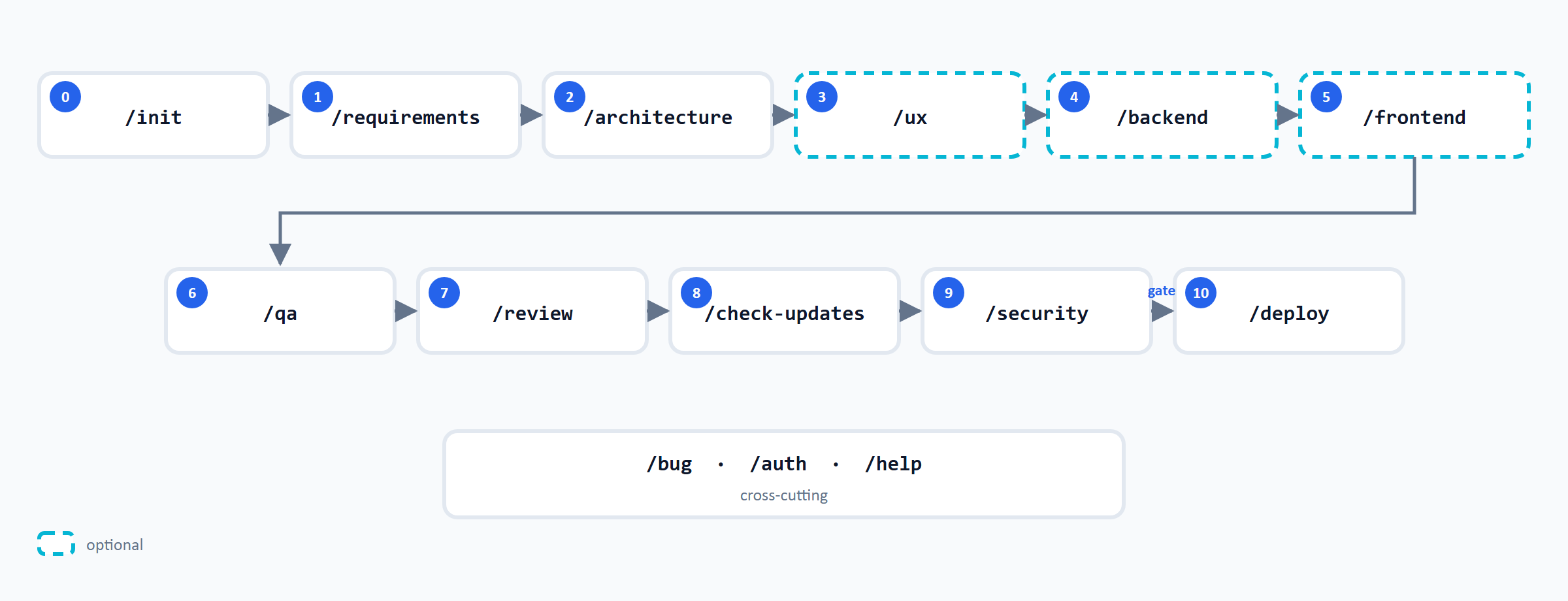
Specs drive the sequence: /requirements writes one specification per feature, with user stories and acceptance criteria, and features/INDEX.md tracks the status of all features — the single overview every later phase orients itself by. The rest of the chain works against that spec: /architecture drafts the technical design, /qa tests against the acceptance criteria, /review checks the diff against spec and conventions. Played through on a small feature, it looks like this:
/requirements   spec feat-0001-csv-import.md — user stories + acceptance criteria
/architecture   design: staging table plus COPY import; no UI → /ux is skipped
/backend        implementation against the spec
/qa             tests against the spec's acceptance criteria
/review         diff check against spec and conventions
The square brackets in the chain mark phases not every project needs: an API service without a user interface knows no /ux and no /frontend; the pruning at setup time removes them entirely. And phase 0 falls out of line: /init runs exactly once, at setup — more on that in a moment.
Two properties keep the sequence in check. First, no phase jumps to the next on its own: every transition is triggered by a human; the kit calls this human-in-the-loop. Second, /security is set as a gate: the project-wide security audit comes before a production deploy, not after it. Running across all phases are /bug (records and closes bugs under docs/bugs/, at any time), /auth (for auth projects) and /help — which answers the question “where am I right now, and what comes next”.
The Database Part: Plain SQL, Deployable and Tested
What sets this setup apart from typical Claude Code templates: it has a real database part. Under db/ sits a complete, runnable PostgreSQL example — tables with audit columns, procedures, triggers, a view, seed data, plus deploy scripts and tests for the database objects. None of this is carried by a migration tool but by a directory convention: object files in fixed numbering, written idempotently, an apply runner plays them in in a defined order; one-off, data-dependent steps run alongside as run-once transitions. In CI, every schema state is brought up against a throwaway database and tested before it reaches a real environment. Doing without a migration tool is a deliberate decision of this setup, not a universal recommendation: where a team already has an established migration tool in place, there is no reason to switch.
The conventions these SQL objects are written to — naming, alignment, object skeletons — live as a rule tree under .claude/rules/sql/ and are the subject of the sister overview AI-Assisted SQL Development with Claude Code, with its deep dives on tables, procedures and functions.
How the deploy works without Flyway or Liquibase in detail — idempotency, run-once transitions, the schema_apply_log table, the runner and the CI safety net — is described in Deploying a SQL Schema Without a Migration Tool.
The Design Decision: Start Maximal, Then Prune
The template ships all fourteen skills and every rule tree — including the parts a given project will never need. Pruning happens at setup: /init is a one-time bootstrap interview. It first captures the product vision and the stack’s parameters — runtime, UI, backend, database, auth, deploy, CI — and writes the vision into the CLAUDE.md, the stack profile into stack.md. It then removes what the answers rule out: no UI means /ux and /frontend go, UI rule tree included; no database means the entire db/ tree disappears. At the end, /init deletes itself — a bootstrap runs only once.
Why delete instead of build up? Because deleting is the easier operation: whoever deletes decides against the complete picture: every file is a yes/no question. Whoever builds up has to remember what is missing, and forgotten things don’t speak up. On top of that comes the context math: rules that don’t apply would otherwise load into every single session.
The interview, the role of stack.md as single source of truth, and the full pruning matrix — which answer removes which files — are described in Maximal Template Over Empty Repo.
What the Kit Deliberately Leaves Out
An overview is only complete with what’s missing — and the starter kit leaves out a few things on purpose.
No hooks. Claude Code can bind shell commands to events, to be executed automatically — before a tool call, after a change, at session start. The kit passes on that: what happens, happens visibly in the dialog and is written in the rules, where the human reads it and the model follows it. That costs a degree of automation but saves the hard-to-trace layer between intent and execution.
No subagents. Claude Code can hand subtasks to separate agents with their own context. Here too the kit keeps the work in the main context, where the human sees and can steer it. It is the same decision that keeps the phase transitions user-initiated.
No app skeleton. There is no src/: the kit is not a Next.js, Python or whatever template. The application scaffold emerges through the workflow, against the stack the project chose in the interview.
Exactly one option per matter of taste. One UI ruleset (React/Tailwind/shadcn), two SQL dialects (PostgreSQL and SQL Server) — no further variants sit side by side. If a project needs a different one, the rule is: port, don’t stack — copy the shipped rule tree, adapt it, remove the original.
These omissions are part of the picture: the kit is not a framework claiming completeness but an opinionated setup from a real project. Where an opinion doesn’t fit, it is replaceable in Markdown files — that is exactly why everything lies open.
Honest framing also includes the counter-calculation: the workflow costs real extra effort per feature: spec, QA and review are steps of their own, not side effects. For a throwaway script or a quick prototype the setup is oversized; there, the empty repo remains the better choice. And the structure only carries with discipline: skip phases regularly and you end up with the folders, but not the process. What that effort buys, the comparison shows:
| Empty repo | Starter kit | |
|---|---|---|
| Requirements | in the chat history | one spec per feature, versioned |
| Order | ad hoc | eleven numbered phases |
| Conventions | re-explained every session | rules, loaded automatically |
| Review and QA | on request | phases of their own, security as a gate |
| Database | manual work | db/ tree, idempotent and CI-tested |
Setting Up a New Claude Code Project with the Starter Kit
The kit is public on GitHub, MIT-licensed. For a new project there are two equivalent paths: use the repository as a GitHub template (“Use this template”) or run the bundled copy script (new-project.ps1 or new-project.sh). Both paths produce a repository with a fresh Git history. A direct git clone of the template is off-limits as a project start: it drags along the template’s history and upstream linkage, neither of which belongs in the new project.
1: gh repo create my-project --template marcusbelz/di2-starter-kit --private --clone
Then open the new project in Claude Code, invoke /init, answer the interview — and specify the first feature with /requirements. From there, the numbered workflow carries.
Two transparency notes belong to the provenance. First, the lineage: the kit is the generalized, product-free .claude/ toolbox of the DI² project. That project in turn descends from the AI Coding Starter Kit by AlexPEClub (MIT); the attribution is documented in the repository. Second, the making: the texts in the kit are written by Claude, under human direction — every file commissioned, checked and signed off; the README states this working mode openly. And an honest maturity note: the conventions grew out of daily use in the DI² project and are proven there; the packaging as a self-pruning template is young. Whoever adopts the kit takes on a well-thought-out setup, not a framework matured over many years.
FAQ
With a template that brings process and conventions along: create a new repository from the template (GitHub “Use this template” or the copy script — no direct git clone), invoke /init in Claude Code and answer the interview about vision and tech stack. After that the project prunes itself, and /requirements specifies the first feature — from there the numbered workflow leads all the way to deploy.
Only .claude/ with rules and skills is a convention of Claude Code itself. Everything else — docs/, features/, db/ — is a decision of the setup. But that is exactly where the difference between “the model writes code” and “the project has a process” lives: specs, bugs and schema states need a fixed place, or they exist only in the chat history.
Rules load fully into context at every session start and apply without being asked; skills load on demand and run on command. The decision rule: what must always apply becomes a rule — what executes as a procedure becomes a skill. The loading mechanics in detail are in Skills vs. Rules in Claude Code.
As a dedicated db/ tree in the repository: object files in a directory convention, written idempotently, a runner plays them in, and CI tests every state against a throwaway database. No migration tool is needed for that — how it works is shown in Deploying a SQL Schema Without a Migration Tool.
No. The workflow skills name no language and no framework — they read the stack at runtime from stack.md, which /init fills at setup. Stack-specific are only the rule trees for UI and SQL dialect; the pruning keeps exactly the variant the project chose.
The building blocks are tied to Claude Code mechanics: rules and skills under .claude/ with their distinct loading paths exist natively there, as do the slash invocations of the phases. The ideas behind them — specs as a contract, numbered phases, security before deploy — are tool-neutral: anyone working with Cursor or Copilot can adopt the process but would have to port the template themselves.
Related Articles
- Maximal Template Over Empty Repo — a Claude Code Setup That Prunes Itself via /init — the design decision “start maximal, then prune” in detail.
- Skills vs. Rules in Claude Code — the loading mechanics behind the scaffold.
- Deploying a SQL Schema Without a Migration Tool — the database part in depth.
- AI-Assisted SQL Development with Claude Code — the sister overview: the SQL conventions that live in the kit as a rule tree.
- SQL depth behind the rule tree: Postgres Table Conventions, PL/pgSQL Procedure Conventions, PL/pgSQL Function Conventions.
- I Gave Claude Code 27 Rule Files Instead of One CLAUDE.md — the experience report on this setup’s rule structure: anatomy, don’ts, inventories.
- The open DI² starter kit on GitHub — template, workflow skills and database part, ready to fork.